Forum Discussion

DavidSprouse
6 years agoCommunity Member
Modern Player Accessibility Issues with Color
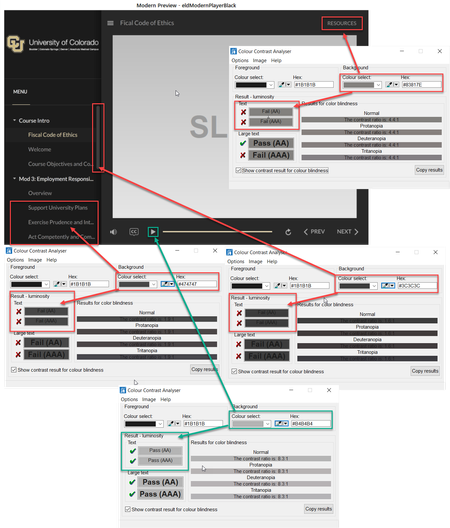
It appears one cannot change or manage the color of most text and controls in the modern player other than the Accent Color. Is that true?
Upon testing the default colors for both the Dark and Lig...

MariaCS
4 years agoStaff
Hi, everyone.
I have great news to share!
We just released another update for Storyline 360. In Update 50, we’ve included important fixes and new features.
One of the features we’ve included is:
The modern player meets WCAG accessibility guidelines for visual contrast and color so all learners can read the text, decipher the icons, perceive the controls, and navigate easily. Learn more about modern player accessible contrast.
To take advantage of this update, launch the Articulate 360 desktop app on your computer and click the Update button next to Storyline 360. You'll find our step-by-step instructions here.
Please let us know if you have any questions by posting here or by reaching out to our Support Engineers directly.

LaurieLyons
4 years agoCommunity Member
Yay! Thank you!
Related Content
- 8 months ago