Forum Discussion

Multiple Text Entry Quiz
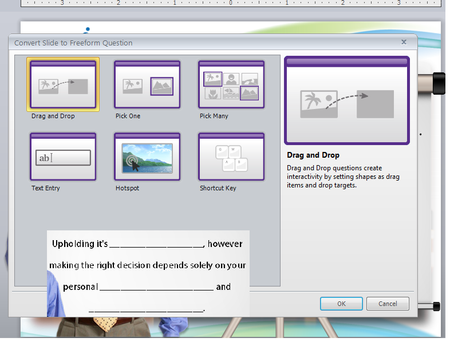

Hi Louise and Becky,
Although the text entry question type is designed to evaluate just one text field, here's a workaround for evaluating multiple blanks on one slide:
- MarcusHaddon10 years agoCommunity Member
Hi
I was directed to this view from a question I had asked a Wendy Farmer pointed me to this clip, which has been very helpful. However, in the clip you have the submit button active. I am creating a software simulation want to learners to click on items from the software screen shot. I have used hotspots and directed the trigger to the hotspot rather than the submit button. But when I click it I don't get the correct or incorrect response.
Would it be because my text entry boxes are on another layer? I am very new to storyline so not sure of my way round quite yet.
Any thoughts?
- KandiceDickinso9 years agoCommunity Member
Thanks for the video! I am wondering if you can change the triggers to allow the answers in any order. for example:
"Violets are _____, Roses are ________."
if the acceptable answers are blue and red, but i do not care what order they are filled in the blanks, how do i set up that trigger?- WendyFarmer9 years agoSuper Hero
Hi Kandice
it shouldn't matter what order as long as the variable names are correct SL will check they match.
Are you having an issue with order?
- KandiceDickinso9 years agoCommunity Member
Yes they only work if i type them in the one order. however, i am using values, not variables. what is the difference?
my answers are textentry1 = character and textentry2 = competence
but if i type competence in textentry1 and so on, it doesn't work.
- Anitagreenberg9 years agoCommunity Member
Hello. I know yours was an old post (4 years ago) but I'm struggling with this issue now. This video was helpful to a point. It doesn't explain how to convey to Storyline which words, when typed into the text fields, are the correct words. It's no longer a text entry question, since the first step in the video is to convert it to a Freeform Pick-1 question.
I'd appreciate any help you can offer. Thanks much,
Anita
- KellyCleaver9 years agoCommunity Member
I'm sorry but I have not used storyline for almost a year.
Kelly Cleaver
- WendyFarmer9 years agoSuper Hero
Hi Anita
you are using two offstage buttons correct/incorrect which are entered into the form view with the correct one selected. Then using triggers to say change state of correct button to selected if (example text entry 1=fog and text entry 2=mist)
- DianaMyers9 years agoCommunity Member
Hi Anita - it's in Jeannette's video, but it's hard to see (or least it was for me... the video wouldn't go full screen).
You use conditions on the triggers to tell Storyline which words are correct.
For example - the trigger to select the correct button would look something like this:Change the State of [Correct Button Name] to Selected
When user clicks
The Submit button
IF
TextEntry1 is equal to Value [correct answer] AND
TextEntry2 is equal to Value [correct answer] AND
... repeat as many conditions as needed based upon the number of text entry fields ...The trigger to select the incorrect button would look similar:
Change the State of [Incorrect Button Name] to Selected
When user clicks
The Submit button
IF
TextEntry1 is not equal to Value [correct answer] OR
TextEntry2 is not equal to Value [correct answer] OR
.... repeat as many conditions as needed based upon the number of text entry fields ...Additonal Notes:
- If capitalization doesn't matter, you probably want to use the "is equal to (ignore case" and "is not equal to (ignore case)" options for the conditions.
- For the trigger to select the Incorrect button, be sure to change the conditions to OR statements.
- Make sure the two triggers to change the state of the Correct and Incorrect buttons are listed above the trigger to Submit interaction
Hope this helps! Please let me know if you have other questions or get stuck!
Cheers !
- ChristopherDawe7 years agoCommunity Member
This work around assumes that the question is a fixed number of points. Does anyone know if it's possible to score each box independently and then have the total of those points reported to an LMS?
- DianaMyers7 years agoCommunity Member
Hi Christopher -
Happy to help and hopefully answer your question on this. The "workaround" Jeannette created assumes that all of the entries must be correct for the learner to get the exercise correct, which is independent of the points assigned to the interaction or any points value assigned to each text entry box.
Do you want to have multiple text entries that are each graded independently on the same interaction? Any additional context may help us find a solution for you. Thx.
- ChristopherDawe7 years agoCommunity Member
I have a table that users must complete. I want each cell in that table to be worth one point. However, each answer is relative based upon the randomly generated data set. I currently have this activity set up as a practice activity for learners. I want to remove the "More Practice" button, and simply score the results and then send that score to the LMS.
I found this response earlier from Ashley Terwilliger, but not sure exactly how to set it up.
"Since the multiple text entry is a custom question set up, it won't be included as a part of the results/scoring - so you'd need to set up another question to track the value of that question. Since multiple choice questions allow you to score by answer, you could set it up to "select" the answer that matches the score the user is to receive based on the text entry. You could either move all the items off screen and add additional information there for the user to see - or set it up as a "jump to slide next slide " when timeline starts - and just ensure that trigger appears after the one to set the state of the question. "
- KatKlein-6aaf495 years agoCommunity Member
I set up a table with multiple text entry fields, using the logic shown in this video. Correct answers trigger the Correct layer and incorrect answers trigger the Incorrect layer. However, I want users to retry answering any incorrect fields. I set the text entry fields to equal blank if they are not equal to the correct answer. All of this works correctly.
My issue is when I click the "Submit" button a second time, upon retrying the question, the Invalid Answer prompt appears and says "You must complete the question before submitting."
I've experimented with resetting the slide to Initial/Resume State but cannot find the solution. Any ideas???
- DianaMyers5 years agoCommunity Member
@Kat
Do you have your interaction set up for multiple attempts? I have a similar project, though in mine I provide a "Clear all" button on the main slide.
And once you have the interaction set to Unlimited or a specified # of attempts (1st image), you'll show the Try Again layer instead of Incorrect, and you'll have the trigger(s) to clear the incorrect fields to on the Try Again layer, too. Keep in mind, you can also add buttons (2nd image) on the Try Again layer if you want to give learners the option of viewing answers, jumping to another slide, etc.
Hopefully that makes sense. I'm happy to help you trouble-shoot further--just reply or reach out using the Contact Me link on my Articulate profile. Good luck!
- KatKlein-6aaf495 years agoCommunity Member
Thanks for the suggestions Diana! I'm attaching the Storyline file in case you can take a look further...
I do have the Attempts set to Unlimited and did I set up triggers to clear the incorrect fields, however, the question is now only showing the Try Again layer, even when all 4 correct entries are submitted. I added a NOTE for you with the correct values for each Text Entry field.
My goal is to allow users to retry the entries that are incorrect, but if this is too complicated, I like your option of including a View Answers button that displays in the Try Again layer.
Thank you!
- ClaudiaTrapp4 years agoCommunity Member
Did the "insert Data Entry Text Entry" button disappear with recent versions of Articulate? I'm trying to create something where the learner has to enter multiple fields (in this case, grab the right numbers of an example to do a calculations). Old conversations on this seem to point to a button I can’t find.
- LaurenDuvall4 years agoStaff
Hi Claudia!
We have Text Entry and Numeric Entry fields under the Input section in Storyline. In Jeanette's example, she uses a Pick One question, which is a great workaround for including multiple data entry fields.
I hope if others will chime in if they have additional workarounds!
- WendyMoon-7ad213 years agoCommunity Member
I followed these steps and when I published the course in our LMS, and even in Review 360 and preview mode the answers appears when you click in a text entry field. I don't know how or why the answers appear when you type, but they do. I don't know how to get rid of this.













Related Content
- 1 year ago
- 10 years ago