Forum Discussion

ChrisWalkerBH
25 days agoCommunity Member
Numeric variable trigger is not affecting state of Next button
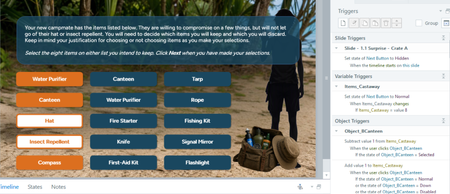
I'm creating a Storyline activity in which the learner needs to select exactly eight items from a list of 15 in order to move forward. In order to accomplish this, I created the following triggers an...

JudyNollet
23 days agoLegend
ChrisWalkerBH: I agree with PhilMayor. Use an invisible layer to calculate how many buttons are in the Selected state.
I'll add a few notes:
- As DavidAnderson mentioned, Storyline automatically toggles between the Normal and Selected state, so you don't need triggers for that. (Here's more info about built-in states.) As Phil mentioned, just add a trigger to each button to show the invisible layer.
- As David also mentioned, troubleshooting is easier when you show the variable reference in a temporary text box. That lets you see whether the value changes as expected.
- Have the triggers in the invisible layer run in that order when the timeline starts on the layer. (Note: Another option for hiding the layer would be to make the layer's Timeline as short as possible, and have a trigger that hides the layer when the Timeline ends.)
- Be sure to set the Slide Layer Properties to "Reset to initial state."
- Because you want exactly 8 items selected (no more, no less), add an Else statement to the trigger that changes the state of Next to Normal. The Else statement should change Next to Disabled. That will ensure that if the user clicks another button after Next is enabled, Next will be disabled again. Then they'll have to deselect a button before Next is enabled again.
ChrisWalkerBH
22 days agoCommunity Member
The use of the variable reference and the Else state were immensely helpful in troubleshooting and improving this slide. Thanks to both you and PhilMayor!