Forum Discussion

Numeric variable trigger is not affecting state of Next button
- 22 days ago
Thanks for sharing the screenshot.
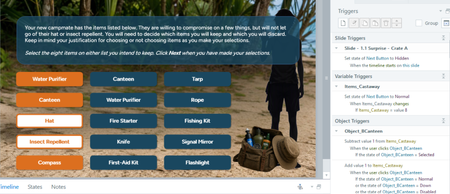
Without seeing the full slide, the first thing I'd suggest is to add your reference variable for %Items_Castaway% to your slide to see if it's counting correctly.
But the thing that stands out the most is the trigger order and how you're counting the selected items. Storyline's Selected state should work because it automatically toggles between Normal and Selected. Here's what I'd try:I attached a quick .story file you can look at to see if it helps.

This worked like a charm! I don't fully understand why, though.
I originally had my "Add value 1" trigger set up like you suggested and I get why that works.
Where I'm lost is the "Subtract value 1" trigger. Wouldn't this subtract 1 on the user's initial click of an item (while the item is in a Normal state)? Or does the trigger order literally go User clicks Selected item > item changes state from Selected to Normal > Storyline subtracts 1 because item is no longer in the Selected state?
Thanks for the help and especially the file you posted!

The default state-toggle between Selected and Normal happens after triggers are run, best I've ever seen. The triggers can be easier to understand if the three parts are rearranged.
If you check the Group tick-box in the Triggers pane, Storyline will rephrase the trigger as "When the user clicks Canteen, Subtract value 1 from Items_Castaway If the state of Canteen is not equal to Selected."
I personally like to internally frame it as "If the state of Canteen is not equal to Selected when the user clicks [it], subtract one from Items_Castaway.
That may better highlight that the action is only performed if the button is a certain state the moment it was clicked. If the button is allowed to change to the Selected state, then it would no longer be the state it was when it was clicked.