Forum Discussion

Review 360 not showing when you have new Feedback in top menu
Hi everyone,
Wondering since the last upgrade if anyone noticed you are not seeing the red circle with the number of new feedback comments on the top Feedback menu? I am still getting the email notifications which makes me go in. I have had this happen after an upgrade years ago but been a long time.
I have been working on three e-learnings, and all three since last upgrade are no longer registering there are new messages, when I click it I can see there are new ones.
Just wondering if I am alone here..
33 Replies
- MatthewMcCabe-aCommunity Member
Hi all,
I am using Edge primarily but it also happens in IE (I don't have access to Chrome on my works machine).
I did export/publish a new version of the course to see if the issue persisted but in the new version the number did show - however of course the comments don't migrate across with it....
Thank you Matthew and Teresa! I've created a bug report and shared it with our team. I'll keep you updated in this discussion.
- TeresaVanderposCommunity Member
So, just wanted to let you know it happened this morning, You can clearly see I have an unread feedback on the first slide but no number on the Feedback menu. I actually have about 50 or more unread comments on this one and you see I have no feedback number. image attached.
https://360.articulate.com/review/content/787e4f42-b4c1-485f-97de-4579cf706b87/review
Not sure if you will see it not working, I am just starting to work on the feedback comment/edits now, so they will gradually disappear but if you look soon you will see hopefully what I see. Unread comments but no feedback number.
Good morning, Teresa!
I appreciate you circling back with more examples. They're very helpful, and I'll surface these to my team so we can update this discussion with any news.
Thanks for bearing with us, and we're here if there's anything else we can do in the meantime.
- Tim_Community Member
I review mutliple courses at the same time and NONE of them are currently showing any new feedback. I have to hunt through courses wondering if the comments are new. Clients have resorted to using email and word documents because of the flakiness of Review 360.
Hello Tim!
I'm sorry that you ran into the issue where feedback notifications aren't showing in Review 360. It is currently in the early stages of review based on our How We Tackle Bugs article.
I've added your comments to our bug report. I'll advocate on your behalf, and jump back in with any progress!
- SharonBildst510Community Member
I'm having same issue with seeing how many review comments have been entered. I saw the number on last Friday, but now on Monday I don't see them. It's helpful to know the total so I know how long to plan for the next step of making the edits. And I did upgrade Storyline Monday morning, although I hadn't correlated that as the reason for the now missing total number.
Hello Sharon!
Thank you for sharing these details with us! I don't have an update to share since my last post, but I'll be sure to add your comments to our bug report.
- CatOxley-bb978cCommunity Member
Hello
My last two RISE projects that I've viewed this week and released in the last week for client review, I'm getting the same - no red circle with the number of feedbacks. Any advice on what I can do?
Thanks! - RenGomezStaff
Hey Cat,
Thanks for sharing your experience as well. It looks like we're still having some intermittent issues with feedback notifications. To get the best experience, I recommend using the latest version of any browser mentioned below.
As an example, I tried Chrome's latest version and was successful in seeing new notifications.
- SheenaKrockCommunity Member
I'm having a similar issue, in both Chrome and Edge. I can't see any new comments, even though I know people replied. Comments are enabled. The only way I can see them is if I click on the link in the notification email 360 sends me. I am running Chrome Version 91.0.4472.101 (Official Build) (32-bit), which is the latest version. I would rather not have to go through emails to click on the link to see comments; I should be able to see them when I'm in 360, especially since I am working on several courses at once. I have also just run the latest Articulate update. Any ideas? Oh and this only started happening about a week ago.
Hello Sheena!
I'm sorry you're running into this issue too! I appreciate you sharing the browser version you're using as well. Do you see the feedback notification not appear in all of the courses published to Review 360 or just a certain one?
As you'll see in the previous comments in this discussion, this has been a difficult issue to recreate, which makes it even more challenging to tackle. We appreciate you taking the time to contribute!
- SheenaKrockCommunity Member
Thank you for taking the time to look into this! It's very weird, I don't envy you this one. I keep thinking it's a browser issue, but since it is occurring in both Edge and Chrome I'm not so sure. And my colleague is not having the same issue. We are on the same config and are both running the latest Articulate update. I have several courses in progress in both SL and Rise. So yesterday I received an email I had a comment in a SL course on 360. I couldn't see it. When I open my 360 library today, I can see the notification in the upper right, and can see the comments just like I'm supposed to. This was not happening yesterday, I swear. Today it seems all the SL courses are working again.
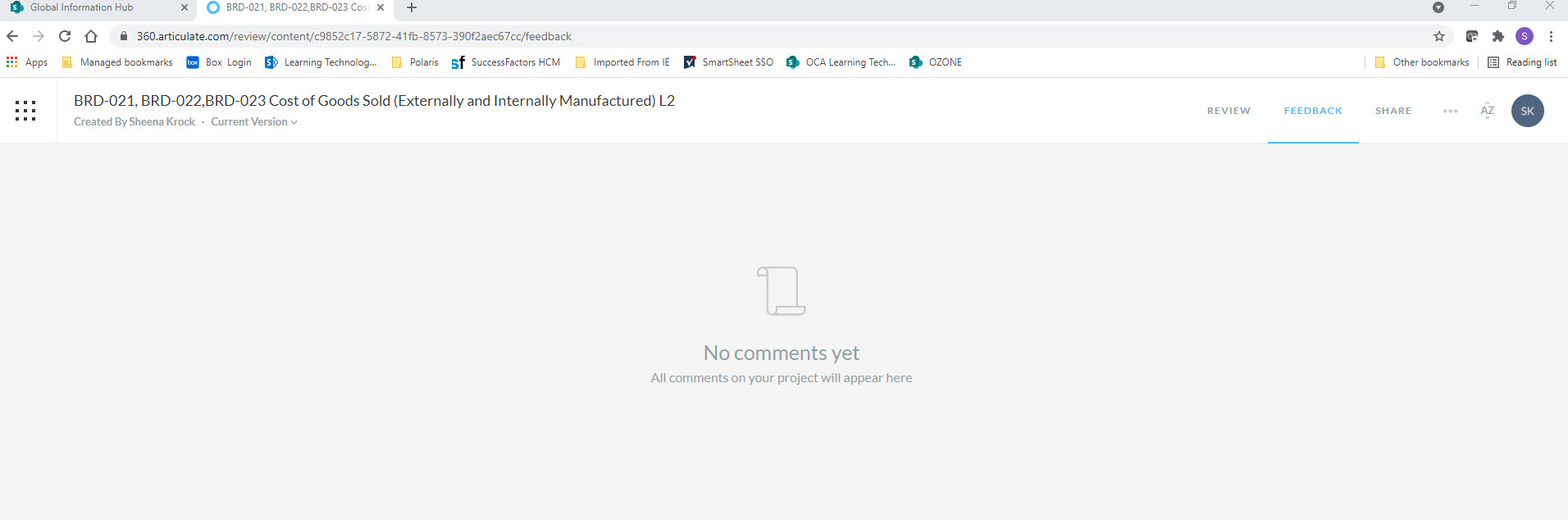
However I have another course in Rise, where I have several emails indicating comments, but when I go there using the 360 site I see there are no comments.
When I click on the link in the email notification however I can view the comments and see how many are new. There are no new ones in this shot because I looked at them already. There are several more comments below these. This is the exact same course. If I leave the screen below and say go back to my library, when I come back to the course the comments are all gone again.
To see any comments I MUST click on the link that comes in the email notification (example attached).
Please let me know if I can be of further assistance, I appreciate the troubleshooting!
- TashaBennett-6cCommunity Member
Hello Teresa, you are not alone. I came here to see if there was a fix. I like to see the total number of comments that I have.
Hello Tasha!
This hasn't made it on our roadmap, but you're now subscribed to this discussion, so we'll update you when it makes it on our roadmap.













Related Content
- 2 years ago
- 10 months ago
- 5 months ago