Forum Discussion

Rise Labels for Quiz: Attempts Remaining and # of Retries
I'm creating a quiz in Rise and no matter how I configure the settings I never see the following labels, which are listed in Settings / Labels/ Quiz and Knowledge Checks/ Attempts Remaining and You have reached the maximum amount of retries. Does anyone know how to get these labels to appear in a Rise quiz? Have you used them? Thanks.
3 Replies
Hi BethPanzini,
Sorry to hear about the trouble. I know you’ve already tried different configuration settings for your Rise quiz. One thing to double-check is whether the quiz retries are set to a specific number instead of Unlimited. That could be what’s causing the issue.
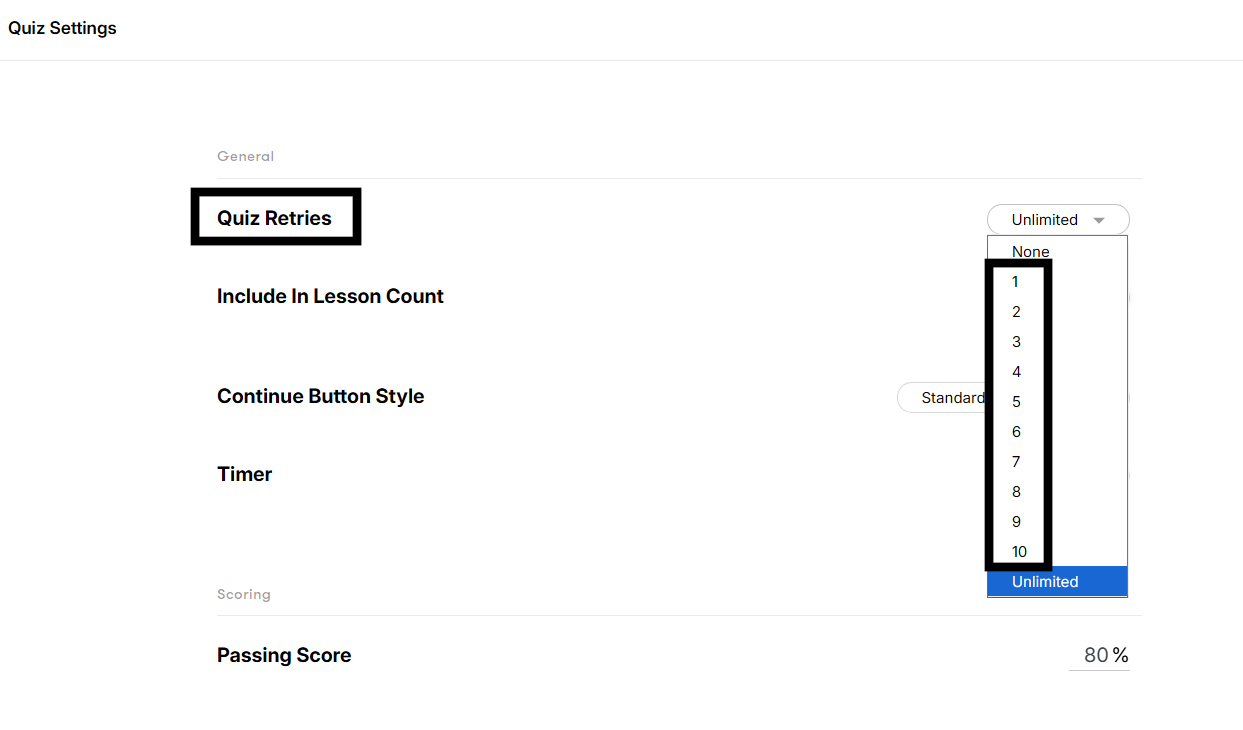
Let us know what you find! And if you’d like more targeted help, feel free to open a support case.
- FranBerry-d82ebCommunity Member
I'm experiencing the same issue. Quiz Retries are definately restricted to a set number, however neither of these labels display on the results screen. I've tested this in Preview, in Review360 and within an LMS. Same result.
Hi FranBerry-d82eb!
Thanks for reaching out and sharing your experience working with Quizzes in Rise 360!
I see that you've also connected with my colleague John, through a support case. As he shared:
The retry labels are currently only available in Knowledge Check Blocks inside a Rise 360 lesson. They're not yet supported in a Quiz. We're tracking requests for this feature to be added in a Quiz, so I've added your voice to the request to help our product team prioritize it.
If you have any follow-up questions, feel free to reconnect with John through your case!



Related Content
- 10 years ago
- 6 months ago
- 7 months ago
- 6 months ago