Forum Discussion

SL3 issue: "Zoom Picture" is adding a grey border around the image
"Zoom Picture" is adding a grey border around the image.
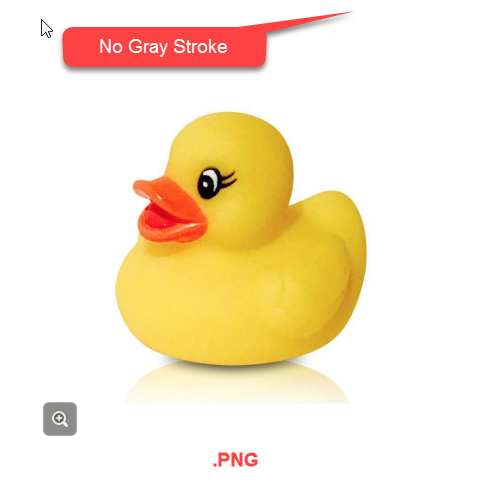
That is an actual screenshot showing the border it has added.
Hello everyone,
Happy to share that we've just released a new update for Storyline 360!
In Build 3.109.36125.0, we've included essential fixes and new features. One of the bugs we’ve fixed is:
- Rotated images with zoom enabled didn't display correctly.
Launch the Articulate 360 desktop app on your computer to take advantage of this update, and click the Update button next to Storyline 360. You’ll find our step-by-step instructions here.
Please let me know if you need additional help.

62 Replies
- MattLangCommunity Member
I've installed the newest update (Jan 7 2020 version). This problem is still not fixed.
- JoyceMaurin-e58Community Member
That is really a shame. We use - and pay - Articulate because it is supposed to be an authoring tool, helping use to do what we want to do the way it is supposed to work. Not to do some workaround again and again. If you don't really support a functionnality anymore, you can try, I dont know... to remove it from the tool? Or de-activate it until it really works again? Or give the infos Ryal gave upthere: it only works with .png files with transparent background?
It's really a shame how long everything takes so long to get fix here. - MattLangCommunity Member
I've just installed the latest update (Sept 2019). This issue still isn't fixed. :(
It has been over a year and a half since I reported this. How much longer will it be before this bug, which didn't exist in SL2, is fixed? Thank you for a definite answer which includes a completion date.
- StianLarsenCommunity Member
I'm guessing you will have to wait a few more years. At least if you're on the SL3 version. :)
They down-prioritize SL3 users, so if there is any fix, SL360 will get it 6-12 months before SL3 gets it. Based on my experience so far. I think your best bet is the mentioned work-around above, though I agree thats not optimal at all.
Hello Peter and welcome to E-Learning Heroes :)
This is still an open issue with our team.
I wanted to share some information on how we define bugs and how we tackle them when they occur.
This conversation is attached so that we can share any updates with you here.
- PeterGalvinCommunity Member
Suddenly, for the first time in my projects, I am seeing this same issue and not why. I am running 360 v.3.29.19305.0.
- RyalBird-1673f6Community Member
Hi folks, I found a workaround to this issue. Instead of using a .JPG, or flattened image:
- In Photoshop, I first change the default 'Background' layer to a normal layer by double-clicking on that layer
- Increase the canvas size (NOT image size) of the image by about 10px on each side (now you should see the transparent BG represented by a gray/white checkerboard {in Photoshop} around the edges)
- Save it as a .PNG (with a transparent background)
- Import into StoryLine and the gray outline no longer shows on a zoom image.
In summary, I basically have an image now that's on its original white background, but now with a 10px transparent border.This is kind of time-consuming and I wish Articulate had fixed this by now, but until then.
Please see attached screenshots.
- GregCebuliak-9eCommunity Member
Hi Ryal,
the grey stroke bug remains, but your workaround worked perfect! Thanks for taking the time to share a solution :)
Cheers,
Greg
Hey folks, thanks so much for replying back. I'm seeing the gray border around images with zoom in Storyline 360 and Storyline 3, so we need to take a second look at this. I'll keep you posted on what I find out.
- ShawnaNaklic915Community Member
Hi Alyssa,
I had previously experienced the grey outline issue that others have mentioned, but this was remedied by the recent update.
I am, however, experiencing a different but related issue with an outline appearing on one side of an image only.
I've attached two images - in build mode, you'll see there is no outline. I've tried multiple different versions of the image, and ensured that there is no line on that side.
Preview image shows how the image appears in preview. It also looks like this when published to Review 360 or HTML.
Has this behaviour been reported?
Thanks in advance!
Shawna
Hi Shawna,
That looks similar to the issue we still have open where a grey border or line appears around an image if it has the zoom picture option enabled. We'll let you know here as soon as we have more info on this issue!
- MattLangCommunity Member
That’s great news. Does it also work for Storyline 3?
Great news, folks! We fixed the issue you reported where inserting an image and adding a Zoom to it would cause a grey border to appear.
Here's how you can update Storyline 360 to see all the latest features and fixes. If this problem resurfaces, please record a Peek 360 screencast for me, and I'll be happy to help!
- MarkCairnsCommunity Member
Hi Katie,
Has this update been rolled out yet? I have the April 11th update and the issue is still occurring.
Maybe a new version will be available in the morning.
Thanks.
- BrengreLITTYCommunity Member
Hi Bérengère,
I can understand how frustrating it is to deal with these small bugs, and I appreciate you reporting it to us. I've filed it with our team using your example and Review 360 link as those were helpful. I'll keep you posted here with any updates on additional information or fixes.















Related Content
- 3 months ago
- 3 months ago
- 6 months ago