Forum Discussion

Storyline 3 Crashes on iPad Safari and Chrome
Storyline Version 3 courses crash when clicking Next or Previous on an iPad on SCORM Cloud and another LMS called Ti LMS.
- Sent case to Articulate support
- Published as HTML5 or HTML5/flash
- SCORM 1.2 (experienced crashes on 2004 3rd Edition as well)
- iPad/IOS 10.3.1
- Does not crash on laptop and desktop browsers such as Safari, Chrome, and FireFox.
- Courses range for 40-70 screens, SCORM file sizes ranges from 17-40MB.
- Using layers for pop ups, quiz questions, narration
- Can't use the Articulate Mobile App, client requires iPad delivery
- Have developed courses of this scope in V2 with no crashing
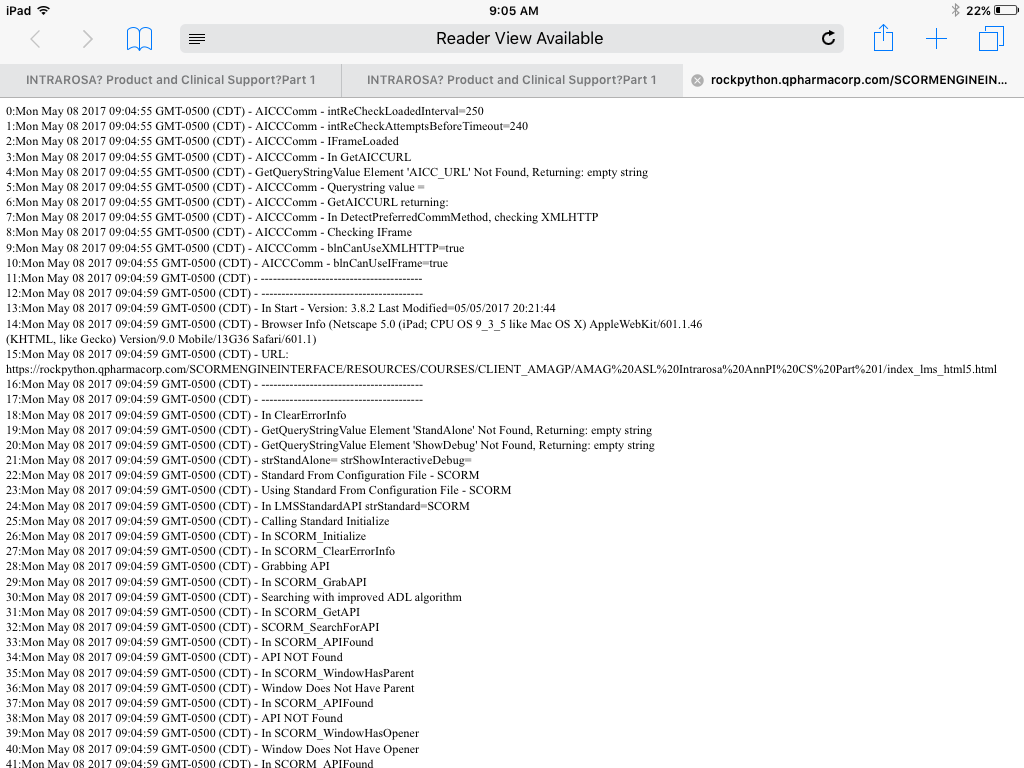
We have tested four courses dozens of times with the above settings and have crashed on the iPad. The crashing is random and we do get a debug screen (see attached). Crashing can occur at any time but seems to occur well into the course and often when clicking the previous button revisiting screens (most set to reset to initial state). But, it has crashed before finishing the course as well and when clicking Next. There is not one screen (or type of screen) that seems to cause the crash. (Can't share courses here because they are proprietary.)
We reduced the layers and removed animations but the courses still crash. We split courses in half, but they crash.
We created a 50 screen course in V3 then recreated it in V2. The course contains one screen with text, narration, a graphic, and two pop ups. The screen is repeated 25 times. I also created 25 quiz questions.
When I test the V3 50-screen course on SCORM cloud, I crash. Usually after finishing the course and then when I am going back, but it crashes.
When I test the V2 version on SCORM cloud, I don’t crash. I can go through the course multiple course times and do not crash.
Has anyone experienced this issue in either V3 (or 360)? Our thinking is that there may be an issue with V3 and that the crashing may not occur on V2, but were wondering if anyone has crashed in V3 and rebuilt in V2 successfully or has crashed in V3 and found a workaround.
We have published dozens of courses with this scope and level of interactivity in V2 and have had no crashing. This all started with V3 just recently.
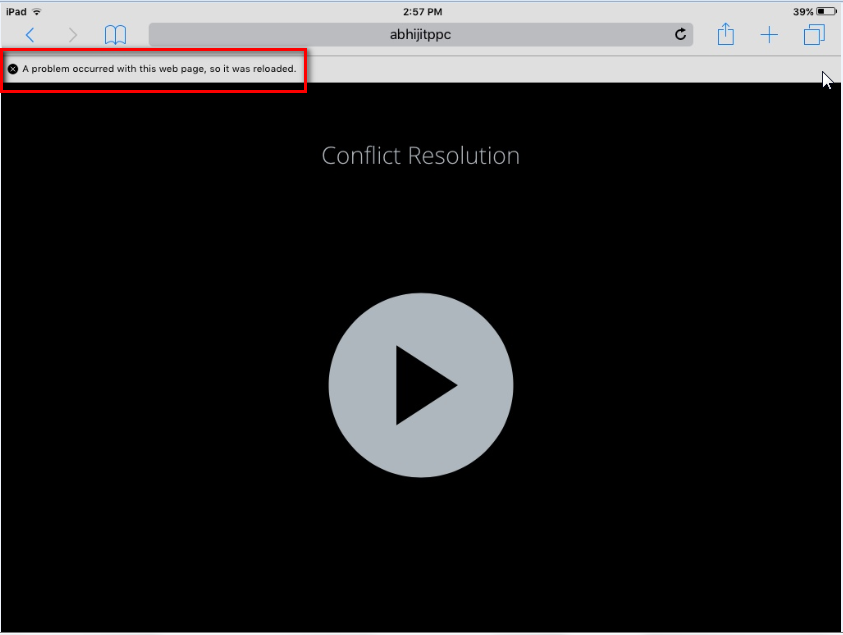
Support has been good and here is their take, "Based on the series of testing performed, this occurs on iOS devices but not on Android. The initial diagnosis has something to do with mobile devices limited resource allocation which might be the cause of the issue. However, investigation is still on-going and I'll be sure to let you know for any progress." And, "It doesn't appear to be an issue specific to LMS as it also occurs when I uploaded your content in our web server. The course will crash on random slides and will reload automatically asking whether to resume or not. I've logged the issue as a possible software bug."
Regardless, we have several courses that we need to deliver for the iPad, Safari and Chrome. We have already missed our initial deadline of this past Monday. Please let me know if anyone has come across this issue. If it is a Storyline bug, it needs to be fixed immediately.
155 Replies
- ColleenFahyCommunity Member
Two weeks ago .... any news? Thanks!
Hi CF,
I saw you reached out in this other discussion as well, so I wanted to connect them.
Our team is still investigating and testing this issue, so I don't have an update to share yet. We know it's a big issue for a lot of customers, and it's a big issue for us too.
Once we've got more to share, we'll update all these discussions. Thanks for your patience.
- bipinchander-2dCommunity Member
I have been facing the same issue with HTML 5 output of SL 360 & 3. It crashes randomly on i-pad. I am getting this issue not only on iOS version 10.3.3 but also on 9.35 and older once.
- PhilEaglesCommunity Member
Is there anyone I can talk to regarding compensation for this fault? My company purchased Storyline 3 the moment it was released and after discovering this fault we have had to revert back to using SL2, as the HTML5/tablet output is the main requirement for our clients.
We feel a bit conned off for purchasing a product months ago that is not being used due to a fundamental flaw in how it works and lack of testing before release.
I understand this must be a big problem for your technical team but we feel it's only fair we are compensated. Please feel free to email me.
Thanks
Phil
- SarahBellezzaCommunity Member
Has this issue been addressed in the new version of Storyline 3 that was released on Sept. 11 (Build 3.2.13213.0)? I did not see anything about it in the Release Notes, but wondering if it has been tested.
- MaheshMahajanCommunity Member
We are experiencing exactly the same issue.
An identical Scorm package 2004 3rd Edition published in Storyline 3
- Uploaded to Scorm Cloud
- Tested using below devices
- iPad Mini 9.3
- iPad Air IOS 8
- iPad Air IOS 10
Storyline 3 version intermittently crashes at random slides. Please find the attached screen short of error messages.
Regardless, we have several courses that we need to deliver for the iPad, Safari and Chrome. We have already missed our initial deadline of this past Monday. Please let me know if anyone has come across this issue. If it is a Storyline bug, it needs to be fixed immediately.
- AdamTrosperCommunity Member
To answer Sarah's question, my company is having the same issues with a course published using the latest version. Granted we are using Storyline 360 (version 3.8.13184.0), not Storyline 3, but I imagine if it wasn't fixed for one it wasn't fixed for the other.
With no fix in sight and no backwards compatibility, we are considering rebuilding the entire course in SL2. Ugh.
- KathyHartman1Community Member
We are so excited about SL3, but we are also afraid to publish in SL3.....even though we have had it since the day it was available.
We play it safe by always building courses in the previous versions, SL1 or 2, then updating them to the latest version.
If problems arise, we just upload the earlier stable version of the module.
Apple product users represent about 99% of our technical issue calls.
It would be great if Articulate could do more to make projects work better with all of Apple's products.
- JustinStaff
Hello, all.
First, I’d like to sincerely thank you for continuing to let us know how important this problem is to you. We cherish our community, and it’s forum threads like this one that really make an impact.
Second, I’d like to tell you a bit more about the root cause of the problem and what we’re doing to fix it:
Some Background
Storyline does two things to produce a speedy learner experience:
- We quietly preload as much content as possible into memory while the learner is focused on the current slide.
- We keep visited content in memory after the learner leaves the slide to support the back button.
In doing so, learners can confidently navigate in all directions throughout a course, knowing that whatever slide they need next is preloaded and ready to go.
The Problem
Our customers are great at producing beautiful, media-rich course content, but it’s no secret that Mobile Safari suffers from some memory management challenges. The preload approach serves us well on most devices and browsers, but as many of you have learned, courses with lots of media can crash Mobile Safari. This happens most often on older Apple devices, but even new iPads and iPhones can have trouble keeping lots of multimedia in memory, especially when other tabs or apps are open.
Our Solution
We want to make Storyline smarter about knowing when the browser can handle preloaded content in memory, and we’ve been working hard on logic that:
- Maintains the preload approach on every device and in every browser except Mobile Safari.
- Asks Mobile Safari for information on the age of the device and:
- Depending on the weight of the slide, preloads some content if the browser can handle it and keeps some content in memory.
- If the slide is too heavy or the device is too limited, preloads nothing and keeps nothing in memory after exiting the slide. Slides will load more slowly for learners in this scenario, but it should reduce the frequency of crashing.
This is a challenging solution to implement, mostly because of the limited information we get from the browser. This is especially true since iOS is so impacted by other open tabs or apps, about which Mobile Safari tells us nothing.
To make this happen, we’ve been digging deep into the sample projects that many of you have provided and testing them hard against our library of iOS devices in an effort to isolate the limits of Mobile Safari. It’s an inexact science, but we feel confident that we can solve the problem.
I can’t promise a precise release date for the above solution, but it’s super important to us. We have our very best minds working on the problem. We’ll let you know as soon as it’s ready, and thanks again for helping us make this a priority!
- AdamTrosperCommunity Member
Hi Justin,
Thank you for the excellent write-up about the problem. I've been developing for years and understand the struggles of memory management and garbage collection.
Could the solution be as simple as only keeping a predefined number of pages in memory?
For example, let's assume you keep the preloading functionality for the next 3 pages. Each time a file is loaded into memory, you store the page_id in an array. Then, if that array is ever going to be larger than the limit, it will unload the items that have less chance of being navigated to.
It would prioritize pages that have direct navigation tied to them (such as the next page, the previous page, and any pages that can be navigated directly to from this page via triggers).
Sample
Let's say you are on Page D and the limit of the number of loaded pages is set to 6. Before removing any items, the array would look something like like this:
['A', 'B', 'C', 'D', 'E', 'F', 'G'].Then, it would check the following logic:
- Page D would never be removed, since it's the current page.
- Pages E and C would have the highest priority to persist, since they are directly next to Page D.
- It would then check to see if Page D there are any active triggers that could navigate you to another page (such as a menu button, or if Page D was a sub-menu). It would prioritize these next.
- Then, it would move on and prioritize Page F, then Page G, in that order.
- Lastly, it would prioritize Page B, then Page A.
In our example, it would mark Page A for removal.
Page A would then be removed from the array, released from memory, and all references deleted so that it COULD be picked up by garbage collection.
This would probably need to happen BEFORE you started loading new content, so that GC could actually have a chance to delete the old content from memory.
Also, there could be other parameters tied to this logic, such as purposely removing items from memory that take up too much memory after they have been viewed.
--------------------------------
From my understanding, the worst case scenario is that the user attempts to go to a page that wasn't pre-loaded. If this happens, the course pauses and shows the loading animation while it finishes loading the page. Not that bad, considering the alternative.
I hope this made sense and hope it helps!
- JustinStaff
Thanks for the input, Adam. We'll continue to preload as much as we can whenever possible, but sometimes even 2 content-heavy slides are too much for Mobile Safari. It's a balance for sure!











Related Content
- 10 months ago
- 11 months ago
- 9 months ago