Forum Discussion

Storyline 3 Crashes on iPad Safari and Chrome
Storyline Version 3 courses crash when clicking Next or Previous on an iPad on SCORM Cloud and another LMS called Ti LMS.
- Sent case to Articulate support
- Published as HTML5 or HTML5/flash
- SCORM 1.2 (experienced crashes on 2004 3rd Edition as well)
- iPad/IOS 10.3.1
- Does not crash on laptop and desktop browsers such as Safari, Chrome, and FireFox.
- Courses range for 40-70 screens, SCORM file sizes ranges from 17-40MB.
- Using layers for pop ups, quiz questions, narration
- Can't use the Articulate Mobile App, client requires iPad delivery
- Have developed courses of this scope in V2 with no crashing
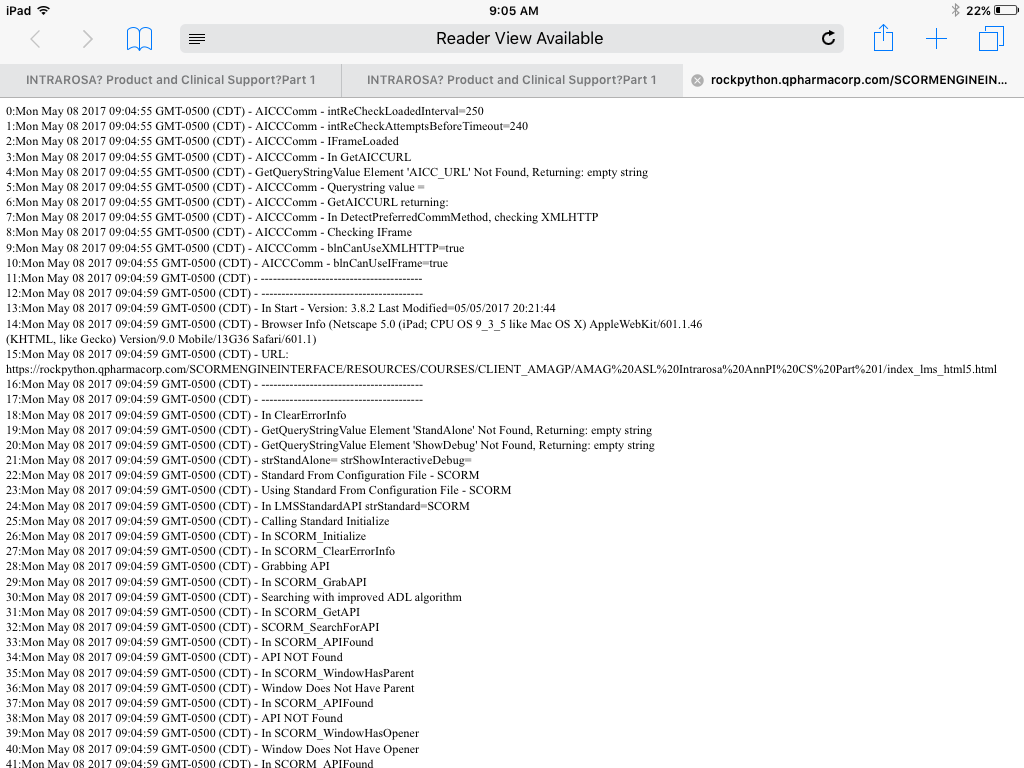
We have tested four courses dozens of times with the above settings and have crashed on the iPad. The crashing is random and we do get a debug screen (see attached). Crashing can occur at any time but seems to occur well into the course and often when clicking the previous button revisiting screens (most set to reset to initial state). But, it has crashed before finishing the course as well and when clicking Next. There is not one screen (or type of screen) that seems to cause the crash. (Can't share courses here because they are proprietary.)
We reduced the layers and removed animations but the courses still crash. We split courses in half, but they crash.
We created a 50 screen course in V3 then recreated it in V2. The course contains one screen with text, narration, a graphic, and two pop ups. The screen is repeated 25 times. I also created 25 quiz questions.
When I test the V3 50-screen course on SCORM cloud, I crash. Usually after finishing the course and then when I am going back, but it crashes.
When I test the V2 version on SCORM cloud, I don’t crash. I can go through the course multiple course times and do not crash.
Has anyone experienced this issue in either V3 (or 360)? Our thinking is that there may be an issue with V3 and that the crashing may not occur on V2, but were wondering if anyone has crashed in V3 and rebuilt in V2 successfully or has crashed in V3 and found a workaround.
We have published dozens of courses with this scope and level of interactivity in V2 and have had no crashing. This all started with V3 just recently.
Support has been good and here is their take, "Based on the series of testing performed, this occurs on iOS devices but not on Android. The initial diagnosis has something to do with mobile devices limited resource allocation which might be the cause of the issue. However, investigation is still on-going and I'll be sure to let you know for any progress." And, "It doesn't appear to be an issue specific to LMS as it also occurs when I uploaded your content in our web server. The course will crash on random slides and will reload automatically asking whether to resume or not. I've logged the issue as a possible software bug."
Regardless, we have several courses that we need to deliver for the iPad, Safari and Chrome. We have already missed our initial deadline of this past Monday. Please let me know if anyone has come across this issue. If it is a Storyline bug, it needs to be fixed immediately.
155 Replies
- AdamTrosperCommunity Member
That's fair. I realize you have no control over the media-rich content that some of us produce!
- SagarPatil-84f0Community Member
Hi Justin,
By when we can expect this issue to be resolved. We have few planned project deliveries scheduled next week and client will not accept such issues.
Thanks
Hi Sagar. Thanks to both you and Mahesh for your additional information and for checking in. I can appreciate that you are facing pressure from your deadlines. We don't have a release date for a fix nailed down yet, but it likely will not be in the next couple of weeks.
Your feedback and frustration haven't gone unheard. We're actively working on the fix, changing how Storyline will behave with iOS as Justin detailed above. It's not a small task, but a crucial one. So we're committed to releasing that fix as soon as we can.
- SagarPatil-84f0Community Member
Thanks Crystal for the update.
- JamesSkaggs-b98Community Member
Our company is seeing the same issue with Storyline 3 SCORM output crashing on iPad devices. We have some very high-priority projects where we are releasing first-time for mobile users, and the performance we're seeing is not going to provide a good user experience right out the gate... We need a fix to this yesterday...
- JessicaAndre026Community Member
I am curious how other users are explaining this issue to their clients and stakeholders. I am in final stages of LMS testing and I just ran into this issue. Telling my client that the module will not work on an iPad is not going to be an acceptable answer.
- OscarGagliardiCommunity Member
I am also experiencing the crashing issues with courses created on SL 360 and displayed on Safari on the iPad. We have experienced the issue on iPad 3, IPad Air 2 and iPad Pro.
I have noticed that in several occasions, the courses begin to display loading issues, like some of the images take longer to load and display on the screen. Sometimes, after this behavior manifests, the browser crashes.
Other times the courses seems to be playing fine and then all of the sudden the courses just crash randomly. Not always on the same screen.
Some of my courses are published as SCORM packages and others just for the web. The problem is present in both.
Several months ago I submitted an issue to Articulate Tech support (Case #01090918). This issue was about a Storyline course that had a video on every page. The file had about 23 screens. Every time the file course was played on the iPad, videos will stop playing back on Slide 18.
I experimented by loading the same quantity of videos but different videos, and I was able to replicate the issue.
Although the issues are different, they are probably related. It is possible that the crashing of the Safari browser on the iPad and the issue with the video playback are related to a memory or system/browser resources issue.
Please, let me know if there is any update on this issue(s) because it has been negatively impacting several of our projects.
Thank you.
Hi Oscar,
Thanks for sharing the case number here - I'm glad Lea was able to confirm it was a bug, and it is similar to the issue discussed here. As you said, it's related to the memory/browser resources issue and our team is looking at what can be done within Storyline to fix it (scroll up to Justin's reply for specifics).
As Crystal mentioned, it's not a small task so it isn't likely to be fixed in the next couple weeks. We know this is critical for you and others in the community - so as soon as we have any more info we'll share!
- OscarGagliardiCommunity Member
Hi Ashley, thank you for your reply. I just noticed a new version build for Storyline 360 (3.9.13488.0) released today. Does this version includes the patch that corrects this issue(s)?
Thanks.
Hi Oscar - Unfortunately not. As you can see from Justin's reply here, this is something that is going to take a bit of research and work to accomplish.
- OscarGagliardiCommunity Member
Hi Leslie, did you see the reply to me from Ashley? She already pointed me to that reply from Justin. I was hoping that this new release of SL360 would have included the fix to this major issue.
- CK1CK1Community Member
Having iPad issues very similar to those posted above. Deadline has already past and it's beyond a critical situation. Will there be a fix soon?
- JustinStaff
Hi, all. We promise that this forum thread will be the first place we visit when our solution is ready. We won't make you ask us to communicate!
- JoannaWilliams-Community Member
Hi Justin-I don't see an update here on this issue, so I'm assuming it is still a work in progress. Is there any estimated timeframe for a fix? Our implementation deadline is looming, and we need to make a decision on how to handle this issue--Continue in SL3 and hope that a fix is ready by next year? Or cut our losses now and look for a workaround: HTML5 or a re-do in SL2? Tell our 20,000 users it doesn't work on Apple devices? None of these is an appealing option...
- CK1CK1Community Member
iPad is a major platform of this course's release and we're out of options. I don't know what changed. Storyline based courses used to run ok on the iPad (html5 output) not to long ago. Maybe it was going from Storyline 2 to 360.
Would supplying a source file help? Standing by.
- PhilEaglesCommunity Member
This problem only occurs with SL3 or SL360, I suspect it's something to do with the way they have changed the way it handles HTML5. I have reverted back to using SL2 for this solve reason, hopefully they will sort this ASAP.
- CK1CK1Community Member
Thanks for the suggestion Phil, however I can't simply revert to using SL2 since SL3 doesn't port anything backwards. I would have to do a complete rebuild basically from scratch on an a huge finished course that already took many weeks to build. Plus, what am I paying a $1000 a year for if I'm unable to use SL3 as advertised? I'm just hoping a fix comes along very soon.













Related Content
- 10 months ago
- 11 months ago
- 9 months ago