Forum Discussion

Storyline 3 Crashes on iPad Safari and Chrome
Storyline Version 3 courses crash when clicking Next or Previous on an iPad on SCORM Cloud and another LMS called Ti LMS.
- Sent case to Articulate support
- Published as HTML5 or HTML5/flash
- SCORM 1.2 (experienced crashes on 2004 3rd Edition as well)
- iPad/IOS 10.3.1
- Does not crash on laptop and desktop browsers such as Safari, Chrome, and FireFox.
- Courses range for 40-70 screens, SCORM file sizes ranges from 17-40MB.
- Using layers for pop ups, quiz questions, narration
- Can't use the Articulate Mobile App, client requires iPad delivery
- Have developed courses of this scope in V2 with no crashing
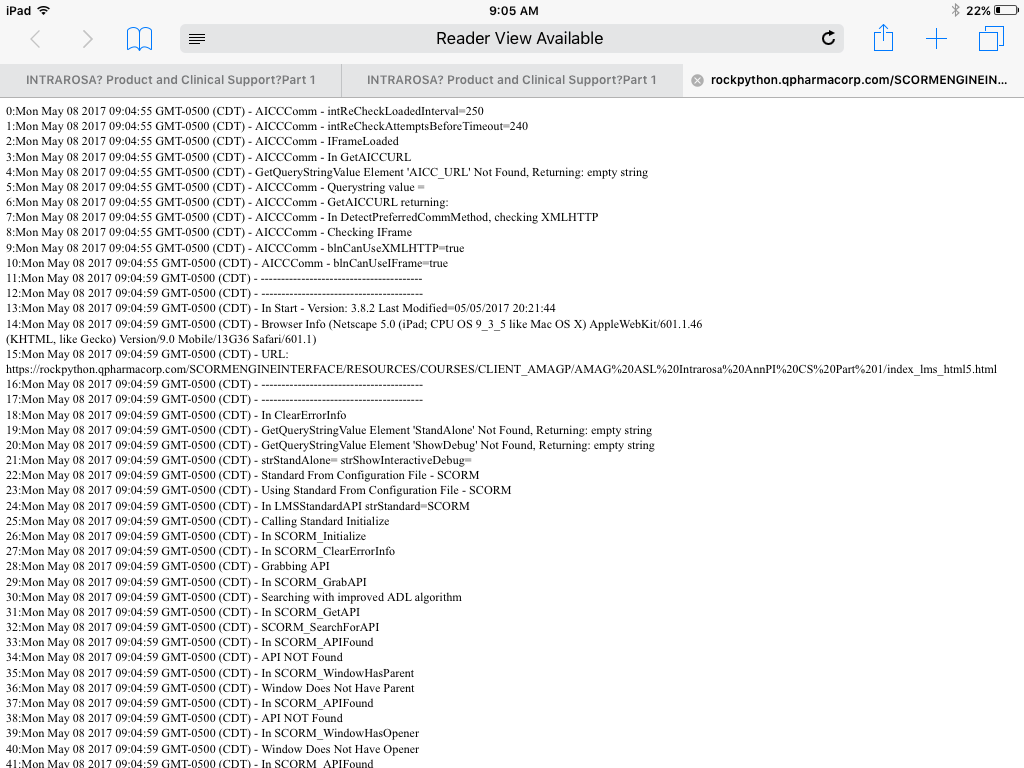
We have tested four courses dozens of times with the above settings and have crashed on the iPad. The crashing is random and we do get a debug screen (see attached). Crashing can occur at any time but seems to occur well into the course and often when clicking the previous button revisiting screens (most set to reset to initial state). But, it has crashed before finishing the course as well and when clicking Next. There is not one screen (or type of screen) that seems to cause the crash. (Can't share courses here because they are proprietary.)
We reduced the layers and removed animations but the courses still crash. We split courses in half, but they crash.
We created a 50 screen course in V3 then recreated it in V2. The course contains one screen with text, narration, a graphic, and two pop ups. The screen is repeated 25 times. I also created 25 quiz questions.
When I test the V3 50-screen course on SCORM cloud, I crash. Usually after finishing the course and then when I am going back, but it crashes.
When I test the V2 version on SCORM cloud, I don’t crash. I can go through the course multiple course times and do not crash.
Has anyone experienced this issue in either V3 (or 360)? Our thinking is that there may be an issue with V3 and that the crashing may not occur on V2, but were wondering if anyone has crashed in V3 and rebuilt in V2 successfully or has crashed in V3 and found a workaround.
We have published dozens of courses with this scope and level of interactivity in V2 and have had no crashing. This all started with V3 just recently.
Support has been good and here is their take, "Based on the series of testing performed, this occurs on iOS devices but not on Android. The initial diagnosis has something to do with mobile devices limited resource allocation which might be the cause of the issue. However, investigation is still on-going and I'll be sure to let you know for any progress." And, "It doesn't appear to be an issue specific to LMS as it also occurs when I uploaded your content in our web server. The course will crash on random slides and will reload automatically asking whether to resume or not. I've logged the issue as a possible software bug."
Regardless, we have several courses that we need to deliver for the iPad, Safari and Chrome. We have already missed our initial deadline of this past Monday. Please let me know if anyone has come across this issue. If it is a Storyline bug, it needs to be fixed immediately.
155 Replies
- OscarGagliardiCommunity Member
I applied the last two Storyline patches: Build 3.9.13488.0 and Build 3.9.13510.0. Since then, if I publish my files they work as before, with the same performance issues. But if I make modifications to my files and re-publish, the issues I experienced before are even worst on the mobile devices and also now on desktops. Many of the videos that used to play before I applied the patch appear now frozen on the first frame.
I made backups of my files before saving them with the new Storyline patched versions. How can I revert back Storyline to the un-patched version?
Thanks.
Hey Oscar - That question is a best fit for our support engineers. I've opened a support case with our team on your behalf. You should be hearing from someone soon.
- KeithLoweCommunity Member
There is no mention of this issue on Presenter 360. I seem to be having it on Presenter 360 and have reported it. Are the two the same issue?
Hi Keith,
I'm not sure if you saw my comment in your other discussion, so I've linked it here. They seem to be the same behavior, so I linked them for our team as they continue to look at it. We'll keep you posted here and in the other discussion as both are tagged for an update.
- JamesSkaggs-b98Community Member
Have there been any updates as to when this issue will be fixed yet?
Thanks,
James
Hi James,
Justin shared a bit more information on this here about a month ago, and what we're doing about it. It's not an easy, or quick, fix to implement - but we know how crucial it is, so our team is focused on this.
We'll let you know as soon as we can about this fix!
- KeithLoweCommunity Member
Hello Ashley, I do appreciate you guys jumping right on it! At a minimum,
50% of our training is done on iPads/Safari. We are constantly creating new
courses and assume all courses will have to be re-published and re-uploaded
once the issue is resolved creating additional work. It would be nice for
Articulate to suggest what we should be conveying to our customers. My
annual renewal is coming up for this software which I can only use with half
my users. Let me know what you and your team's thoughts on how you would
convey this if you were in our shoes.Respectfully,
-Keith
- JamesSkaggs-b98Community Member
Thanks, Ashley.
Yes, I had reviewed that explanation, and like others, we are anxiously awaiting a fix. What I don't understand exactly from the additional information provided is why this is an issue from Articulate Storyline 3 or Storyline 360 outputs, but it's not an issue with output from Storyline 2. Storyline 2 output played on the iPad through Safari seems to be fine. That seems to indicate that something changed with the version switch from Storyline 2 to introduce the problem. Are you able to elaborate on whether that matches what you see, and does that help narrow the cause in any way that might lead to a quicker solution?
Regards,
James
Hi, Keith.
We've found that Mobile Safari suffers from some memory management challenges. Courses with lots of media can crash Mobile Safari even if other browsers are fine. This happens most often on older Apple devices, but even new iPads and iPhones can have trouble keeping lots of multimedia in memory, especially when other tabs or apps are open.
Having said that, we'd understand if you can't explain that to your customers and need to tell them that it's a problem Articulate is working to improve.
Thanks for sticking with us, and please know that our team is working to resolve this as fast as possible.
- MarkWheeler-aa5Community Member
Hi Ashley, please can you email me ASAP when this issue is fixed?
We are getting a lot of complaints from users with iPads for this exact reason! This is a massive problem for us.
- JustinStaff
Good Morning, James and Joanna.
James, this issue is newly-introduced in Storyline 360 because the HTML5 engine in Storyline 360 is a complete rewrite when compared to our HTML5 output from Storyline 2. This has allowed us to expand our browser support, achieve 508/WCAG compliance, and accomplish feature parity. Unfortunately, it also means that we introduced new challenges like this one. We have a solution mapped out, and we're working on that now.
Joanna, I still can't project a release date, but we promise that this forum thread will be the first place we visit when our solution is ready.
- SagarPatil-84f0Community Member
Hi Justin & Ashley,
Please make sure that the issue resolved at earliest so that we can update our clients on this. Lots of projects/courses are on hold due to this issue and there is discussion going on, around alternate Tools and Technology to develop the projects/courses.
Thanks
- BethMathisCommunity Member
Is there any update available for SL3 to fix Ipad performance issues identified here?










Related Content
- 10 months ago
- 11 months ago
- 10 months ago