Forum Discussion

Storyline 3 Crashes on iPad Safari and Chrome
Storyline Version 3 courses crash when clicking Next or Previous on an iPad on SCORM Cloud and another LMS called Ti LMS.
- Sent case to Articulate support
- Published as HTML5 or HTML5/flash
- SCORM 1.2 (experienced crashes on 2004 3rd Edition as well)
- iPad/IOS 10.3.1
- Does not crash on laptop and desktop browsers such as Safari, Chrome, and FireFox.
- Courses range for 40-70 screens, SCORM file sizes ranges from 17-40MB.
- Using layers for pop ups, quiz questions, narration
- Can't use the Articulate Mobile App, client requires iPad delivery
- Have developed courses of this scope in V2 with no crashing
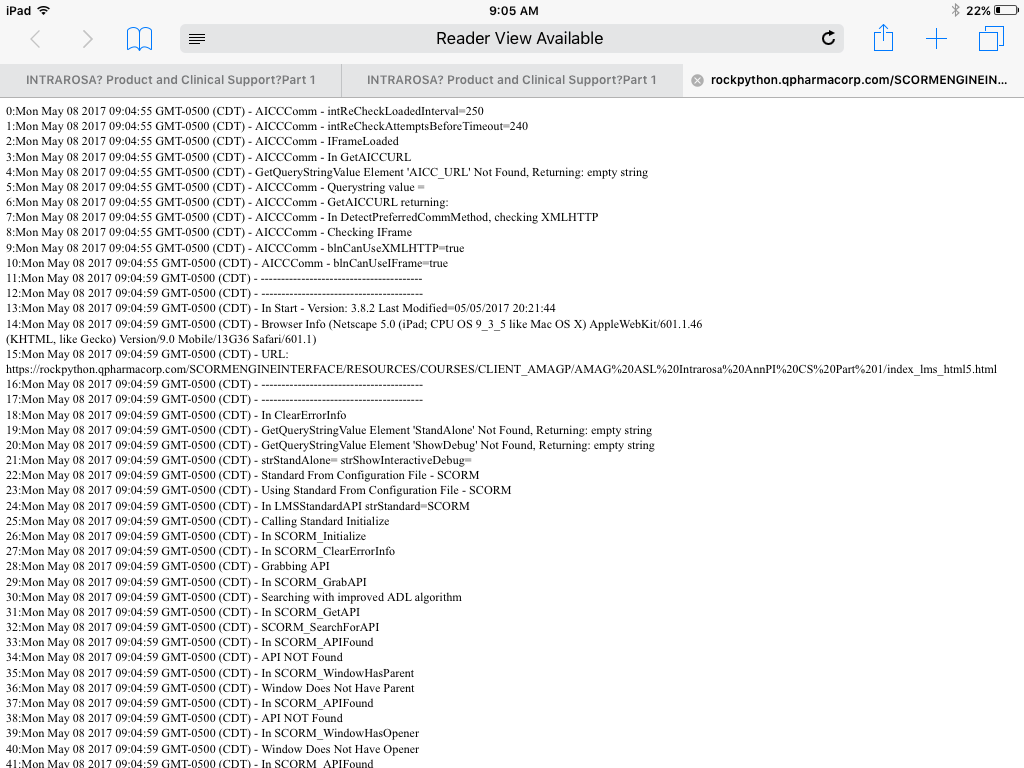
We have tested four courses dozens of times with the above settings and have crashed on the iPad. The crashing is random and we do get a debug screen (see attached). Crashing can occur at any time but seems to occur well into the course and often when clicking the previous button revisiting screens (most set to reset to initial state). But, it has crashed before finishing the course as well and when clicking Next. There is not one screen (or type of screen) that seems to cause the crash. (Can't share courses here because they are proprietary.)
We reduced the layers and removed animations but the courses still crash. We split courses in half, but they crash.
We created a 50 screen course in V3 then recreated it in V2. The course contains one screen with text, narration, a graphic, and two pop ups. The screen is repeated 25 times. I also created 25 quiz questions.
When I test the V3 50-screen course on SCORM cloud, I crash. Usually after finishing the course and then when I am going back, but it crashes.
When I test the V2 version on SCORM cloud, I don’t crash. I can go through the course multiple course times and do not crash.
Has anyone experienced this issue in either V3 (or 360)? Our thinking is that there may be an issue with V3 and that the crashing may not occur on V2, but were wondering if anyone has crashed in V3 and rebuilt in V2 successfully or has crashed in V3 and found a workaround.
We have published dozens of courses with this scope and level of interactivity in V2 and have had no crashing. This all started with V3 just recently.
Support has been good and here is their take, "Based on the series of testing performed, this occurs on iOS devices but not on Android. The initial diagnosis has something to do with mobile devices limited resource allocation which might be the cause of the issue. However, investigation is still on-going and I'll be sure to let you know for any progress." And, "It doesn't appear to be an issue specific to LMS as it also occurs when I uploaded your content in our web server. The course will crash on random slides and will reload automatically asking whether to resume or not. I've logged the issue as a possible software bug."
Regardless, we have several courses that we need to deliver for the iPad, Safari and Chrome. We have already missed our initial deadline of this past Monday. Please let me know if anyone has come across this issue. If it is a Storyline bug, it needs to be fixed immediately.
155 Replies
Thanks Jamie - Looks like Wilbert is taking a look. Thanks for letting us know that you reached out to the team.
- KristaShannonCommunity Member
Good morning,
I see there was an update yesterday for Storyline 3:
https://articulate.com/support/article/Storyline-3-Version-HistoryMarch 6, 2018 (Build 3.3.15007.0)
Among the fixes listed:
"Fixed: Lots of videos in a course could cause slides to lag or lock up in HTML5 output, and they could be sized or positioned incorrectly during preview."Could you please confirm if the fix for "Lots of videos in a course could cause slides to lag or lock up in HTML5 output" is an attempt to resolve the main issue of this thread which is (quoted from Staff Ashley Terwilliger 9 days ago in thread) "crashing on mobile Safari due to the way Safari keeps the memory and what Storyline is trying to load"?
Thanks very much!
- PatrickRyan1Community Member
Thanks Krista, I am eager to hear as well.
- SagarPatil-84f0Community Member
Similar to release notes of Storyline360, this time also Articulate has not mentioned anything about Crashing & Memory issue in Storyline3 release notes.
- CK1CK1Community Member
Does this apply to SL360 as well? I always assumed SL360 was SL3 too
- KristaShannonCommunity Member
Good morning,
To follow-up on my post on March 7, 2018, we did install Storyline 3 update 3.3.15007.0.
We found that it did seem to resolve some crashing we were experiencing on iPad iOS 10.3.3 similar to that described in this thread, but, introduced a new issue where it would seem the third video and videos beyond in a course do not autoplay with the "Play Video" setting at "Automatically" or with this set to "When triggered" and a trigger on the timeline set to play the video. They will only play by clicking on them or on click of a button.
In our actual course, it did not seem to matter which of our videos (smaller or larger) was the third, or whether that third video appeared directly after the first two or later in the course.
We experienced the issue on two SCORM LMSs including SCORM Cloud, on two different iPads using iOS 10.3.3 and when publishing the course in the Storyline 360 trial version 3.13.15006.0.
We tried different simple examples to troubleshoot and narrowed it down to what seems to be the core issue by creating a new SL3 file with four video pages using the same fairly small video with audio, and added a Next button. We published to SCORM 1.2 without any patching and on a SCORM 1.2 LMS the third and fourth videos would not autoplay on iPad iOS 10.3.3.
It would seem perhaps this is a new issue with these versions of Storyline 3 and Storyline 360.
Thank you for any information you can please provide regarding this issue.
- JustinStaff
Thanks for letting us know about the new problem you're having, Krista. Can you please send us a copy of your .story project file for a closer look?
Thanks!
- JustinStaff
Good Afternoon, all. A quick update:
- In Storyline 360 Updates 10, 11, 12, and 13, we incrementally introduced pieces of the solution we outlined last September. The following improvements are now complete:
- Based on the age of the iOS device and the weight of the slide, Storyline preloads some content if the browser can handle it and keeps some content in memory.
- If the slide is too heavy or the device is too limited, Storyline preloads nothing and keeps nothing in memory after exiting the slide. Slides will load more slowly for learners in this scenario, but it should reduce the frequency of crashing.
- The same solution was added to the release of Storyline 3 Update 3 earlier this week.
We've tested many media-rich courses, and although it is still possible to build a slide that will crash Mobile Safari (think many layers of large, lengthy videos, or high-resolution images with zoom regions) we believe our solution solves the problem for all but the toughest courses.
We have an inkling that there is still more work that can be done on this, which is why you haven't seen FIXED ALL MOBILE SAFARI CRASHING in neon lights within our release notes, but we've made significant progress. If you have a .story project file that is still capable of crashing Mobile Safari, we'd love to have a copy of it so that we can continue to optimize our published output for iOS.
- JamieDruryCommunity Member
Hi Justin,
Thank you for the update. In order to see the changes, do we need to create a new story file in the updated version, or can we just publish our existing course in the update to produce the desired results.
Thank you!
- JustinStaff
Jamie, you should see those improvements simply by republishing your existing projects.
- AndrewKircher-2Community Member
Do you have estimates on what defines a "Tough Course"? Is there a file size I need to avoid going over? What constitutes as too many layers? How large is too large for video sizes? Do you have any tips best practices.
- In Storyline 360 Updates 10, 11, 12, and 13, we incrementally introduced pieces of the solution we outlined last September. The following improvements are now complete:
- PhilEaglesCommunity Member
I can confirm that the update has fixed my media rich, problematic file. Good job guys.
- KristaShannonCommunity Member
Thanks very much for the update on the overall issue Justin, and for requesting a file to troubleshoot the video issues I posted on March 8, 2017 following installing the Storyline 3 update 3.3.15007.0. I have submitted a new case to Articulate with a sample file and am looking forward to the team's response.
Thanks!
- JustinStaff
Hi, Andrew. We don't have a specific guideline, but our user data shows that most users won't run into this limit.
- CliffPorterCommunity Member
Hello All.
I too am finding that courses on the iPad are crashing.
I had a short course with some video clips in and this crashed. I stripped out all of the video - still crashed. Cut it down to just one scene, containing a drag-drop slide and six multiple choice questions with feedback (story attached) and it still crashes. Throughout all, it worked fine on the PC. This was made and published using the latest SL3 update (6th March 2018).
This is the third course I've put together using SL3 and going back to check the others, I have noticed that they also crash iPads, although less frequently. These ones were made using earlier release of SL3. I will try republishing with the latest version to see if that has any effect.
Any help would be appreciated. It really is a deal-breaker in terms of being able to use SL3. I really like the features and ease-of-authoring in SL but can't afford to deliver courses that can't run on iPads.
Any thoughts or news on this?
- SagarPatil-84f0Community Member
Even after using latest SL3 updates(6th March), we are still facing crashing issues on iPad, iPhone and Android Tablets. The course does not contain anything as explained by Justin (many layers of large, lengthy videos, or high-resolution images with zoom regions). We have used hardly 3-4 layers, images are optimized and no videos. The courses are working fine on desktop browsers.
Urgent attention is required, since we cant deliver such courses to our clients.










Related Content
- 10 months ago
- 11 months ago
- 10 months ago