Forum Discussion

Storyline Module
Hi all, I am hoping to gain some insight into whether this can be done.
I currently have a Storyline 360 module put together that has a video on each scene that's part of a larger video. The user must watch each video clip during the relevant scene and can choose to watch the full length video at the end of the training. However, this has resulted in too large a SCORM file.
I am wondering if I could set up the module to instead only have the full length video and trigger the user to watch only the appropriate portions/clips from that video when appropriate. I'm mostly not sure if I can set up the triggers to communicate with the full length video, and how to set up the triggers to only play specific time stamps in the video.
Any thoughts on if this is possible and how to set it up would be appreciated! I have included a visual of my current setup and my hopeful setup.
4 Replies
- AaronBurgessAUCommunity Member
I'm guessing this is only achievable through Javascript. I do hate that SL's timeline doesn't have a sync video timeline with slide timeline option. Videos will always play from the start, no matter where you jump in the timeline. Hopefully someone with Javascript skills can help you out on this.
- JudyNolletSuper Hero
Perhaps rethink this. Keep all the video clips on their own slides. To show the full video, program the course to jump from video slide to video slide automatically.
Here's how that might work:
Create a T/F variable to track how the user should view the video. For example, call it view_full_video, with a default value of False. A value of "False" means they're going through the course and just watching clips. "True" means they're watching the full video.
On whatever button you use to play the full video, add a trigger that adjusts the variable to True. Be sure that comes before the trigger that jumps to the slide with first video clip.
On each video slide, add a trigger that jumps to the next video when the timeline ends (or when the media/video ends, if that happens before the timeline ends). Include a condition that the variable = True.
Also add triggers that hide the standard navigation buttons if the variable = True. Otherwise, add conditions to the PREV and NEXT triggers so they jump to the previous or next video clip if the variable = True.
If they can go through the course again, you'd need to change the variable back to False.
Another option would be to present them with a menu of the video clips, so that they can rewatch the ones of interest. In that case, program the slides to jump back to the video menu when the video ends.
- NedimCommunity Member
It’s entirely possible to achieve this using JavaScript. You can jump to any point in a video and even define specific playback ranges—where the video automatically starts and stops at set times.
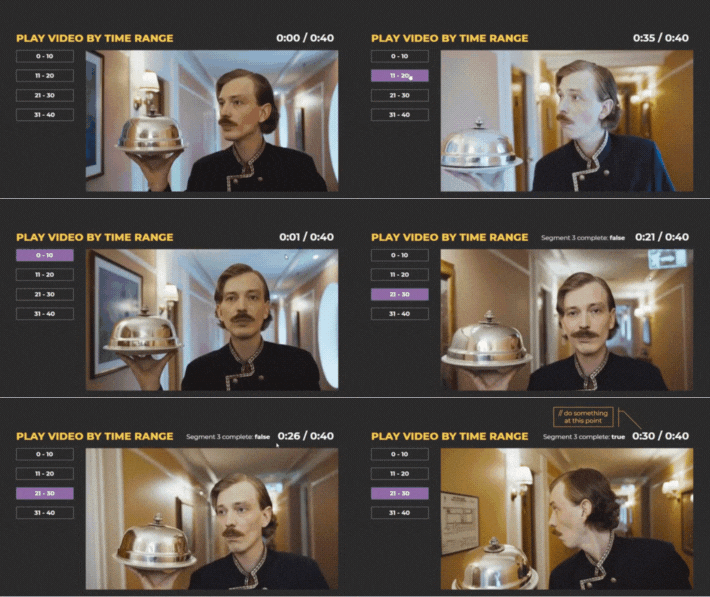
In the example below, my video is 40 seconds long. On the left side, I’ve added buttons that trigger different playback segments: 0–10, 11–20, 21–30, and 31–40 seconds. When a range is selected, the video plays from the defined start point and pauses at the endpoint, giving you control over what happens next.
For instance, calling playVideoSegment(21, 30, 's3_complete') will play the video from 21 to 30 seconds, then automatically pause and set the variable 's3_complete' to true. This makes it easy to trigger subsequent actions based on the variable’s value.
This setup is just a simple demo built on a single slide, but the same logic can be easily adapted to more complex or interactive video scenarios.
If this approach aligns with what you’re trying to build, feel free to share more details about your project—or reach out to me at nedim.ramic@gmail.com for further help.
- TeslaTaliaferroCommunity Member
Thank you all for your feedback. In the end, I ended up using free online software to compress the video files down further, and decided that since the students had to watch the full video in pieces, the optional full length video could be left out and available to them separately (outside the module).



Related Content
- 5 months ago