Forum Discussion

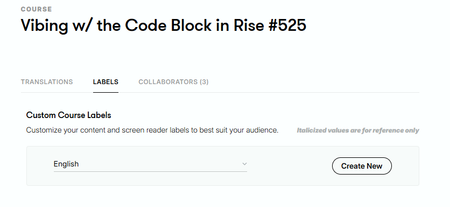
Why does the course language label change to English after copying a course?
- 6 months ago
Hi LD_Sabrina,
Great question! Happy to clarify how this currently works in Rise 360.
At the moment, there is no setting that preserves language labels when a course is copied. Those labels will always default back to English. Labels are associated with the Articulate account of the current course Owner. If you send a copy of a course to another account, the unique label set will not travel with that course.
Also, only the Course Owner can change the language settings. Managers can edit course content, but they cannot access course-level label configurations.
I do understand that having this functionality could improve your workflow when localizing content. I've submitted both of your requests directly to our product team! We'll be sure to notify you if we release a future enhancement that helps.


StevenBenassi I am a one-person team, so there is no one else doing changes. This labelling issue is still a problem for me, and I have just wasted hours editing and re-editing, but keep on getting language changes. I thought that changing the labels in settings will help and that the copied language settings (Dutch for me) I have meticulously translated will be saved in the settings, but I've lost all the versions I have just saved and everything reverted back to English. Please, can you have somebody contact me to extend some help?
- KellyAuner4 months agoStaff
Hi nudriz,
Thanks for reaching out and sharing your experience. I've opened a support case on your behalf so you can connect with one of our Support Engineers. They'll be in touch shortly via email!
- nudriz4 months agoCommunity Member
Hi KellyAuner
Thanks for the assistance. The problem has now been resolved and the solutions seem to be holding up well. Is it possible to download the PDF file of the version I made so that I can use it in other courses as well, or would that be available to me in settings when I make another course?
Thanks,
Nu- StevenBenassi4 months agoStaff
Hi nudriz,
Happy to jump in here.
Are you referring to custom language label sets you've created in Rise? If so, those sets are tied to your Articulate ID and remain available under Settings > Labels when creating a new course. You shouldn't have to download them if you're planning to reuse the same set in a new course.
However, Rise does support downloading label sets if you wish. For your reference, those label sets are downloaded as XLIFF files, not PDF. This article outlines the steps for exporting/importing label sets.
Please let me know if you need anything else!
