Forum Discussion

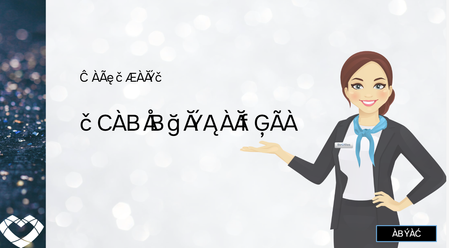
Why is Review link generating with illegible font?
- 1 year ago
Hi Luciana,
I've had another friend test it also and it has to be something on my end. I tested the modern test rendering and that had no effect either.
I'm also speaking with my IT department, and while there is a major Windows update coming in the next couple of weeks, no update has been made. I have however completed a Lenovo update.
I am thinking I may have to delete and re-install the font. I'm just waiting to get the all clear from IT.
Thank you for getting back to me :)

Hi CarmelDavenport!
Sorry to hear you've run into this setback with fonts from your Storyline course!
Does this behavior occur across all fonts, or is it specific to one? If it's just one, can you please share which? Also, have you tried testing the font with and without Modern Text Rendering to see if that improves the behavior?
If you're still having trouble, it would be helpful to see a copy of the .story file you've been working with. Do you mind uploading a copy here in the discussion or privately through a support case?
Thank you! Looking forward to hearing from you!
Thank you for getting back to me Steven.
Its happening with Onest Bold but not Onest regular as you can see in this image-
I have uploaded the basic template story file for you, and I will have a look at Modern Text Rendering and see if that can fix the problem for me.
Thank you again.
- LucianaPiazza1 year agoStaff
Hi CarmelDavenport,
I'm sorry to hear you are having trouble with the Onset Bold font displaying correctly in your Storyline course, and appreciate you sharing your file with us! I tested this on my end, and I'm able to successfully view the fonts when publishing to Review 360.
- Have you recently made any updates to your Windows Operating System? I'm curious if perhaps that has created any outages to the connection you have with the fonts on your device when working in Storyline.
I understand you are testing out Modern Text Rendering. Please let us know your findings, and we can proceed from there!Looking forward to hearing from you!
- CarmelDavenport1 year agoCommunity Member
Hi Luciana,
I've had another friend test it also and it has to be something on my end. I tested the modern test rendering and that had no effect either.
I'm also speaking with my IT department, and while there is a major Windows update coming in the next couple of weeks, no update has been made. I have however completed a Lenovo update.
I am thinking I may have to delete and re-install the font. I'm just waiting to get the all clear from IT.
Thank you for getting back to me :)

Related Content
- 10 days ago
- 15 days ago
- 15 days ago
- 15 days ago
- 15 days ago