buttons
52 TopicsAdding Dynamic Buttons
A few years ago, someone at work let me know how to make more dynamic buttons, and I have become completely addicted ever since. They make the content look a little more professional when used strategically. Look at the examples to see if you would be interested and download it if it helps. These examples are very easy to implement, but you can do a surprising amount of modifications.1.5KViews21likes12CommentsBranching menu solution
When creating a course with branching options, I have always been concerned about the menu. I wanted to prevent learners from clicking on items that aren't relevant to their chosen path. I believe I have found a solution. It involves writing some JavaScript code on the Slide Master and using Storyline variables. At the beginning of the course, I will hide the branching options. However, when learners reach the slide where they can choose their direction, the relevant menu items will appear based on their selection. The menu at the beginning of the course: The learner selects their choice. The menu after the learner made their choice. See example Let me know if you think this is useful/helpful. Thanks!732Views10likes7CommentsCooking Game (Jeopardy style + Gamifiation)
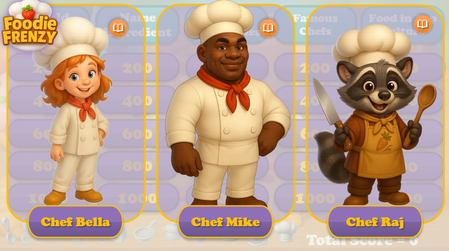
Hello Articulate Heroes! I'm excited to share my second personal project with you — a cooking-themed, Jeopardy-style game! Cooking Frienzy This project was inspired by two fantastic webinar series shared here: How to Create A Jeopardy! Style Game Gamification series I started with the "Jeopardy!" template and added the following custom features: Cooking-themed questions and answers — 5 questions across 5 categories Custom visuals — including characters, backgrounds, UI, and tokens The ability to choose one of three characters at the start of the game (and replay with a different chef assistant!) Personalized feedback and questions — with character-specific images and voiceovers A 20-second Pomodoro-style timer with a “wiped” animation Tokens awarded when the user completes a certain number of questions The characters were created using AI. Thank you for taking the time to check out the game! I’d love to hear your thoughts — feel free to share any comments or suggestions! You can check-out the game by this link: Cooking FrienzySolved2.5KViews9likes21CommentsInteractive Dynamic Shadows Script
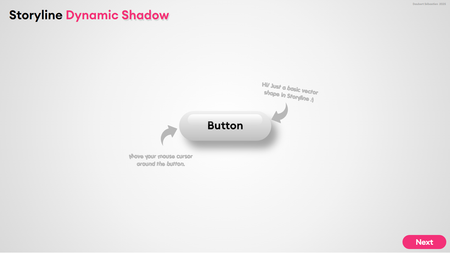
This JavaScript code automatically generates a realistic drop shadow that reacts to mouse movements, simulating a moving light source. How it works: Paste the code into an "Execute JavaScript" trigger. Add the Accessibility Text (Alt Text) Mybtnshad to any object or button. The shadow applies instantly and moves opposite to the cursor to simulate depth. Key Features: Fully customizable settings (intensity, blur, opacity) located right at the top of the script.594Views6likes5CommentsVictorian Alphabet game
A Most Curious Diversion: The Victorian Alphabet Dial Dearest Gentlefolk, Though I am tardy in submitting this humble creation, I felt compelled to share my vision nonetheless. Ever enchanted by the elegance and refinement of the Victorian aesthetic, I have embarked upon a whimsical endeavour: an interactive alphabet dial. With a gentle spin, the player shall unveil a letter accompanied by a charming illustration and a verse, each rendered in the ornate style of the age. It is my sincere hope that this modest project shall delight and amuse, and perhaps even transport you—if only for a moment—into a bygone era of beauty and imagination. * This project has also been submitted to the #522 Weekly Challenge (Dial Menus), where I hope it may find favour among fellow enthusiasts. ** The images and verses were brought forth with the assistance of artificial intelligence, yet each has been lovingly tailored and refined to suit the spirit and aesthetic of this particular work. Enchanted Alphabet589Views6likes6CommentsWorkplace Violence and Harassment – Game-Based Scenario
One of our recent projects involved developed a game-based, scenario-driven Custom eLearning Solution focused on Workplace Violence and Harassment Training. As part of our broader corporate training solutions and digital learning services, the goal was to move beyond traditional click-through compliance courses and create a learning experience where employees actively practice real-world decision-making. What we built: A scenario-driven course with 1–4 progressive levels Each level presents realistic workplace situations that require learner judgment Learners complete a knowledge check or quiz at the end of each level Successful completion unlocks a badge, reinforcing motivation and progression Why this project matters: Rather than relying on a traditional, click-through compliance approach, we designed this eLearning course to help learners practice real-world decision-making in a safe environment, supporting better recognition, prevention and response to workplace violence and harassment. Behind the scenes: Branching scenarios were designed to encourage reflection, not just right-or-wrong answers Feedback carefully crafted to explain why a response is appropriate Game mechanics were applied thoughtfully to maintain the seriousness of the topic What this project reinforced for us: When designed with intent, gamification can enhance engagement and retention, even for sensitive compliance topics. Tools used: Articulate Storyline 360 for course development Vyond for video creation Learning outcome: Participants will be able to identify, prevent and appropriately respond to workplace violence and harassment situations through practical, scenario-based decision-making. Explore the course: Click the link below to view the course. https://www.swiftelearningservices.com/our-portfolio/game-based-scenario-sample/story.html We welcome your feedback, questions and suggestions, especially around scenario design, feedback strategies and gamification for sensitive compliance topics.2.2KViews5likes6Comments💡 Confidence Self-Check: A Reflective Benchmark Tool UPDATED 151125 - See comments below!! 👇
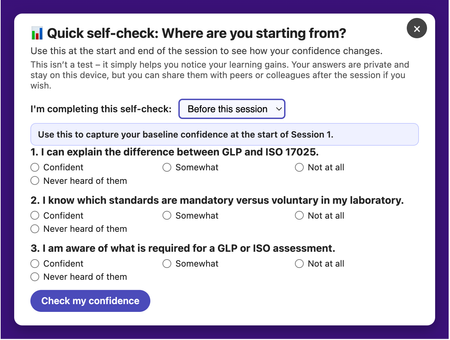
Hi everyone, UPDATED 151125 - See comments below!! 👇 Here’s a quick show-and-tell example I’ve been experimenting with — a Confidence Self-Check tool built in Storyline 360 and embedded into Rise 360 as a formative reflection block. The goal was to give learners a way to benchmark their confidence and awareness before and after a session, helping them see their own progress and prompting metacognitive reflection — without the need for LMS data capture. I wanted something that: ✅ Supports metacognition — helping learners think about their own learning 🔄 Tracks progress with “before” and “after” self-checks 🧠 Encourages reflection rather than testing knowledge 💬 Uses local storage only (no data collection) to keep it private and learner-centred 💻 How it was created This build was produced through an iterative Generative AI-assisted workflow, where I coached an AI (ChatGPT – GPT-5) step-by-step through design reasoning, JavaScript development, accessibility checks, and instructional alignment. The focus was on human-assured prompting — using AI to accelerate build logic while maintaining learning design intent, tone, and pedagogy. The project was inspired by JoeDey’s “Perpetual Notepad” (huge kudos for the original concept!), and extended to include weighted confidence scoring, dual checkpoints, and adaptive feedback messages. ⚙️ Known limitation Because this tool is designed to be session-specific, each new deployment requires: Updating the SESSION_LABEL and STORAGE_PREFIX variables in the JavaScript to give that session its own ID. Editing the question text to match the focus of that session. These edit points are clearly marked in the script with: >>> EDIT SESSION METADATA HERE <<< and >>> EDIT QUESTIONS FOR THIS SESSION HERE <<< It’s a simple one-minute change — but worth noting if you plan to scale this across multiple modules or courses. You can explore the working example here: 👉 Rise Review link A downloadable .story file is included inside the review for anyone who wants to look under the hood, edit the JavaScript, or adapt the design for their own learners. 💬 Open for feedback I’d love to hear from other e-learning designers — especially anyone experimenting with AI-supported authoring or reflective learner tools. How might you extend or refine this concept? I’d love your thoughts or suggestions — particularly around: How you’d extend this for different learner profiles Ideas for alternative feedback messages or visual treatments Whether you’ve built similar “confidence meter” interactions in your own work Feel free to reuse, remix, or expand the concept. Always happy to connect and collaborate with other learning designers! 🔗 Portfolio: forgedframeworks.co.uk/ 📧 Contact: [email protected] Thanks in advance for any feedback, and again, credit to Joe Dey and the Articulate community for sharing the foundation idea that made this possible.692Views5likes7CommentsParking inspector safety
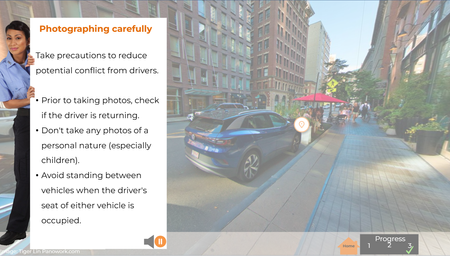
This interaction uses a 360 street photo with three markers to locate and learn about how inspectors stay safe on the street. Each learning pop up is accompanied by a text to speech option. On the bottom right on the page, you can view your progress out of the three tasks. Review link: Parking inspector safety | Review 360677Views5likes5Comments