instructional design
147 TopicsPeer Pod Coming Soon: “New to Instructional Design” — Who’s Joining Us?
We’re kicking off a brand-new Peer Pod for anyone who’s new to instructional design and you’re invited! 🎉 Peer Pods are 4-week learning groups where community members explore a topic together through weekly prompts, curated resources, and shared discussion. Whether you’re a few days or several months into your role, this is your chance to connect with peers, reflect on key topics, and build confidence together. Here’s what we’ll explore: ✨ What to focus on as you get started 📦 Intro to Articulate 360 + course design best practices 🤝 Tips for working with SMEs 💻 Best practices for incorporating AI By the end, you’ll walk away with a stronger foundation and a group of peers cheering you on. 🗓 Start Date: Monday, January 12, 2026 Participants will be added to the private Peer Pod group about a week before we begin. 👉 Want to join? Fill out the registration form. 💬 Your turn: What Peer Pod topics do you want to see next? If you could join a focused 4-week learning group, what topic would you choose? Drop your ideas below so we can build pods around what you want most. 🙌1.8KViews14likes36CommentsWorried about AI taking your job?
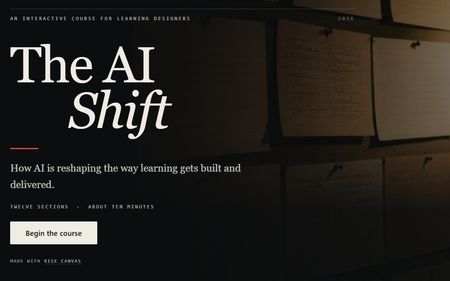
Most people use AI the way they use a search bar. Type something vague, take what comes back. That's how poor course content gets made. This course is about using it deliberately. You'll practise briefing an AI properly, interrogating what it gives you, and deciding what your own expertise still has to supply. The AI Shift Tools used: Canva, Gemini and Rise Canvas386Views12likes10CommentsLess Is More Is Not Just About Content, but About Learning Experience
After working in instructional design for many years, I've come to realize that "less is more" is often misunderstood. It is usually associated with simplifying content, such as making courses shorter, reducing information, or avoiding overload. But in my experience, it goes beyond that. Even when we have correctly identified what learners need to know, do, or change in order to meet business goals, there is still another important question: How should we design the learning experience itself? The goal should be to help learners learn with the least unnecessary effort. Not by removing depth or rigor, but by removing friction that does not contribute to learning. Over the years, I've seen many different approaches to learning design. Some learning experiences feel under-designed, where the lack of structure or intention makes it difficult for learners to stay engaged or understand the purpose of the content. I've also seen cases where, in an effort to avoid being "too simple" or "boring," additional layers of interaction, visual elements, or gamification are introduced. Many of us have probably spent hours building advanced interactions in Storyline or carefully structuring a Rise course because we wanted the learning experience to feel more engaging. There is nothing wrong with using these features. The question is whether they genuinely support learning. Sometimes these additions are driven more by what the tool allows us to build than by what learners actually need. As a result, learners may end up spending more time completing interactions than understanding, retaining, or applying the knowledge that really matters. This is especially important in corporate learning. Learners are often balancing training with their daily responsibilities. Time is limited, and attention is limited. That is why I believe we should be intentional about where we add complexity. Interaction is not the problem. In fact, meaningful interaction is essential for learning. The key word is meaningful. The most valuable learning experiences are those that help learners understand concepts more deeply, retain what they have learned, and apply that knowledge in real work situations. This is where I choose to focus my design effort. Not on adding interaction for its own sake, but on identifying the moments in learning that truly matter. Instead of asking, "What cool Storyline feature can I use here?", I think we should be asking, "How does this interaction help learners understand, retain, or apply what they need to learn?" When we design with that intention, learning can often become simpler while also becoming more effective. That's the kind of learning experience I continue to strive for. I'd love to hear how you decide when an interaction is truly worth adding.418Views11likes12CommentsWelcome to Week 1 of the E-Learning Heroes Passport Challenge!
🌍 Welcome to the Passport Challenge Hub! Your one-stop spot for all things E-Learning Heroes Passport Challenge. Each week, we’ll share a new update celebrating badge earners, Globetrotter progress, and community highlights. Check out the Passport Challenge post to learn how to join, earn badges, and see all the rewards you can unlock! ✈️ Getting Started Here’s how to start filling your passport this week: Post a new discussion or comment on a post that caught your eye. Jump into the Welcome Center and greet a new member. Like a few posts that inspired you. 💡 Weekly Pro Tip You can earn two badges in one! Complete the Weekly Challenge to earn your Challenger stamp, then post your project (with details!) in the Share Examples Hub to unlock your Showcase stamp. 💬 Join the Conversation How are you hoping to grow, learn, or stretch your skills during the Passport Challenge? Drop your goals in the comments — we’d love to cheer you on!526Views11likes6CommentsID Toolbox
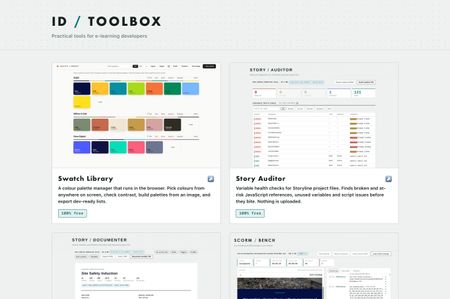
Practical tools for e-learning developers… Over the past several months I've built a set of browser tools for the bits of Storyline and Rise that used to cost me hours. Eleven of them, all completely free, no signup, no accounts, nothing to install. They run entirely in your browser. Nothing is uploaded anywhere, which for me was the whole point, I wasn't keen on posting client content to a website just to check something… ID Toolbox245Views10likes3CommentsPassport Challenge: Badge Updates, Highlights & Upcoming Events
Great news, travelers! ✈️ All badges earned so far (except Voyager — those will be added at the end) should now appear on your profiles. If anything looks off, just let me know, and I’ll get it sorted. Remember, the Passport Challenge runs through January 5th, so there’s still plenty of time to level up and earn those badges! 🎉 This Week’s Highlights A huge shout-out to our badge earners so far! Tier 1 Members who’ve earned 3+ badges: JudyNollet Nedim Silverfire Seb_Daubert elizabeth ThierryEMMANUEL JHauglie HillaSchlegel jveedubs SandyMyers LeeMillardButlr Kate_Golomshtok KayleneWance ClaireBogue-155 Stephanie BarryHollembeak SMcNicol FelixFranke DanThornton ChelseaYoung-6f samxuan Caitlin_B jeremykelley78 Emily02 BorgCube RonPrice JodiSansone larryvanwave-ff HoneyTurner JenniferThom012 BenjiLukas Mb06 hannahrad22 DaisyWoods-2947 RamonTalavera-0 CydWalker_mwh RehanTT JulieBaker-ad32 RhondaRolf-1090 TamaraCraft-62f RomanieRoach-e9 SyedAmjad-Ali Tier 2 Members who’ve earned 5+ badges: Emmanuel_Kegler Lori_Morgan GolfPrincess AbigailVettese PaSchl Jonathan_Hill Michelle_Brooks MrugeshJani Marie-Pierre701 DanBoylandUK Ekaterina_V MeeraLynn-UK VickyAttridge 🌟 Most Badges Earned (so far!) Emmanuel_Kegler is leading the way with 7 badges — just one more to reach Globetrotter status! 🎁 Prize Reminder Tier 2 = Entry into our Articulate swag drawing Tier 3 (Globetrotter) = A chance to win our Grand Prize: a Fujifilm Instant Film Camera! 🚀 Keep the Momentum Going Here are a few ways to earn more badges this week: Weekly Challenge: Share Your 2025 E-Learning Challenge Highlights Upcoming Webinars: Overview of AI Assistant in Rise - Dec 16 Edit AI Images Using Free Windows Tools - Dec 16 Quick Tips & Tricks: Episode 120 - Dec 18 Join the Conversation - Jump into these recent discussions and share your insights: How does your organization support different ways of thinking and working? by smous Help with multiple packages that make up one course by RachelDavis-7dd Welcome Center: Say hi to a new member! Share Examples Hub: Post a project — and remember, sharing your challenge submissions is a great way to earn badges and contribute to the community! 💡 Weekly Pro Tip: Check out the latest Made by Members featuring portfolio examples. Participating in the Passport Challenge is a great way to sharpen your portfolio and showcase your skills! 💬 Join the Conversation What’s one badge you haven’t earned yet but plan to tackle this week?413Views10likes3CommentsDesigning Immersive Phone Conversations in Storyline
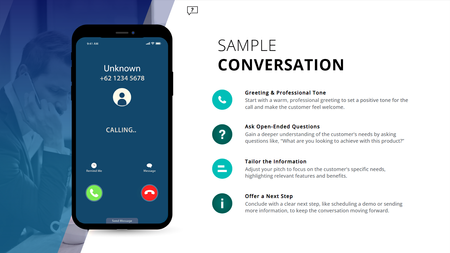
Ever have two characters talk in a training module, but it still feels flat; even with speech bubbles, audio, and triggers? This (FREE) Storyline phone conversation template changes that. Whether you're designing for sales, compliance, healthcare, or support, it creates real, layered convos that feel like you're eavesdropping on a call. Animated phone effects Realistic voiceover dialogue Transparent APNG waveforms (way better than GIFs!) Custom triggers for pick-up/end call Clean, modern layout with animated text Watch how it works: https://www.youtube.com/watch?v=kMpUcYJRNnE Preview the demo: https://www.redesignedminds.com/Discuss/story.html Download it free: https://drive.google.com/file/d/19AvmE7q3PAUbXoNKIViQtPNqCwUoFDQW/view?usp=sharing If your training includes a conversation, this is how you bring it to life.1.4KViews10likes14CommentsHow are you approaching learning creation in your organization beyond “traditional” L&D use cases?
Hey ELH community 👋, We know that learning creation doesn’t live solely within L&D or instructional design teams. In large organizations especially, managers, training, enablement teams, and other departments are increasingly creating their own learning to meet team and business needs. We’re curious how that’s playing out in your organization. If you’re in L&D, what’s holding you back from bringing on more teams create courses in Articulate? Are there particular challenges—technical, process-related, or cultural—that make it harder to open things up? And if you have scaled and democratized course creation with Articulate beyond L&D, what’s helped it work well? We’d love to learn from your experiences; what’s working, what’s not, and what would make it easier. ~ The Articulate Research Team627Views9likes5CommentsHow Rise Canvas was created
I’ve had several requests to detail how I created Rise Canvas Rather than trying to respond to everyone via DM, LinkedIn etc, I thought I’d detail everything here in one post. I’m a web/app designer in addition to being an ID (and some other side hustles that pay the bills!) so this has been a bit of a background passion project initially started for my own work… This will be a long read, so I’ll write it in several parts… This will be fairly non-technical as this isn’t really the place to discuss technical detail.. Part 1 coming next…422Views7likes11CommentsDo you create training for Sales Enablement or Customer Service teams? Join our Template Creation Guild pilot program!
💁 Are you a trainer in either the Sales Enablement or Customer Service Training spaces? 🤝 Do you love co-creating content and networking with others in your training niche? ✍️ Do you want to build authority and credibility in your training niche with an Articulate by-line, all while helping others in your space? We’re launching a new community program just for you! Introducing: Template Creation Guilds 🎉 These four-week co-working programs will bring together 15-25 creators from specific training niches to collaborate on creating a “core template hub” for that niche. Gain connections and skills with peers in your niche while working together to produce valuable additions to your portfolio, supported by Articulate’s team. Interested in learning more? We put together an article here with all the details about: Program schedule Time commitment Who’s a fit How to join 💬 Your turn: what was the last training you created? If you work in the Customer Service Training or Sales Enablement spaces, what was the last training you created for this niche? Was it new agent onboarding, a quarterly product launch overview, a QA assessment training, or something completely different? Let us know in the comments.560Views6likes1Comment