localization
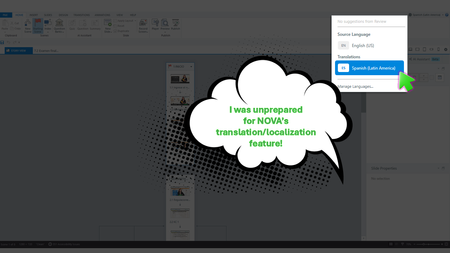
233 TopicsI Was Wholly Unprepared for NOVA’s Translation and Localization Power!
Yup, We Need This Course Updated by Next Week During the week of Articuland Orlando, my business partners dropped an “immediate need” eLearning build in my lap. At first, I didn’t think it would be a huge lift. Then I realized I had to fine-tune the English version of an existing course and create a Spanish version. Typically, translating a course from English into Latin American Spanish can take us two to four weeks. After I use Copilot to translate the course's script, an internal expert validates the translation. I then make the necessary changes, and the expert confirms that the revisions are correct. The challenge is that my internal expert has a full-time role with the company, so reviewing eLearning translations naturally falls lower on their priority list. When Articulate announced during the keynote that NOVA’s translation and localization feature had been activated for Articulate360 subscribers, I was literally in the middle of translating my course (MANUALLY). What Can It Hurt - Take NOVA for a Spin I said, “What the heck. Even if Storyline is able to only translate the base layer’s onscreen text, that’s a win.” Mind blown, when NOVA translated nearly everything!🤯🤯🤯 It translated: Onscreen text (base layer) Onscreen text (layers) Onscreen text (Master slides*) Changed the language the player was set up in AI Voiceover audio Lessons learned Written Spanish, typically, runs longer than written English. Resizing your text boxes etc. takes time, even with the tool that spotlights exactly where the issues are. *Some Master Slide (layouts) were translated, some were not. I was not working on a highly complex course, so fixing the lingering untranslated Master Slide (layouts) was not a big deal. As mentioned in Articulates Help documentation, when you have hardcoded text onto an image, that will not be translated. I can’t share a full demo, but I captured a few screenshots for your perusal (see below). My Key Takeaway Bottom line, the time NOVA saved us is remarkable. I was so excited, I nearly called my manager to rave about it (even though she was on vacation 🤣🤣).120Views8likes5CommentsAutomatic Selection of preferred language in LMS/SCORM-Package
Hi there, I have a question about the localisation feature in Articulate Rise and would be grateful if anyone with similar experience could help me. 😄 My use case is as follows: Our course content is inside an Articulate Rise course and is exported as a SCORM 1.2 package to a Moodle platform. When the SCORM package is clicked, the user is directed to a pop-up containing the course contents. I understand that Articulate Localisation is the best way to generate and export Rise courses in multiple languages, as demonstrated in the following article and e-learning course: Articulate Localization: Publish Multi-Language Rise 360 Courses | Articulate - Community https://rise.articulate.com/share/wbbxvTJyDgfSsfVryNBVDjvmjdX8agsK#/ The best method I have found is to allow the user to select their preferred language at the beginning of the SCORM package using a dropdown menu, as demonstrated in this article: Multi-SCO SCORM Package with Language Select | Articulate - Community Is there any way to skip the dropdown menu and automatically display the correct course language based on the user's browser language or, alternatively, based on the user's Moodle profile fields? Ideally, this would not require much coding or a custom solution and would not change the current user flow when accessing course content. Any help or feedback on this issue would be much appreciated. 🙏 Best regards, Felix306Views0likes7CommentsSwitch languages from within Rise 360 course using Articulate Localization
Hi! We have used Articulate localization to translate our course into 5 languages. We then export to one SCORM package that contains all of the languages. We use that SCORM file in 2 LMS's. In Litmos, the user is presented with the language, they choose the content and off they go. If they decide they want to go back and choose English instead (it's technical content, this is common), they simply exit and go back in and they'll have the option to choose the language again. It keeps track of where they were, just presents in the new chosen language. All works great. In Thinkific, once again the user is presented with the language choice when first entering the course. However, whatever language they choose "sticks." There is no way to switch to a different language if they accidentally chose the wrong one or want to go back to English. When they exit and come back in, they come back in in the same language with no option to choose another one. Is there a way to present the option to switch languages from within the course? I'm using Rise 360, not Storyline. I found this previous article, but I think it's meant for Storyline? Articulate Localization | Articulate - Community673Views1like11CommentsError publishing upload a SCORM package I've translated using localisation
Hi I've translated a storyline course and published to LMS just one of the languages. I translated it from English to French and only want the French version in my Brightspace course container. I published fine and can view the file fine. Then I zipped it up and tried to upload to Brightspace but it fails with the error message "The package is missing a manifest". I've never had this error before and this is the first time using localisation. Has anyone else experienced this?54Views0likes3CommentsHow are you designing courses for localization from the beginning?
I've been thinking a lot about localization as a design decision rather than something that happens after a course is built. One thing I've learned from working on global learning projects is that decisions made early, including how text is handled in graphics, how media is structured, how reviews are managed, and how the course is packaged, can make a huge difference once you begin scaling across languages. I'm curious how others approach this. What are you doing during the design and development stage to make localization easier later?52Views0likes3CommentsScenario block labels
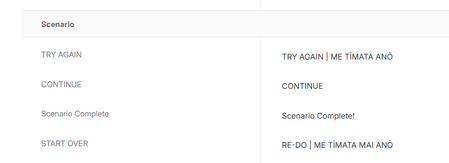
Hi there | Kia ora Articulate Team I'm a bit frustrated with the Rise scenario block labelling. For a couple of reasons: 1. The button/text container on the front page is too small to accommodate our dual language labels. Our organisation uses both English and Te Reo on all labels where possible. 2. The front page button label and continue button label (once you get into the scenario) use the same label. I think these should be different labels. 3. The front page label should be Get Started, or Begin or something like that and large enough to cope with dual language. 4. The "continue" label should allow for dual language, the same as the retry button. What do you think? Any chance you could make this happen? Kind regards | Nga mihi Helen PS I've attached a screenshot of my dual language labels for Scenario.111Views0likes6CommentsIssue with languages on images - text translation
I have a Rise course that is in English and I used the new Articulate Localization/translation service to have it translated into Italian, and that part is fine. What is NOT fine, however, is that, throught the course are images that have text on them (see attached), that I assumed would translate with the rest of the course. I understand that the text on the images does not translate, so I had the text on those images translated separately - WITHIN Rise, in some instances...and each time I replaced the pictures in the Italian version with pictures that had Italian text, the images in the original English were also replaced with the now-Italian text versions. So, either my pictures are forced to be in Italian, even on the English version, or they are forced to be in English, even on the Italian version. How can we fix this? I have to have this translated into German, French and Spanish, too, so how do I ensure that those versions have the appropriately imaged pictures? Do I have to make a separate module for each different language? Screenshots included are one of the images - the original English, then in Italian. Also a screenshot that shows the English module with the images in Italian, when they should be in English.Solved144Views1like10CommentsLayout problems
Hello! I was testing Localization this past weeks and I found a problem for our e-learnings. We always adjust the design very precisely to the text lengths, such as the button width, or other text boxes. I actually thought that in the new Localization version, it was already possible to customize these text boxes or shapes with text individually for each language. But when I change something in one language, it gets changed in all languages, including the source language. Is this something that will be fixed in the next version? After all, the timeline can already be customized individually for each language. It would be very helpful for our workflow to change the size of text boxes individually as well. Now we have to save the translated languages as new files but then we cannot import updates that were made for the source language..29Views0likes0CommentsLocalization verification - but verifiers will not use the Review360 function.
Looking for some advice, workarounds, and eventually, a solution to a hurdle we have been thrown. We are localizing multiple (over 100) courses using Articulate localization. Each translation must be verified by our in-house localization team; however, they will NOT use the Review360 method for verification. The verification team has requested Excel spreadsheets of each Rise and Storyline element for side-by-side comparison and editing. I can't export Rise or Storyline like that, I can't copy/paste from the Review360 verification sidebar, and the XLIFF file I was able to export does not line up with the source language file. Thoughts? Ideas? Any help or insights would be appreciated.33Views0likes0Comments