localization
233 TopicsLocalization News!
Hello, I just wanted to take a moment to share a couple of announcements that I'm super excited about! The big news is that we just launched Articulate Localization, which allows you to translate, validate, and manage your courses from within the Articulate 360 platform. 😍 Check out this article for more information. Along with that, I'm happy to share that we just launched a new Localization group where you can ask questions, discuss localization best practices, connect with others who work with localization, and more. Just hit the Join Group button to get started! I'm curious, have you started a trial of Articulate Localization yet? Let us know in the comments!5.2KViews6likes46CommentsYou can now Localize Text to Speech on Rise and Storyline!
We’re thrilled to announce an exciting enhancement for all Localization Pro users! When you translate your course, the script will be automatically translated and new audio will be generated and re-inserted in the target language, saving you time and effort. What’s New With this update, translation now includes: Automatic translation of the script (the text that powers Text to Speech). Automatic generation and insertion of localized audio in your translated course. Validator updates: Validators can now update the script, and importing their suggestion will automatically update the audio as well. This functionality is now live in both Rise and Storyline. Important Note for Storyline Users This update applies to both AI Text to Speech and Legacy Text to Speech shapes. You’ll no longer need to manually replace audio after translation, it’s all handled automatically during the translation process! Next Steps We’d love to hear your feedback and learn about your experience using this new feature. Your insights are invaluable as we continue refining how teams create localized learning experiences.1.5KViews2likes10CommentsMigration to EU server
I want my data on an EU server but that seems impossible. I started using Articulate 5 years ago. Than there was no EU server. I did build courses and now I could not send a copy of a course to a customer I builded the course for. I see it as my content and I want to migrate to a EU server. But this is a service that Articulate does not offer. Does any now how solve this? Or perhaps some experts of the organisation can solve this for me. Thanks in advance, Rypke Procee1.4KViews3likes30CommentsTranslation for Custom Blocks, Code Blocks, and Text-to-speech
I was just on David's call and these new features in Rise look really great. I can see a lot of possibilities—if I can get them translated. What are the translation options, processes, and limitations for each of these features? For example, are text boxes in Custom Blocks included in the XLIFF exports? What about text in a Code Block? During the call, David inserted a calculator using a code block. The calculator had a heading at the top. How would I go about getting that heading translated? Finally, if I use the text-to-speech feature, how do I go about getting that text translated so I can generate the speech in other languages? Is it included in the XLIFF file? I'm loving these new features, but everything I do needs to be translated and I'm trying to avoid creating extra work and opportunities for things to get missed. Thanks!1.3KViews8likes18CommentsAI Voice Availability Differences Between Storyline and Rise – Anyone Else Noticed This?
Hi there, While working with AI voices in Storyline and Rise, I noticed a small inconsistency in the voices available between the two tools. Some voices that appear in Storyline don’t seem to show up in Rise, and vice versa. For example, voices like Jessica — Woman | Young | English | American accent | Dialogue | Cute and Brittney – Social Media Voice – Fun, Youthful & Informative are available in Storyline but don’t appear in Rise (at least in my environment). It’s not necessarily an issue, but it does make it a bit challenging to maintain voice consistency across courses, especially when some modules are built in Storyline and others in Rise. I’ve already raised a support case with Articulate regarding this, but I was curious to check with the community as well. Have you noticed similar differences in AI voice availability between Storyline and Rise? If so, how are you maintaining consistency across projects? Would love to hear your experiences! Thanks!1.2KViews3likes17CommentsArticulate Localization - Shrink Text on Overflow Bug
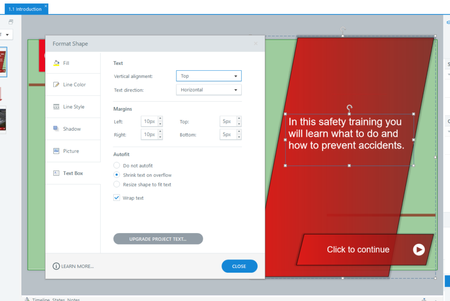
Hi all, Articulate Localization is a dream come true that my team and I have been waiting for for years. We are however running into an issue/bug in Storyline 360 with 'shrinking text on overflow' Currently we use the settings you see below. The text of each box is 'wrapped' and if there is too much text the size of the text automatically decreases. This functionality is essential, because it allows you to easily manage multiple translations because if there is too much text then the text simply slinks a little bit to still fit in the box. As a result you don't need to make ridiculously large boxes for lengthy languages like Ukrainian and Bulgarian (these versions of the training then simply have text that has smaller font). However, Articulate Storyline 360 breaks this functionality when there are multiple translations. Here is the Ukrainian Translation for example: As you can see, suddenly, scrollbars have appeared. This should not be possible but it still happened, if you Publish or Preview the Project the scrollbars are still visible. Therefore, our trial of Articulation Localization has come to a very short end because we cannot use this for our clients if the text of each text box does not shrink in other languages other than the source language. Is anyone else experiencing this bug and/or can this bug be resolved so we can use this feature as well. Secondly, when using Upgraded Project Text the option to 'Shrink text on Overflow' disappears whilst this feature is 100% necessary for running multiple translations in the same Storyline file. Japanese uses about 50% of the space Bulgarian uses, so making huge text boxes for everything just because there are languages that need a lot of room means there is also a lot of empty space on other languages. In short, it's MUCH better if Storyline simply reduces the font size of these languages so you don't need to leave insane amounts of room. We are excited about Articulate Localization, but it needs to work perfectly in Storyline 360, because we (on average) would like to have twenty languages running in one file. Best regards. Kaj Dekkers1.1KViews6likes18Comments