localization
233 TopicsI Was Wholly Unprepared for NOVA’s Translation and Localization Power!
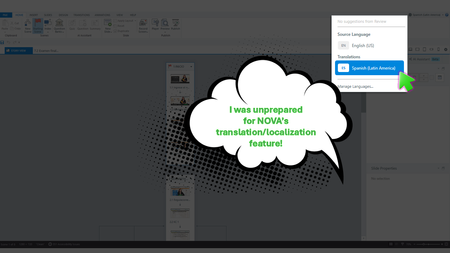
Yup, We Need This Course Updated by Next Week During the week of Articuland Orlando, my business partners dropped an “immediate need” eLearning build in my lap. At first, I didn’t think it would be a huge lift. Then I realized I had to fine-tune the English version of an existing course and create a Spanish version. Typically, translating a course from English into Latin American Spanish can take us two to four weeks. After I use Copilot to translate the course's script, an internal expert validates the translation. I then make the necessary changes, and the expert confirms that the revisions are correct. The challenge is that my internal expert has a full-time role with the company, so reviewing eLearning translations naturally falls lower on their priority list. When Articulate announced during the keynote that NOVA’s translation and localization feature had been activated for Articulate360 subscribers, I was literally in the middle of translating my course (MANUALLY). What Can It Hurt - Take NOVA for a Spin I said, “What the heck. Even if Storyline is able to only translate the base layer’s onscreen text, that’s a win.” Mind blown, when NOVA translated nearly everything!🤯🤯🤯 It translated: Onscreen text (base layer) Onscreen text (layers) Onscreen text (Master slides*) Changed the language the player was set up in AI Voiceover audio Lessons learned Written Spanish, typically, runs longer than written English. Resizing your text boxes etc. takes time, even with the tool that spotlights exactly where the issues are. *Some Master Slide (layouts) were translated, some were not. I was not working on a highly complex course, so fixing the lingering untranslated Master Slide (layouts) was not a big deal. As mentioned in Articulates Help documentation, when you have hardcoded text onto an image, that will not be translated. I can’t share a full demo, but I captured a few screenshots for your perusal (see below). My Key Takeaway Bottom line, the time NOVA saved us is remarkable. I was so excited, I nearly called my manager to rave about it (even though she was on vacation 🤣🤣).120Views8likes5CommentsTranslation for Custom Blocks, Code Blocks, and Text-to-speech
I was just on David's call and these new features in Rise look really great. I can see a lot of possibilities—if I can get them translated. What are the translation options, processes, and limitations for each of these features? For example, are text boxes in Custom Blocks included in the XLIFF exports? What about text in a Code Block? During the call, David inserted a calculator using a code block. The calculator had a heading at the top. How would I go about getting that heading translated? Finally, if I use the text-to-speech feature, how do I go about getting that text translated so I can generate the speech in other languages? Is it included in the XLIFF file? I'm loving these new features, but everything I do needs to be translated and I'm trying to avoid creating extra work and opportunities for things to get missed. Thanks!1.3KViews8likes18CommentsArticulate Localization – A Licensing Trap?
Our Situation During the previous billing term, we purchased Articulate Localization credits and used them to translate several courses. However, while our subscription was still active, the licensing terms were fundamentally changed. When our current billing term began, we decided not to purchase additional Localization credits because of these new conditions. At that point, we discovered that the translated courses we had already paid for could no longer be used as expected. What We Find Problematic We paid for the translation of our courses. Nevertheless, without an active Localization license, we can no longer use the translated content in the way we originally anticipated. Most importantly, it is no longer possible to save projects to individual languages or export a translated courses in a single lanuage as SCORM packages. From our perspective, this raises several concerns: Changes to the Licensing Terms The licensing terms were changed during our contract period. As a result, we now have no real options for working with translations that we already paid for than we had at the time of purchase. Previously Paid Translations Are Effectively Locked The translation service was delivered and paid for. However, the translated content can no longer be freely exported and used. From our perspective, it feels as though we are being required to pay again just to access and use content that we already own. Furthermore, the full translation cost is incurred again for every change after the current billing term - even if only a few words need to be updated or a single-language course simply needs to be re-exported. Lack of Transparency Before Purchase Our official Articulate reseller did not inform us that projects created using the Localization feature would become significantly restricted once Localization credits were no longer available. Had we known this in advance, we would most likely not have purchased the Localization feature. No Opportunity to Adjust Our Subscription We made several attempts to change our existing billing term to an annual subscription. Unfortunately, this option was not made available to us. As a result, we were placed under significant time pressure and were unable to properly assess the impact of the licensing changes before making renewal decisions. Our Conclusion We paid not only for the translation of our courses but also with the expectation that the translated content would remain available for long-term use. Discovering that courses that had already been translated could not even be exported as single-language courses once the localization license had expired was neither transparent nor foreseeable. Clear and transparent information about these restrictions would have significantly influenced our purchasing decision and could have prevented a great deal of frustration397Views7likes4CommentsLocalization News!
Hello, I just wanted to take a moment to share a couple of announcements that I'm super excited about! The big news is that we just launched Articulate Localization, which allows you to translate, validate, and manage your courses from within the Articulate 360 platform. 😍 Check out this article for more information. Along with that, I'm happy to share that we just launched a new Localization group where you can ask questions, discuss localization best practices, connect with others who work with localization, and more. Just hit the Join Group button to get started! I'm curious, have you started a trial of Articulate Localization yet? Let us know in the comments!5.3KViews6likes46CommentsArticulate Localization - Shrink Text on Overflow Bug
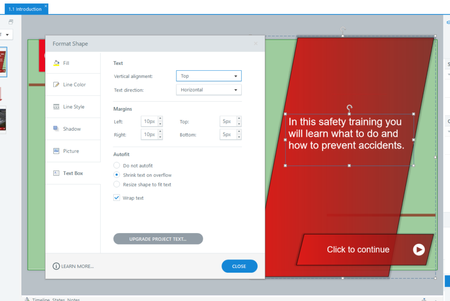
Hi all, Articulate Localization is a dream come true that my team and I have been waiting for for years. We are however running into an issue/bug in Storyline 360 with 'shrinking text on overflow' Currently we use the settings you see below. The text of each box is 'wrapped' and if there is too much text the size of the text automatically decreases. This functionality is essential, because it allows you to easily manage multiple translations because if there is too much text then the text simply slinks a little bit to still fit in the box. As a result you don't need to make ridiculously large boxes for lengthy languages like Ukrainian and Bulgarian (these versions of the training then simply have text that has smaller font). However, Articulate Storyline 360 breaks this functionality when there are multiple translations. Here is the Ukrainian Translation for example: As you can see, suddenly, scrollbars have appeared. This should not be possible but it still happened, if you Publish or Preview the Project the scrollbars are still visible. Therefore, our trial of Articulation Localization has come to a very short end because we cannot use this for our clients if the text of each text box does not shrink in other languages other than the source language. Is anyone else experiencing this bug and/or can this bug be resolved so we can use this feature as well. Secondly, when using Upgraded Project Text the option to 'Shrink text on Overflow' disappears whilst this feature is 100% necessary for running multiple translations in the same Storyline file. Japanese uses about 50% of the space Bulgarian uses, so making huge text boxes for everything just because there are languages that need a lot of room means there is also a lot of empty space on other languages. In short, it's MUCH better if Storyline simply reduces the font size of these languages so you don't need to leave insane amounts of room. We are excited about Articulate Localization, but it needs to work perfectly in Storyline 360, because we (on average) would like to have twenty languages running in one file. Best regards. Kaj Dekkers1.1KViews6likes18CommentsArticulate 360 User Guides are Moving!
Hey, everyone! As we get ready to say goodbye to 2025 and hello to 2026, we're setting you up for even greater success in the new year. In the next few weeks, we’re moving the user guides you know and love in ELH over to our other documentation database in Product Support! That means you’ll soon have a “one-stop shop" for all of your Articulate 360 documentation needs. This change will also improve the accuracy and responsiveness of Artie, our AI support agent. (Did you know you can ask Artie to find documentation for you instead of searching?) Unifying our databases enables us to analyze usage more deeply so we can better tailor our documentation to meet your needs. Plus, it gives us more options for translating user guides into other languages to serve our global community. Once everything has been transferred, the directories for the individual user guides you depend on (and may have bookmarked), like those for Storyline 360 and Rise 360, will remain available in ELH for your convenience. When you follow the links to the individual articles, they’ll take you to the Product Support knowledge base. We'll have landing pages for each Articulate 360 product there as well. We have a few more things to put in place before flipping the switch, but the transition should be seamless for you when it happens in the next few weeks. Let us know if you have any concerns or questions in the meantime.Solved310Views5likes3CommentsLocalization Validation Tools for English Course/Project
Clearly the Localization Validation tools are great for other languages, but why don't they exist for the published English version? These tools and their capabilities for simplifying the review process would be great for any course, no matter the published language. How about some support to get those validation tools implemented as standard to Review 360?75Views4likes3CommentsQuery and Feature Request: Pop up when a localization credit will be used
In my last billing cycle I created a localized e-learning in 8 languages (elearning 1). In the new billing cycle I initially didn't have localization as an add-on and so couldn't open the file, instead I was prompted to save the languages as individual storyline files. Then a different project has been assigned 10 credits so localization is back as a feature but I only want to use those credits for a specific project that Omniplex are working on and not my original file (elearning 2). What I cannot tell is, if I make edits to one of the exported language files from my original e-learning (elearning 1), that I created when I didn't have localization enabled, will I be charged a credit when I publish that individual language file? And if I am not the admin of the account how do I know if a credit is about to be used / has been used? Could we please have a feature in Storyline that gives you a pop up when a credit is about to be spent? It would help a lot in trying to manage credits that have been allocated for certain projects, especially if you have a centralized account with one admin, as then users could see if and when they are at risk of spending credits they don't have allocated. Thank you for any support.67Views3likes0CommentsFind and Replace workaround tool for Rise
Hope this might help some users - posted as a reply to another thread, but thought this would help share it furtuer I've created a simple tool to help with a specific bulk find and replace I needed to do in a Rise course. Its a bit of a work around, but it does streamline things somewhat. I succesfully bulk updated the US to UK English for a course I'm working on, which I've put as a preset, but you can add other find and replace commands. Just export the xlf file from Rise. Modify it in the tool then re-upload. I can add features if you want to request them, or if you find a bug, please let me now. Its on github, so you can fork it if you wish https://manicmig.github.io/xlf-find-replace/ https://github.com/manicmig/xlf-find-replace Best wishes Matt198Views3likes2Comments