localization
171 TopicsIssue with languages on images - text translation
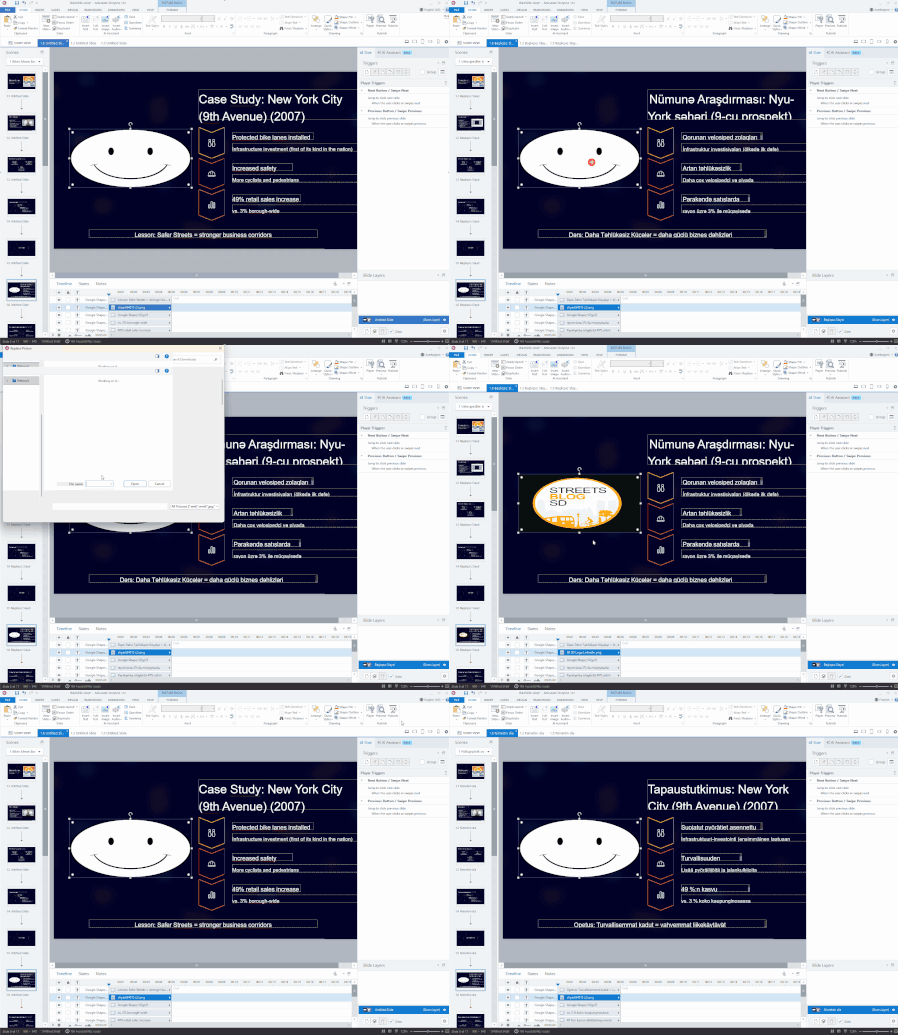
I have a Rise course that is in English and I used the new Articulate Localization/translation service to have it translated into Italian, and that part is fine. What is NOT fine, however, is that, throught the course are images that have text on them (see attached), that I assumed would translate with the rest of the course. I understand that the text on the images does not translate, so I had the text on those images translated separately - WITHIN Rise, in some instances...and each time I replaced the pictures in the Italian version with pictures that had Italian text, the images in the original English were also replaced with the now-Italian text versions. So, either my pictures are forced to be in Italian, even on the English version, or they are forced to be in English, even on the Italian version. How can we fix this? I have to have this translated into German, French and Spanish, too, so how do I ensure that those versions have the appropriately imaged pictures? Do I have to make a separate module for each different language? Screenshots included are one of the images - the original English, then in Italian. Also a screenshot that shows the English module with the images in Italian, when they should be in English.Solved144Views1like10CommentsScenario block labels
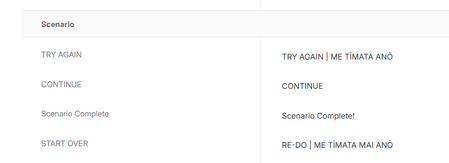
Hi there | Kia ora Articulate Team I'm a bit frustrated with the Rise scenario block labelling. For a couple of reasons: 1. The button/text container on the front page is too small to accommodate our dual language labels. Our organisation uses both English and Te Reo on all labels where possible. 2. The front page button label and continue button label (once you get into the scenario) use the same label. I think these should be different labels. 3. The front page label should be Get Started, or Begin or something like that and large enough to cope with dual language. 4. The "continue" label should allow for dual language, the same as the retry button. What do you think? Any chance you could make this happen? Kind regards | Nga mihi Helen PS I've attached a screenshot of my dual language labels for Scenario.111Views0likes6CommentsButton Label After Translation
In Articulate Rise, after a course has been translated and the interface labels have been changed to the target language, any newly added Continue button still appears in English instead of using the selected language. Note, I have customized the button labels under Settings already. Expected behavior: Newly added buttons should automatically display in the course’s selected language or be available for translation. Actual behavior: Newly added Continue buttons remain in English. Thanks for any insights on this.68Views0likes2CommentsMulti language and corresponding video availability
Hi all. I have made an e-learning for my organization, in Dutch, it includes videos, that are included in the learning. Now I also have translated the course to English, nice and fast and easy to select languages before starting the course. Now, I have also created English videos. But when adding the English video in the translated version, it also shows in the Dutch versio, I was hoping for each language both videos could stille exist when selecting the language. Is there a way, that for each of the languages selected, also the corresponding videos are shown for the selected language?48Views0likes1CommentCourse Audio Translation Not Completing Successfully
We are facing an issue with course audio translation. The audio files are not getting translated completely, and the process stops with the error message: "Translation not complete." Has anyone encountered this issue? Any suggestions or guidance would be greatly appreciated. Thank you!Storyline 360 – Chinese interaction responses appear as underscores in SCORM 2004 reports
Hi everyone, We're experiencing an issue with Storyline 360 courses published as SCORM 2004. For the Traditional Chinese and Simplified Chinese versions of our course, the Interaction Report does not display the Correct Response or Learner Response correctly. Observed behavior The course launches and functions normally. Assessment scoring is correct. Correct/Incorrect status is reported correctly. The Interaction Report correctly displays: Interaction ID Interaction Description (Question Text) However, the Correct Response and Learner Response fields do not display Chinese characters. Chinese characters appear as underscores/blank lines (e.g., __________). If the response contains English characters, only the English portion is displayed while the Chinese characters appear as underscores. Example Expected response: 範例 ABC Displayed in the Interaction Report: ______ ABC Additional information Storyline 360 Published as SCORM 2004 Issue occurs in both Traditional Chinese and Simplified Chinese versions. The French version of the same course reports interaction responses correctly. The issue affects both the Correct Response and Learner Response fields. Interaction ID and Interaction Description are displayed correctly. Assessment score, completion status, and Correct/Incorrect results are all reported correctly. Has anyone experienced a similar issue with Chinese (or other CJK languages)? Is this a known Storyline limitation, a Unicode/encoding issue, or is there a recommended workaround? Any suggestions would be greatly appreciated. Thank you!Error publishing upload a SCORM package I've translated using localisation
Hi I've translated a storyline course and published to LMS just one of the languages. I translated it from English to French and only want the French version in my Brightspace course container. I published fine and can view the file fine. Then I zipped it up and tried to upload to Brightspace but it fails with the error message "The package is missing a manifest". I've never had this error before and this is the first time using localisation. Has anyone else experienced this?54Views0likes3CommentsPer Language Images in Storyline!
Per-Language Images is now available in Storyline. 🎉 You can now replace images on slides, layers, and slide masters in a target language without affecting the source language! Previously, showing different images per language required building triggers; now it's a direct swap from the ribbon or right-click menu, no workarounds needed. Check it out and let me know what you think! See how it works!238Views2likes4CommentsEditing Translated Content in Rise
Hi Everyone, I have a Rise course that is in both English and Spanish that I'm trying to edit. The English version needs PDFs in English and the Spanish needs PDFs as attachments in Spanish. But when I try and add or remove the attachment in one language or the other, the change is made in both languages. Shouldn't I be able to have content blocks that vary in each language?Articulate Localization – A Licensing Trap?
Our Situation During the previous billing term, we purchased Articulate Localization credits and used them to translate several courses. However, while our subscription was still active, the licensing terms were fundamentally changed. When our current billing term began, we decided not to purchase additional Localization credits because of these new conditions. At that point, we discovered that the translated courses we had already paid for could no longer be used as expected. What We Find Problematic We paid for the translation of our courses. Nevertheless, without an active Localization license, we can no longer use the translated content in the way we originally anticipated. Most importantly, it is no longer possible to save projects to individual languages or export a translated courses in a single lanuage as SCORM packages. From our perspective, this raises several concerns: Changes to the Licensing Terms The licensing terms were changed during our contract period. As a result, we now have no real options for working with translations that we already paid for than we had at the time of purchase. Previously Paid Translations Are Effectively Locked The translation service was delivered and paid for. However, the translated content can no longer be freely exported and used. From our perspective, it feels as though we are being required to pay again just to access and use content that we already own. Furthermore, the full translation cost is incurred again for every change after the current billing term - even if only a few words need to be updated or a single-language course simply needs to be re-exported. Lack of Transparency Before Purchase Our official Articulate reseller did not inform us that projects created using the Localization feature would become significantly restricted once Localization credits were no longer available. Had we known this in advance, we would most likely not have purchased the Localization feature. No Opportunity to Adjust Our Subscription We made several attempts to change our existing billing term to an annual subscription. Unfortunately, this option was not made available to us. As a result, we were placed under significant time pressure and were unable to properly assess the impact of the licensing changes before making renewal decisions. Our Conclusion We paid not only for the translation of our courses but also with the expectation that the translated content would remain available for long-term use. Discovering that courses that had already been translated could not even be exported as single-language courses once the localization license had expired was neither transparent nor foreseeable. Clear and transparent information about these restrictions would have significantly influenced our purchasing decision and could have prevented a great deal of frustration397Views7likes4Comments