studio 360
970 TopicsArticulate on iPads?
Hi Team, Was wondering how you plan to deal with the increasing amount of iPad users. I know that in my company they are running pilots with them but my Articulate courses won't run on them :( Are you looking into a Publish for iPad or other solution like publishing a course to HMTL5 or something like that?2.8KViews0likes201CommentsNeed to record audio internally, not through the microphone
I'm attempting to create a "Record Screen" Replay project but running into issues with audio. I want to record the audio from the source (my Storyline output) and not the external microphone built into my laptop. Is this possible? Thanks in advance!2.8KViews0likes95CommentsQuiz not allowing student to select answer choice in quiz
Hello folks, I'm hoping someone has had a similar situation and been able to find a solution. I have quizzes that contain multiple choice questions. There have been reports from students that are sometimes unable to select an answer choice. The blue highlight bar that normally appears while hovering over an answer choice does not appear and when clicking on an answer choice it is not selected (i.e. the radio button does not show that it has been selected). Interestingly everything else that can be clicked in the quiz works, including the volume slider, previous and next buttons, and the question list dropdown menu. The quizzes are delivered via an LMS and are published in QM'13 using SCORM 2004, 4th ed. I don't believe the problem to be a browser issue as I've switched browsers and the same problem occurs. What's makes this even more difficult to solve is that it only happens intermittently. Most students are able to get through the same quizzes with no problems. Any ideas? Would you lean towards this problem being caused by the LMS or a glitch in QM'13? Thanks for any feedback any of you might be able to provide. Best, Steven2.7KViews0likes67CommentsHangs on Cleaning up Temporary Files
Any idea why Presenter Studio360, while publishing, hangs when it is cleaning up temporary files? I had this issue with another course and submitted it to Articulate Support. This particular project was published earlier without an issue. Articulate 360 updated and now the project will not publish. Using Windows 10, PowerPoint 2016, Articulate Studio 3602.5KViews0likes71CommentsFAQ
I have an Engage FAQ slide with ten slides. Currently, the viewer cannot navigate away from the slide unless he/she goes over all questions. How can I make it possible to navigate away from the slide without having to go over all questions? to make it a sort of reference FAQ page. In the Player Templates>Navigation the User Navigation is set to: Free-user can view slides in any order. please help. Thanks, Anton2KViews0likes79CommentsScreen recording with mouse pointer in the wrong place
Hey all, I was creating a quick tutorial today and after publishing I noticed my mouse pointer wasn't in the right spot at all when viewing the video. Is this a known issue and is there a fix? https://360.articulate.com/review/content/96f57ac5-a468-43e7-a42d-aca612122831/review1.8KViews0likes63Comments"Online presentations aren't supported"
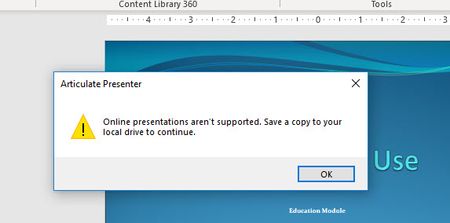
I like keeping all of my development files in my OneDrive Folder. However, Articulate Presenter won't allow this as shown by the error msg below. Has anyone found a workaround? Are there any plans to fix this situation? Technically it is saved to my local drive: (C:\Users\wfindlay\projects\....) Keeping everything in OneDrive makes it much easier to ensure every device has the files I need as a developer.1.7KViews0likes27CommentsSCORM Wrapper
I'm not sure if this is an Articulate issue, or something from Plateau/Success Factors, but here goes. I'm publishing my Articulate 2013 course in SCORM 2004 v2 for deployment on our Plateau LMS. When the course is launched, it comes up in a "wrapper" with a set of control buttons (Suspend, Continue, Exit). Is this something from Articulate, and if so, how can I manage it? At the very least, I need to edit those buttons because the naming is not at all intuitive. I don't see any place within the Articulate tool to control this, although I am seeing some possible connection in the manifest file. Help?1.6KViews0likes33Comments