translation
31 TopicsLayout problems
Hello! I was testing Localization this past weeks and I found a problem for our e-learnings. We always adjust the design very precisely to the text lengths, such as the button width, or other text boxes. I actually thought that in the new Localization version, it was already possible to customize these text boxes or shapes with text individually for each language. But when I change something in one language, it gets changed in all languages, including the source language. Is this something that will be fixed in the next version? After all, the timeline can already be customized individually for each language. It would be very helpful for our workflow to change the size of text boxes individually as well. Now we have to save the translated languages as new files but then we cannot import updates that were made for the source language..40Views0likes0CommentsI Was Wholly Unprepared for NOVA’s Translation and Localization Power!
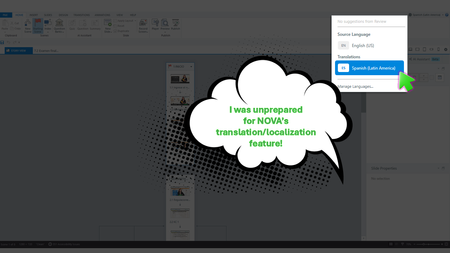
Yup, We Need This Course Updated by Next Week During the week of Articuland Orlando, my business partners dropped an “immediate need” eLearning build in my lap. At first, I didn’t think it would be a huge lift. Then I realized I had to fine-tune the English version of an existing course and create a Spanish version. Typically, translating a course from English into Latin American Spanish can take us two to four weeks. After I use Copilot to translate the course's script, an internal expert validates the translation. I then make the necessary changes, and the expert confirms that the revisions are correct. The challenge is that my internal expert has a full-time role with the company, so reviewing eLearning translations naturally falls lower on their priority list. When Articulate announced during the keynote that NOVA’s translation and localization feature had been activated for Articulate360 subscribers, I was literally in the middle of translating my course (MANUALLY). What Can It Hurt - Take NOVA for a Spin I said, “What the heck. Even if Storyline is able to only translate the base layer’s onscreen text, that’s a win.” Mind blown, when NOVA translated nearly everything!🤯🤯🤯 It translated: Onscreen text (base layer) Onscreen text (layers) Onscreen text (Master slides*) Changed the language the player was set up in AI Voiceover audio Lessons learned Written Spanish, typically, runs longer than written English. Resizing your text boxes etc. takes time, even with the tool that spotlights exactly where the issues are. *Some Master Slide (layouts) were translated, some were not. I was not working on a highly complex course, so fixing the lingering untranslated Master Slide (layouts) was not a big deal. As mentioned in Articulates Help documentation, when you have hardcoded text onto an image, that will not be translated. I can’t share a full demo, but I captured a few screenshots for your perusal (see below). My Key Takeaway Bottom line, the time NOVA saved us is remarkable. I was so excited, I nearly called my manager to rave about it (even though she was on vacation 🤣🤣).143Views8likes5CommentsQuery and Feature Request: Pop up when a localization credit will be used
In my last billing cycle I created a localized e-learning in 8 languages (elearning 1). In the new billing cycle I initially didn't have localization as an add-on and so couldn't open the file, instead I was prompted to save the languages as individual storyline files. Then a different project has been assigned 10 credits so localization is back as a feature but I only want to use those credits for a specific project that Omniplex are working on and not my original file (elearning 2). What I cannot tell is, if I make edits to one of the exported language files from my original e-learning (elearning 1), that I created when I didn't have localization enabled, will I be charged a credit when I publish that individual language file? And if I am not the admin of the account how do I know if a credit is about to be used / has been used? Could we please have a feature in Storyline that gives you a pop up when a credit is about to be spent? It would help a lot in trying to manage credits that have been allocated for certain projects, especially if you have a centralized account with one admin, as then users could see if and when they are at risk of spending credits they don't have allocated. Thank you for any support.71Views3likes0CommentsSwitching between languages in the LMS
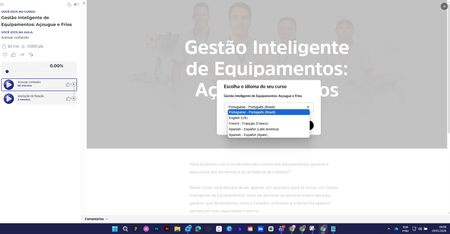
Hi everyone, how are you? I used the "Localization" feature in a course. After making the content available, when selecting a language I can't revert to the original language. What am I doing wrong? Choice of language After this, it is no longer possible to change the language. Thank you in advance.1KViews0likes11CommentsLocalization translation of closed captions
Hi - We have just started using the translation features and received this feedback from a reviewer "In general, the translation is good. However, in the section which translates the closed captions of the videos, as it takes only one sentence at a time, it loses all sense and is very difficult to correct." Has anyone had the same experience with the translation of closed captions?448Views0likes1CommentTranslating a course into Farsi
Hi Everyone. I am still pretty new to Articulate and brand new to the world of translating an e-learning. I apologise in advance if I am on the wrong forum as I am not subscribed to Articulate Localisation so my question is not about that service but translation in general. I have spent the whole day researching the best way to translate my small eLearning from English to Farsi, using copilot and ChatGPT as advisors. Various tools like Smartcat, Crowdin, Localise were recommended but the pricing plan felt high for me given I am just starting out and the NGO i am developing my first e-learning for also doesn't have a lot of money to pay out each month. In short, given I already had the content translated into Farsi in a word document, I decided to manually upload the Farsi version into Rise and then align/format the text. For those elements that I was unable to align within Rise (a handful of headings and MCQs), I decided to export a XLIFF copy and using Poedit make the necessary edits/format changes. I then successfully managed to import the updated version of the XLIFF file which I was happy about as I read it can be problematic. However for the headings I was struggling to align/format - instead of correcting them to a RTL alignment it changed the headings to the original heading with the tags as text instead of interpreting them. Regarding the RTL formatting of MCQs ChatGPT said this was not possible as the formatting was baked in within Rise. When I reported back to ChatGPT about my issue with the headings and asked if I used more powerful translation tools like Localazy would I have the same issue, ChatGPT implied yes. I appreciate ChatGPT doesn't know everything. My conclusion at the end of todays research is the best thing is to continue to manually enter my translated material and make the alignment changes I can do within Rise and just accept some things wont be aligned perfectly and thats ok. However before I make this compromise (as I know I might get frustrated with this compromise as the 'test' lesson happened to be relatively simply formatted whereas other lessons have bullets, timelines, image and text blocks, etc.. which might throw up more challenges) I thought I'd seek any advice from this forum of experts. If anyone has any advice, similar experience and solutions (hopefully) or just confirmation that I need to accept this compromise I'd much appreciate it. Many thanks in advance for time and expertise. Kind regards Katheirne173Views0likes0CommentsAudio Translation
Hi everyone, I have a question: will a translate audio feature be added to Localization? I'm testing it during the trial period and just noticed that it only translates the text on screen, not the audio, so we have to type or re-record the text in the new language, which is quite time consuming. Thank youSolved1.3KViews1like11CommentsXLF translated files error message
Hi team, I am trying to upload xlf-files, translated by ChatGPT. I have made about 20 attempts with all kinds of different configurations (with html and without, with lessons and without, with a different file name and with an identical file name, before and after having the file checked with an xml checker), but I keep getting the same error message: Check formatting or re-export translation. I get this error message when ChatGPT translates only a single sentence in the file. I even get this error message when ChatGPT gives me back the exact same xlf file, without any changes, just saved again. The only time I don't get this error message, is when I upload the identical file that I downloaded. Obviously, I am following the instructions, so I've made a duplicate of the course, downloaded the xlf file from there, and am uploading in the same location. Clearly, I am missing some sort of information here that's crucial to this process. Please assist as this is getting highly frustrating. Thanks, Chantal505Views0likes3Comments