Forum Discussion

Automatic Resize of Player in a Browser
Greetings:
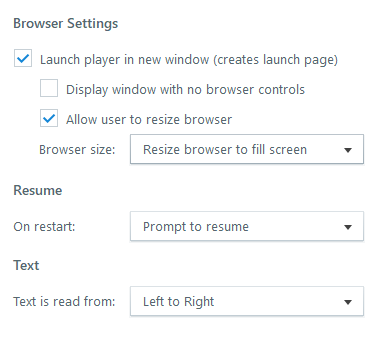
I'm using a larger player frame size in my current project (1440X1080). I've noticed that the player doesn't resize to fit the current browser window (see attachment). I have to manually resize the browser window for the player to fit. I'm sure I'm doing something wrong here. My question is: Is there a way to make this larger-sized player automatically resize in a browser? (I'm using Storyline 2.)
As always, I sure do appreciate your guidance.
Thank You,
Rod Machado
6 Replies
- ShannonBarronCommunity Member
- marlasingerCommunity Member
this answer saved my life too.thanks
- RodMaxhadoCommunity Member
Greetings Shannon:
OMGosh, I never noticed that. How embarrassing . Nevertheless, I sure do appreciate the quick reply. If it's not too much to ask, does Storyline 3 allow the creation of a video of a slide? I'm thinking about upgrading and this would be an important feature.
I sure do appreciate it.
Best,
Rod Machado- ShannonBarronCommunity Member
No worries! Sometimes we stare at things too long and miss what we are looking for.
In regards to comparisons, here's a good comparison between Storyline 1, 2, 3 and 360. I currently utilize 360. Maybe one of the staff here can answer your questions better :)
- HassaanIjazu345Community Member
Hi Hassaan,
The modern player always completely fills the learner’s browser, leaving no white space around the player. That means if they have a widescreen monitor with the browser open fullscreen, they may see extra space on either side of the slide.
But as the browser window is minimized, the modern player adapts to the window size, like this.
Can you share a fullscreen screenshot of how the player looks in the iFrame? This will be great feedback to share with our Product team. Thanks!






Related Content
- 5 months ago
- 2 years ago