Forum Discussion

Best Way to Create Multi-Part Spelling Quiz in Storyline 360 with Custom Scoring
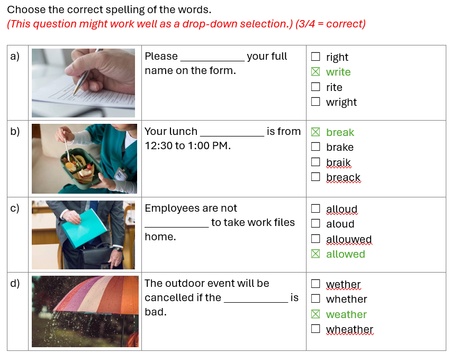

If you want to closely replicate the setup from your screenshot, then I think using a Pick-One Freeform question type is your best bet. See attached a quick example. Based on the number of correct choices for the 4 questions, off-screen Correct/Incorrect buttons are selected and then the choice is submitted for scoring. Have a look and see if that helps you along.
Thank you Michael so much for the example. If no feedback is needed, could I delete the 2 correct/incorrect layers? Would this affect the scoring? And how do I ensure the scoring is correct when all 4 correct answer was selected? To be specific, which trigger was set up to achieve the scoring please? Thanks again for your time and advice.
- MichaelHinze7 months agoCommunity Member
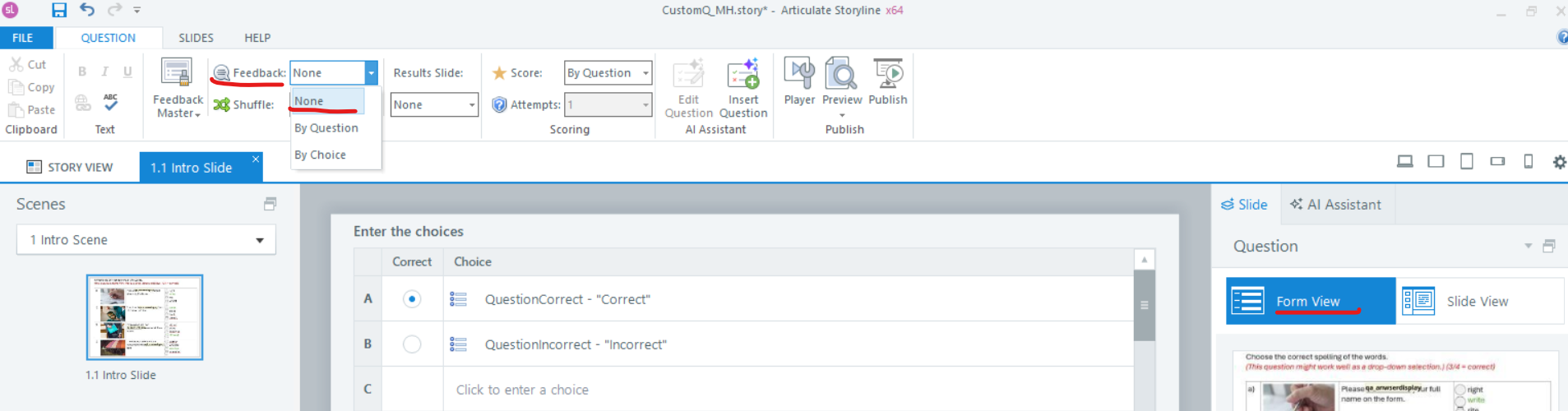
To turn off the feedback layers, you can select the None option in Form View.
In the second screenshot, I highlighted the triggers that calculate the score and then sets the offscreen Correct button to selected when the score is >=3.
- ElaineWu-18cd256 months agoCommunity Member
Hi Michael,
I have completed 2 questions based on your example. Each question is worth 1 point, and learners need to successfully complete all 4 sub-questions to earn that point.
However, I've encountered an issue: when learners finish question 1, the selected words automatically appear in question 2 as well.
Could you please help me understand:
- What is causing this issue and how to fix it?
- How to verify that the scoring is properly configured to award 1 point per question (only when all 4 sub-questions are answered correctly)?
Thank you for your assistance.