Forum Discussion

GordonLam
12 years agoCommunity Member
Cant get rid of scrollbar
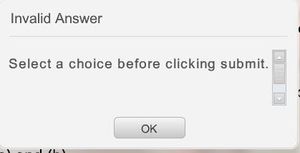
I am not sure why but my invalid answer box has a scrollbar
in it and I can’t seem to get rid of it.
Can you tell me what slide master might control this? I tried adjust the text label but to no
a...

WendyFarmer
12 years agoSuper Hero
Hi Gordon
this might help its from a previous post
The default Invalid Answer message is something that Storyline generates automatically - it doesn't come from the Feedback Masters, so that's why you're not seeing it in your slide master layouts. But here are some things that you can do to customize it:
- You can change the Invalid Answer text by customizing Storyline's text labels (the Invalid Answer text comes from items 17, 18, & 19)
- You can also change the colors on the pop-up (check out this job aid if you need help identifying which parameters to change).
- If you'd like to completely change the visual design of the message, you could use the method shown here. It involves creating your own slide layer for the Invalid Answer message, and using a trigger to tell Storyline when to display that layer. It's a little more work, but it might give you the customized look that you're after.
Hope that helps! 
Wendy
Related Content
- 2 years ago
- 11 months ago
- 2 years ago