Forum Discussion

Localization File Issue
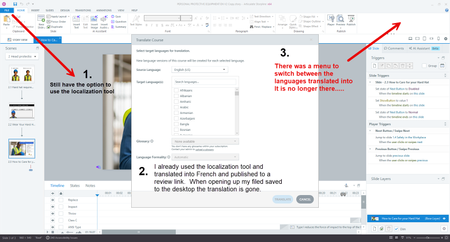

Hi ShMac!
Sorry to hear you're having trouble with your localized .story file!
I see that your support case has been escalated to my colleague, Ian. It looks like he just replied to your e-mail sharing insight and next steps.
You're in great hands troubleshooting with Ian, and we can continue the conversation through your case!
- SudeepaGanguly4 months agoCommunity Member
StevenBenassi Same thing happened to me, I did my 5 language translations, last time I updated few translations, saved it, and closed Storyline. next time, I opened the file and I see all my localization has just dissapeared. I am stressed as validation has started, and how to import it, I have no idea.
- WeraLeber3 months agoCommunity Member
I have the same issue...seems like a bug. Can you help us? I first translated to Spanish, then I wanted to import the changes from my reviewer and the language is gone.
- StevenBenassi3 months agoStaff
Hi SudeepaGanguly & WeraLeber,
I'm so sorry to hear that the localization workflow has disappeared from Storyline!
That shouldn't be happening, and I'm unable to replicate the same behavior when testing on my end. Also, I can confirm that both of your Articulate IDs are tied to localization-enabled subscriptions. First, please confirm that you are working with locally-stored .story files as authoring directly from a network drive can introduce unexpected behavior like this.
If you're already working locally, please try repairing your Storyline installation. If that doesn't do the trick, we're happy to investigate further. It would be helpful to see copies of your affected .story files. Do you mind uploading those items here in the discussion or through a support case?