Forum Discussion

Rise shift with transcripts
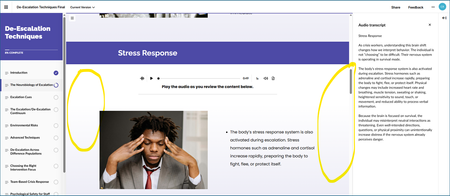
- 2 months ago
Hello PhilFoss,
I'm happy to share that we've just released a new update for Rise 360!
This update fixes the issue you ran into where:
- 'Show transcript' Tooltip lingers when closing the Transcript panel via the 'close' button from within the panel itself.
There's nothing to install for web-based apps, as new features and fixes are immediately available.
Thanks again for letting us know about your experience. Please let us know if you have any other questions.


Thanks for the update Steven, I'm still seeing an issue with tooltips appearing where they shouldn't after closing the transcript panel. The behavior is shown in my screen recording.

You're welcome PhilFoss!
I see what you mean, and I've just logged this as a new bug in Rise 360. This bug causes:
- 'Show transcript' Tooltip lingers when closing the Transcript panel via the 'close' button from within the panel itself.
I've linked this discussion to the bug report so we can update you as soon as a fix has been shipped.
In the meantime, as workarounds, we suggest:
- Close the Transcript panel from the Audio Block's Show/Hide Transcript button.
- Click anywhere on the screen to force the Tooltip to disappear.
Thank you. We appreciate you calling this out!
Related Content
- 8 months ago
- 5 months ago