content library 360
99 TopicsArticulate Rise text alignment issue after update
I attached screenshots from before and after the Articulate Rise update. After the update, the paragraph text shifted inward automatically. It is now left-misaligned compared with the other objects. Please let me know if there is a fix.278Views10likes7CommentsHow to Add Audio or Video to Rise 360 Introduction?
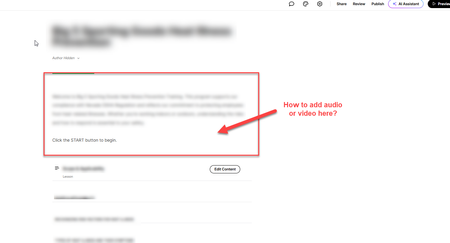
I would like to add audio or video to a Rise 360 Introduction that narrates the text. I know I can add audio or video to Lessons within the course, but I can't find a function to add audio or video to the Introduction. Does anyone know how add audio or video to the Introduction, or is it even possible in Rise 360? Screenshots provided of Dev and Preview. Thank you.553Views3likes4Comments.ASPX Files Now Download Instead of Launching from SharePoint
Hello all, My organization has recently discovered an issue with .aspx files hosted on SharePoint. We've been using them to launch Storyline and Rise files so they act like web pages (like this). However, we just recently found that after reuploading the file or folder to SharePoint, SharePoint no longer opens the page. If you navigate to the .aspx file, it force-downloads the file. If you use the direct URL, you get a File Not Found error. We suspect this is a SharePoint issue that has to do with the upload process. My IT department has asked me to check here to see if anyone else has experienced this problem, and if so, what the root cause was (e.g., Microsoft update, policy change, etc.)? We're looking at SharePoint because: It happens to multiple people in multiple offices (not a computer issue). It happens with Chrome and Edge. Modifying the URL to add ?web=1 has no effect. Clearing cache and cookies has no effect (not a browser issue). I tested the "old" file to confirm it worked, then downloaded the .zip package from SP. When I reuploaded the exact same package back to SP, the file now force-downloads/is not found (so it's not the files or the Storyline version). I copied a file that's still working and uploaded the copy. The original opens as a web page, the copy doesn't (again, not the files). Thanks in advance for your feedback!9.7KViews2likes54CommentsMatching Question Randomizing Both Sides
I created a matching question as part of a final assessment for a course, but I can't figure out how to make the quiz randomize only one side of the exercise. For this particular question, users are matching an action with the appropriate order that action is taken (Step 1, Step 2, Step 3, etc.). I want the actions column randomized, but want the steps column to show up in numerical order, with Step 1 at the top and Step 5 at the bottom. I have tried toggling the Column Freeze setting to freeze matches, toggling it to freeze choices, and swapping which column the steps and actions are listed, but it always randomizes both sides. I did not have this issue while creating matching questions for knowledge checks earlier in this course (the right column always stayed in order), just this final quiz assessment. Any tips on how to fix this? Thanks!294Views2likes5CommentsImages not uploading to Rise360
Hi there, Rise360 isn't allowing me to upload images. I keep getting the message attached. I've tried clearing browser history, restarting computer, logging out and back in and it still says the same error message. Is anyone else experiencing this or know how I can fix it? Thanks in advance!155Views2likes4CommentsCustom image library in Rise 360
Hi there, I work for an organization with a very strong brand identity in terms of iconography that we can use. We have a large number of approved icons that I'd like to be able to import into a shared image library in Rise. This way whenever we create new content, any team member is able to access the icons without needing to upload a new one each time. Is this a feature that exists?195Views1like3CommentsAI Voice - Added Voices showing zero as the limit of my voices; cannot use new voices
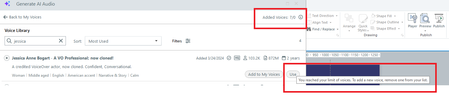
I'm experiencing an issue where the voice counter now displays 0, as in, I have added 7/0 voices. I cannot add new voices because I receive an alert stating that I've reached the limit of voices (apparently zero?!). I have: restarted Articulate, resaved the storyline file, attempted to use added voices in different Articulate files logged out of and back into Articulate, and restarted my computer. ALL to no avail. No matter which voice I try to "use," I get the message that I "reached my limit of voices." I tried removing one from the list, and the count decreased from 7/0 to 6/0 Added Voices. I was not able to re-add the voice that I removed from the list. I do not want to lose access to the voices that I have because I am currently using them, and I worry I will not be able to get them back. HELP!291Views1like1CommentConverting PPT Slides to Content Library Slides
Is there an easy way to convert slides already created in PowerPoint to a layout in the content library? I have imported the slides but can't find an easy way to convert them into a content library slide without inserting a slide from the content library and then copying and pasting the information.113Views1like1Comment