localization
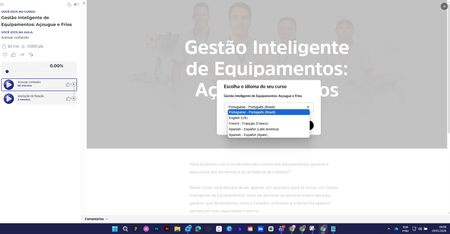
20 TopicsSwitching between languages in the LMS
Hi everyone, how are you? I used the "Localization" feature in a course. After making the content available, when selecting a language I can't revert to the original language. What am I doing wrong? Choice of language After this, it is no longer possible to change the language. Thank you in advance.955Views0likes11CommentsLoving Localization, but is anyone else having loading issues?
First, I just want to say how thrilled I am with the new Articulate Localization feature! Supporting right-to-left languages is something we've been requesting for a long time, and I’m so impressed with what I’ve seen so far. I started my trial yesterday and it’s been fantastic. I’m wondering if anyone else is experiencing issues viewing courses in different languages once published to an LMS? I can see the language selection drop-down, but after choosing a language, the course doesn’t load—regardless of the language selected. I've tried SCORM and TinCan with no luck. Any ideas?Solved599Views0likes4Comments[Issue] AI Localization: Text-to-Speech audio does not auto-regenerate after translation?
Hi everyone, I am currently testing the new AI Localization feature (English to Italian) and ran into a workflow issue regarding Text-to-Speech (TTS) audio generation. The Setup: Source: English Storyline file using native Text-to-Speech audio. Action: Used File > Localization > Translate Course to convert to Italian. Settings: Formality set to "Formal". The Issue: The AI successfully translated the text inside the Text-to-Speech script editor into Italian. However, the actual audio file on the timeline did not update automatically. When I previewed the slides: The text on screen was Italian. The script in the TTS window was Italian. The Audio being played was still the original English voice. The Workaround: I had to manually open the Text-to-Speech editor for every single audio clip and click the blue "Update" button. Only after doing this manual step did the audio regenerate into the Italian voice. My Question: I noticed the disclaimer that "Text-to-speech translation is currently in beta." Is this manual update process expected behavior for the Beta version? Or should the AI be auto-regenerating the audio files during the initial translation process? Checking if anyone else has experienced this or if there is a setting I missed to force auto-generation. Thanks!499Views0likes2CommentsUsing TTS to pronounce English words while speaking another language.
One challenge we are having is that when generating audio tracks based on the localized transcripts (using TTS), the narrator voices are trying to pronounce English words as if they were in the local language. So for example, even though the script says “Measurement Solutions”, the Danish voice is pronouncing it like “More sour mind pig lution” (context, below). I know that I could try inserting some silence in the Danish audio, and and adding as second audio track that uses an English TTS voice for those 1-3 words, but then we would be using 2 different TTS voices in one sentence. Any other hacks/ideas/tricks? For context, here's an example: Danish script: Välkommen till Measurement Solutions: Vår kvalitetskultur. Syftet med denna utbildning är att ge en förståelse för varför kvalitet är så viktigt för företaget och varför det är viktigt för alla anställda. Vi kommer visa hur du kan bidra till att vi utvecklar och upprätthåller en stark kvalitetskultur på alla Measurement Solutions anläggningar.405Views0likes2CommentsLocalization - Videos, Assets, Audio+
To set the stage, I created a Storyline course in English and localized it into Spanish. In this course, I have 4 external video files and an external podcast audio. The first video file I remade in Vyond in Spanish and when I uploaded it the Spanish version of the SL course, it replaced it in the original source (EN) file. How can I prevent this from happening? I imagine I will have the same issues with the other 3 video files as well. Additionally, I added an icon and a text box to the Spanish only version of the course and it carried back to the original source (EN) file. How can I prevent this from happening? I have a podcast audio file (external .wav) with 2 voices as part of this same course. Are there any tools you can recommend to have this localized into Spanish? Last, and a little bit of a different topic... The options for Mexican and Spain (formal/informal) Spanish are not appropriate for most US cities across the country. Can we add a request for Latin American Spanish to be added to the roadmap, as a priority?352Views0likes1CommentAudio duration and animation timings when localizing
I’m coming across 2 separate but related challenges when localizing. The first challenge is slide duration. As you can see in the attached screenshot, the English-language audio has >10 seconds of silence at the end, because the Romanian version of that audio (for example) is longer. The 2 audios are “connected” and the longer audio is driving slide duration. The second challenge is that because the Romanian version is longer, the animations that are timed to the English version (e.g. ovals 1/2/3 in screenshot) are not timed well for Romanian. I think that one solution is creating separate layers for each language: basically duplicating the base layer of every slide for each language, and displaying them using the language trigger condition. But I think this solution will end up having some limitations. Another path I’m considering is that maybe I have to export each language as a separate course, and then manage each course separately. (really don’t want to manage 9 different courses). Thoughts on these ideas, or any other ideas are greatly appreciated.334Views0likes2CommentsWelcome!
Hello, and welcome to our Localization group! Please use this group to ask questions, share your thoughts, and discuss localization best practices with other community members. This is also a helpful place for learning more and chatting about Articulate Localization. As you get started with our group, please take a moment to review our community guidelines. Some key points are: Be Respectful: Treat all members with kindness and respect. Stay On Topic: Keep discussions relevant to localization. Be Helpful: When you provide feedback, please be constructive and helpful. No Spam: Avoid posting spam or self-promotion. Please introduce yourself by replying to this post. We'd love to know if you're brand new to working with translations/localization or if you have extensive experience in this area.299Views0likes2CommentsUpcoming Localization Webinar on April 22nd
In case you missed our session on April 15th, we're hosting it again on the 22nd! 😀 Here's some information about that webinar: Join us on April 22nd at 11 a.m. ET for a one-hour training webinar on Articulate Localization. David Anderson, Director of Customer Training, will walk you through how to: Translate courses into 70+ languages right in Rise and Storyline. Give language validators the power to view and edit course translations themselves—no subscription needed. Publishing multiple language versions as a single package. Register Now! Even if you can't join us for the live session, go ahead and register for the webinar so you get the recording sent to you afterwards.247Views0likes4CommentsWhat about Glossaries and Translation Memories
Hello, me too, I am very excited to read about the new Localization Feature within Articulate. One question, that is very important for us: Is there an option to reference to Translation Memories or Glossaries for the localization process? I have to cope with very specific technical terminology and it would be great, if there is the possibility to consider our existing terminology. Many thanks in advance, Bärbel242Views0likes3CommentsBe a Voice in Shaping the Future of Localization
The Localization team at Articulate is constantly striving to create the best experience possible for our customers. Your participation will directly impact the future direction of Localization, ensuring it meets the needs of users like you. We value your opinion and would be thrilled to have you on board. Articulate User Research Program Details: Objective: To gather feedback and insights on our Localization product to improve user experience and functionality. Participation: The program will involve various research studies, including interviews, usability tests, and more. Each study is different, offering diverse ways to share your thoughts and experiences. How to Participate: Express Your Interest: If you’re open to being contacted for participation, please fill out this form. Get Invited: As different studies come up, we'll invite you via email including all the details, so you can decide if you'd like to participate. Some studies may include specific screening criteria - if you meet these criteria, you may be selected to participate in the research study. Provide Feedback: Engage in the research study and share your valuable insights. Note: We can't guarantee that all participants who sign up will be contacted for a research study, but your willingness to participate is greatly appreciated and helps us immensely. If at any point you’d like to remove yourself from the distribution list, you'll be able to do so. Your feedback is invaluable to us, and we believe that your insights will significantly contribute to the development and enhancement of our services. Thank you for considering this invitation. We look forward to your positive response and to working together to create a better Articulate experience.201Views0likes0Comments