other
629 TopicsAI and decreasing Quality Assurance review time and found errors
Hello, I am a QA Coordinator and have been asked to evaluate the potential impact of incorporating an AI agent into our Articulate 360 QA process. I would like to identify which tools or capabilities within Nova and Frontline could support and enhance quality assurance including decreasing time and documentation of comments. Specifically, I’m interested in capabilities that can assist with: Spelling, grammar, and consistency Specialized spelling and use of industry-specific terminology Font, layout, and design consistency Closed captions and caption-content accuracy Alignment of course content and assessments with stated learning objectives Verification of working hyperlinks Navigation and functionality Quiz functionality and completion requirements Identification of other potential quality or accessibility issues The goal is to understand where AI could supplement our existing QA process, improve consistency and efficiency, and identify issues that may still require human review. THANK YOU!9Views0likes0CommentsHow can I start a motion path where it ended in a previous slide?
I created a curved motion path for an icon in slide one. In slide two, I want that curved motion path to be a straight-line motion path, starting where the curved motion path ended in the previous slide. How do I accomplish this?62Views0likes9CommentsHelp Embedding Interactive Storyline Map into SharePoint Online
Hi! I'm hoping someone can help me figure out how to display an interactive map I created in Storyline directly on my company's SharePoint site. I'd love for my colleagues to be able to interact with the map right on the SharePoint page rather than having to download it/open it separately. Is this possible? I've looked at these two posts from before, but it still didn't work: https://community.articulate.com/discussions/discuss/embedding-storyline-into-company-sharepoint/1021044 https://community.articulate.com/discussions/discuss/viewing-articulate-360-content-in-sharepoint-online/774255 A few of the comments mentioned converting the story.html file to story.aspx, so once I did that and uploaded it, it wouldn't let me select it through the File and Media web part. Then when I tried to embed, it launched File Explorer instead. Has anyone successfully done this recently? Thank you!!Option to prevent Articulate 360 updates from recreating desktop shortcut?
Hello, Is there a setting or installation option to prevent Articulate 360 from creating a desktop shortcut during updates? On my corporate managed Windows computer, the shortcut is recreated after an update even when I have deleted it. It (probably) appears in C:\Users\Public\Desktop, so in our corporate environment a standard user cannot remove it without administrator assistance. I appreciate that shortcuts may be useful for some users, but I prefer to keep my desktop clear and can launch Articulate from its existing location. Could you advise whether there is a supported way to stop the shortcut from being created, or consider adding an option to disable it? Thank you.74Views1like6Comments(Kind of urgent) How do I make an icon animate across a map in multiple slides?
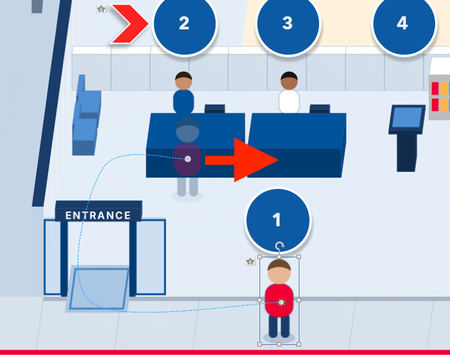
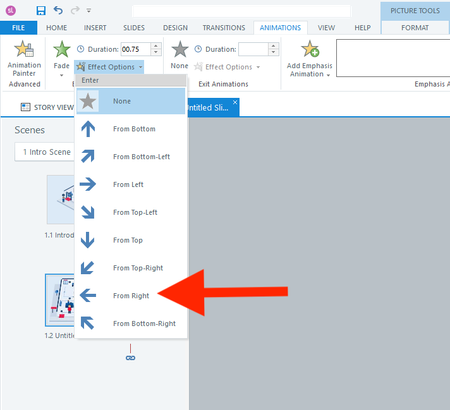
Hi everyone, I actually have two questions. I will start with the easier one first. Question 1 In a fade-in from the right animation, is there a way to adjust how far to the right the object starts? I don't want it to animate from off the right side of the slide. I only want it to start a few pixels to the right. Question 2 How do I animate the red shirt character below across 13 slides? I want it to follow each button from 1 to 13. I realize I should use the Motion Path. But what's the smartest way to use the motion path across slides? I have always found the motion path to be challenging. Thank you all for your help! :)74Views0likes3CommentsAI Avatar GUI needs work
The AI Avatar generator needs some tweaks. First when opening the program, my screen is locked onto that GUI. I can't switch back and forth between storyline and the GUI. Need to fix this. Second, when exiting I am told that I have unsaved changes with the option to 'cancel' and continue working or 'discard unsaved changes'. Will someone please tell me how to 'save'. I have scoured the GUI and can find no way to save. I would like to, I keep having to reset Avatar and voice each time I launch it. George112Views0likes7CommentsBuying AI credits is not easy
It would be great if I could simply purchase AI credits through my company card on account instead of having to work this through email exchanges to sales. This process sets be back a day or two in production. Can't this process be automated?Solved54Views0likes1CommentICYMI: New ways to connect, share, and earn recognition!
In case you missed it, we recently launched ELH Rewards, a new program that recognizes the ways you help make this community better. Want to earn points and participate? Start by opting in to ELH Rewards. Check out two opportunities to earn bonus points this month: October Monthly Mission 🧭 Complete four community actions by October 31—welcome someone new, show some appreciation, start a conversation, and share an idea sparked by Articuland—to earn 10 bonus points. Shout-out to AndreaGentis, KarlMuller, JenLynnRusso, JudyNollet, AndrewBlemings-, @ronald-hicks, @ISa, LuisCGreer, and Thomas_Shayon for diving right in and completing the September mission. Your 10 points have been awarded! Nova Expedition ✨ Try Nova, share what you discover, and connect with other members’ experiments. Complete the expedition by October 23 to earn a Nova Expedition badge and 30 bonus ELH Rewards points. Shout-out to AndrewBlemings-, RoBeKayBee, Mrigna2611, Thomas_Shayon, and BryanPechtl for already sharing their experiments. There are some really great lessons to learn from their threads! Looking forward to another great month full of community connections! And while you are here, October is one of my favorite times of year, so I have to ask: are you bringing in the new month with spooky season 👻, cozy season 🍂, or a little of both?73Views2likes2CommentsBlock Course Progress When Offline
Hi everyone, I’m looking for advice on how to handle internet connection loss in both Rise 360 and Storyline 360. Our requirement is that if the learner loses their internet connection while taking a SCORM course, the course should immediately stop and prevent the learner from progressing. Once the internet connection is restored, the learner should be able to continue from where they left off. The main goal is to make sure learners cannot continue through mandatory/compliance training while offline, as the LMS data will also be used for reporting and audit purposes. What settings or development would be required to achieve this in: Rise 360 Storyline 360 Is there a native setting for this, or would it require custom JavaScript or modification of the published SCORM package? Thanks in advance for any advice or examples.101Views0likes4Comments