Forum Discussion

Are fonts embedded?
When I would pick a new font for a slide is that font embedded?
In other words if I have a special font on my machine and I click on that
special font does the user have to have that font on their machine or is
the font embedded so the one I picked from my machine will work on
everyone elses machine?
thanks
91 Replies
Hi Hannah, thanks for joining the conversation. What version of Storyline are you using? Was the course published with the latest update of that Storyline version?
Also, do you have a sample file you can share here? Even one or two slides will do the trick. Thanks!
- HannahMcQueenCommunity Member
Hello there,
Would you be able to let me know when you are able to look at this for me?
Thank you so much for your help.
Kind regards,Hannah McQueen
Learning Technology ConsultantT: 023 80352771 (ext 22771)
hannah.mcqueen@ageas.co.ukAgeas House, Hampshire Corporate Park, Templars Way, Eastleigh SO53 3YA
Please consider the environment and do not print this email unless absolutely necessary.
Hi Hannah, I'm happy to help you here! Can you tell me what version of Storyline are you using? Was the course published with the latest update of that Storyline version?
Also, if you have a sample file you can share here, even one or two slides, that would be really helpful. Thanks!
- KevMan-b0b88161Community Member
"Variable reference fonts are not embedded"
This has been an issue for 5 years, and this hasn't been fixed yet?
Seriously? Why?
You like the idea of generic system fonts to show up in an otherwise styled activity? None of us do and have been saying so for half a decade.
HELLO!?!?!?- JustinStaff
Hi, Kev.
We can't make variable references display using custom fonts right now because we don't know what characters a variable might use, and embedding every character in a font would seriously bloat the size of your published output.
For example, some font files are up to 25 MB in size, and we load font files into the main CSS of the course, not just for the slide that needs it. So, imagine (1) delivering that over a mobile network and (2) not crashing mobile safari with that.
We're absolutely considering ways to fix this and will continue to do so, but for now, it's a very challenging problem to solve.
- KevMan-b0b88161Community Member
Macromedia Director had that problem licked prior to 2000.
Google solved that with web fonts.
Even Flash allowed you to embed fonts.
For now, it's a big amatuer looking glitch in someone's design that they have to explain to the client why it's like that. - JuliaBakerCommunity Member
I'm going to chime in. We're also having problems with fonts not working properly. The original post is 6 years old so I'm surprised there are still problems with this, but I'm hopeful there's a fix I'm missing.
We're using Storyline 360 to create and publish courses in HTML5 (no Flash allowed) and upload them to a web-based LMS. We have a big client with custom fonts (their brand fonts, which are important because they use the training to train their customers), and the fonts aren't appearing for most of their trainees.... which is a big issue. The fonts work on our computers and on the company's computers, but not for most of the people they need to train.
We did a font test with a number of fonts, and none of them came out properly for the trainees in any area of the course. Every font was replaced by fonts with serifs, some characters were missing, and the spacing is all wrong. Some of the tested fonts were custom, but we also tested basic fonts like Open Sans and those didn't work either. So we currently have a really sleek course design that just looks tacky for all the end users... and we desperately need a fix.
Any idea on a fix for this? Are the fonts not embedded in the published project? Or is there an option to have the fonts embedded? At the very least, is there a list of super standard fonts that are safe to use for any device? We need a fix ASAP, and preferably one that involves using our customer's custom fonts without issues. Thanks in advance for your help.
- HannahMcQueenCommunity Member
Hi Julia,
I'm glad I'm not the only one! On my journey I did find a fix that you may find helpful.
1. Player Type
Check the player type that you've used. Since the latest upgrade we now have the option to use a 'Modern' player and a 'Classic' player. If you have selected 'Modern' your Storyline file will automatically publish in a HTML5 format. This is great for modern browsers but isn't compatible with some server restricted / older browsers, making the fonts appear in serif.2. 'Classic' player publishing options
If you have the 'Classic' player selected you can choose how your files are published. Your default publishing options will default to 'HTML5 with Flash fall back' I found that changing this to the other way around fixed our font problem.I hope this helps and happy to be corrected if any staff know otherwise!
- JuliaBakerCommunity Member
Hi Hannah,
Thanks for sharing your tips!
We've been using the Classic player, so it looks like we're good to go there. I had no idea the Modern player has been having those issues, but that's great to know before we use it.
The problem must have something to do with the lack of Flash. Our customer is under strict restrictions for publishing in HTML5 only since Flash will be gone in 2020 and most browsers are already phasing it out. We're hopeful there will be a fix soon with our Articulate projects that keeps them looking nice without it. We've been seeing a number of features that are reliant on Flash to work properly, and it's making us a bit uneasy... so we're hoping that update comes soon!
Hi Julia,
Thanks for describing the issue your customer is experiencing.
We have some documentation here on why learners may be seeing the wrong font. It may be as simple as the server your customer is launching the course on for those users.
- JuliaBakerCommunity Member
Hi Leslie,
Thanks for sharing that documentation. We have control of the server and it's configured properly for the fonts. So unfortunately, it looks like it's an issue specific to their customers' admin-configured Internet Explorer settings, so we have no control and their organizations are strict on security so we can't have them change settings or switch browsers. Our only fix right is to switch all custom fonts to fonts that are included in Windows, although we're still testing that to ensure it will actually work. It's a really disappointing fix.
- IndraniSen-e083Community Member
As a quick fix, I changed all the fonts to standard fonts too.
- JuliaBakerCommunity Member
I need more help on this. We've been having our end-users test out our training with standard fonts on their systems (due to organization restrictions, they have to use Internet Explorer and don't have control over the settings), and not a single font is displaying properly for them... The server is configured properly for all the fonts used, and we're at a loss for workarounds.
We're publishing in HTML5 only (not allowed to use Flash) and using the Classic player. The training is used in a WordPress-based platform/website, and all of the site fonts display properly except those inside the training. The fonts on the site are standard sans serif fonts, but every sans serif font used in the font testing version of the training (Segoe UI, Arial, Calibri, Candara, Franklin Gothic, Verdana) ends up with serifs and spacing issues, and some of them are even missing characters.
Please tell me there's a way to make this work? It appears that the only thing they're having trouble viewing are the fonts in the Storyline training itself. Everything else on the server is displaying perfectly. I'm at a loss, and this is our biggest customer so I have to come up with a fix. Thank you.
Hi Julia!
Have you tried turning on Modern Text and republishing the file? I wonder if you'll see a difference using that feature.
Go to the Design tab on the Storyline ribbon, click the Fonts drop-down list, and select Use Modern Text at the bottom of the list. This feature converts the entire project to modern text all at once.
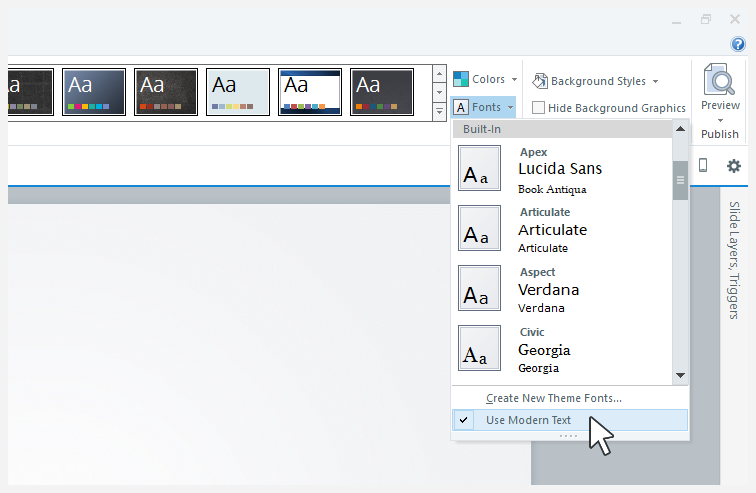 Let me know if you see an improvement!
- ShawnMcCulley-bCommunity Member
Has any solution been found for this issue? We have a client that still uses IE 11 and when they view the prototype of the course we are developing for them, the fonts are being substituted. I was initially using Lato, but switched to Open Sans to see if that would help. It didn't. (See the attached files). Additionally, the f and sometimes the i are missing. We are exporting to HTML 5 only. We can't expect a large state agency to change or update their systems for one course and they shouldn't have to. Can CSS be used to reference a Web font placed in an external folder similar to what Lectora can do? Any help would be much appreciated.
Thanks.
-Shawn
Hi there, Shawn. We've prioritized the fix on the authoring side so that course viewers, or their administrators, won't have to make adjustments to the browser settings. We're still finalizing the details of the solution after getting some feedback from users. We're making progress, and I hope to be able to share some good news with you as soon as I can!
- CherylPowersCommunity Member
Intermittently, for the past several months, I am having these problems with storyline 360 published courses, published for SuccessFactors LMS as html5/flash fallback, and seeing it mostly on the Edge browser. Our standard font for our company is Segoe UI. The most difficult challenge is that I do not have direct access to our lMS server for supporting WOFF. in our courses, the users have blanks/missing letters.
Hey Cheryl,
I know that intermittent problems can be the most difficult ones to track down.
Have you taken a look at the solutions shared here? Modern text and our documentation here on missing letters?
- CherylPowersCommunity Member
also the link above to modern text is sending me to a link to a .story file to download?












Related Content
- 11 months ago
- 10 years ago
- 11 months ago