Forum Discussion

Articulate 360 Update All button error
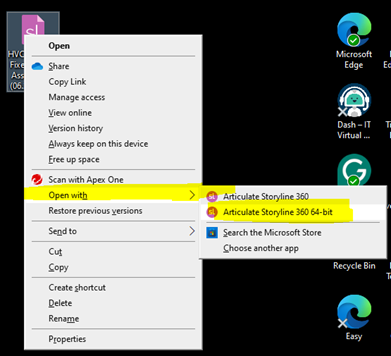
Error when selecting Articulate's "UPDATE ALL" button: I currently have Articulate that provides the Articulate "Storyline 360 64-bit version". When the pop-up "Updates are available for Articulate" appear, I go to the app, and select the "UPDATE ALL" button for all of the programs within Articulate "Storyline", "Rise", "Review 360", etc. When I do this, I get a red error message associated with "Storyline 360" line item that says, "Uninstall Failed" That is weird considering I wasn't requesting an uninstall, but simply to get the available updates. I believe not only am I not getting the latest updates for Articulate's Storyline, but for any of the programs within Articulate. I have provided screenshots showing the error message I received. I am asking for help here to allow the best resolution so as to not lose access to my existing modules should the resolve require a version change. A year ago, after getting a modem clean, I lost access to all of my Storyline modules that I had built under using Articulate version simply of "Articulate Storyline 360". After seven days of intervention, I gained access with the version I am using now of "Articulate Storyline 360 64-bit" Thank you.
2 Replies
- JudyNolletSuper Hero
I suggest you submit a case directly to the Articulate staff. You can do that here: https://access.articulate.com/support/contact
Be sure to give them details about your computer and operating system.
Note: When you update (or even uninstall) Storyline, that doesn't affect the .story files. They remain wherever you saved them. (All .story files should always be on the local computer. Working on a file over a network can corrupt it.)
However, the list of files in the "Recent" area of Storyline's Welcome screen might be cleared out. If so, you should still be able to open any .story file on your computer by browsing for it.
Hi jolondacarter!
Sorry to hear you're having trouble updating the Articulate 360 desktop app!
Great to see Judy has been assisting you. I noticed you're also working with my colleague John, through a support case. I understand you're planning to connect with your IT admin to ensure all Network Endpoints have been enabled. That sounds like a great first step!
We can continue the conversation through your case to keep all information in one spot.