Forum Discussion

JennaG
1 year agoCommunity Member
Changing the Matching dropdown graded quiz/survey colors
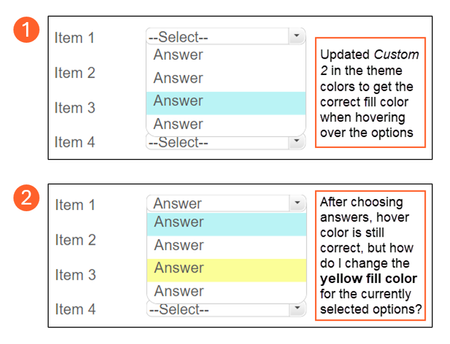
Hello! I'm hoping someone can help me out with a question about changing the colors for the choices in the matching dropdown options.
I was able to find the answer on how to change the hover color...
- 1 year ago
You’ll need to inject JavaScript to target the selected state. To do this, add an Execute JavaScript trigger that runs when the timeline starts on the slide:
const style = document.createElement('style');
style.innerHTML = `
  .drop-list-item-selected {
    fill: #87CEEB !important;
  }
`;
document.head.appendChild(style);

Nedim
1 year agoCommunity Member
You’ll need to inject JavaScript to target the selected state. To do this, add an Execute JavaScript trigger that runs when the timeline starts on the slide:
const style = document.createElement('style');
style.innerHTML = `
  .drop-list-item-selected {
    fill: #87CEEB !important;
  }
`;
document.head.appendChild(style);
Ange
1 year agoCommunity Member
Fantastic Nedim I wish I'd known that a few months back. I had do similar: change colors and fonts, and add images on quite a few of the same quiz type to match branding, a laborious task using triggers, layers, variables... This is a keeper! Thank you for sharing your expertise.
Related Content
- 1 year ago