Forum Discussion

Quiz Question Answers Formatting Issues

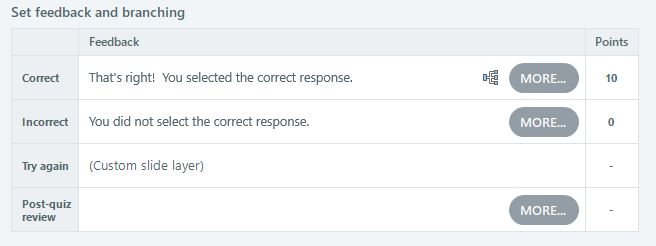
I'm currently experiencing this issue. I have three question slides in a row. The first two will NOT show the "Correct" answer layer, though they will show the incorrect slides. The last of the three will show the correct answer layer. The only difference I can see is that there is a "branching" icon on the slide that it is working (found on Form View / Set feedback and branching" (images below). I cannot figure out how to add the branching, as I'm suspecting that's the primary issue. Hopefully someone can help out.
- EricSantos1 year agoStaff
Hello Kristin,
I'm sorry to hear about the trouble with the question slides. I appreciate you sharing the screenshots and a detailed description of your experience.
It would be helpful to see the Storyline file to understand why the layers are not showing. Would you mind sharing your project with us privately in a support case? We'll delete it when we're done testing.
Once you send the project file, we'll receive a notification, and one of our talented Customer Support Engineers will contact you to help resolve the issue.
- davelees1 year agoCommunity Member
this should not be a surprize ... as a Storyline user for years there has always been a problem with quiz questions bouncing all over and changing formatting / size when changing states, it looks very unprofessional. Is there nothing that can be done to fix this???
- KellyAuner1 year agoStaff
Hi davelees,
If you have a file you can share where you're experiencing this issue, we'd be happy to take a closer look at what's happening. Please feel free to upload that here or privately if you prefer!





Related Content
- 8 months ago