Forum Discussion

Showing a button in a slide when several variables are changed.
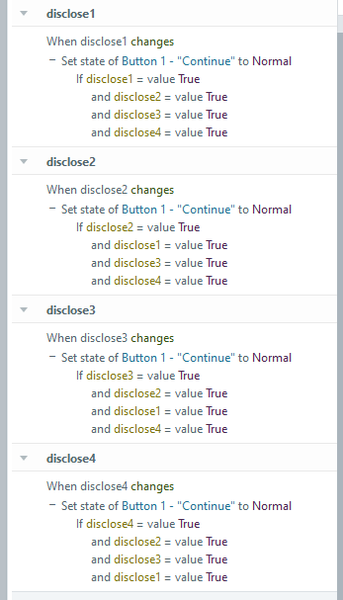

A long time ago, I found myself in a situation with a dozen buttons, each linked to a layer. Each button was supposed to set a variable to True when the associated layer was visited. To show the "Next" button, I created 12 triggers, each corresponding to a variable change. As you said "this works but its a bit overkill".
To simplify things, I turned to JavaScript logic, where I could use a timed action to perform an action within a specified duration.
To implement this, I inserted an offstage shape and applied a motion path to it. The motion path was set to last 0.10 seconds, when the timeline starts. Once the animation was complete, the shape would move along the same path, repeating in a loop. This created a reliable time reference that I could tie to my "When" action, allowing me to execute other actions every 0.10 seconds under specified conditions.
I then set a trigger to change the state of the "Next" button to Normal when the shape's animation completed, but only if all the variables (i.e., all layers had been visited) were True. Instead of using 12 triggers, I ended up with just 3: two to keep the shape running in a loop and one to set the button state to Normal under specified conditions.
There are so many scenarios where this approach could come in handy to replace JavaScript’s setTimeout function. For example, instead of using setTimeout to execute actions after a fixed duration, you can use the motion path and loop method to trigger actions at regular intervals.
- JudyNollet10 months agoSuper Hero
An off-slide animation makes a great "when"! 🙂
- DarrenNash10 months agoCommunity Member
cheers, I have tried that in the past, even used a hidden layer with a 5 frame timeline and an off screen object and set it to basically the same based on when the timeline ends on the layer...but they are all awkward workarounds instead of Articulate addressing the needs to make better trigger options.
