accessibility
871 TopicsKeyboard accessible drag-and-drop help
I've created a keyboard accessible drag-and-drop exercise in Storyline using these instructions which has worked great for both users who click & drag with a mouse and users who select with a keyboard. My challenge is when I try to add animation so incorrect responses are returned to their original position while correct responses remain in the drop field. I used these instructions to make that happen. And it works but only for users who click & drag with a mouse. Any ideas on how I could return incorrect drag-and-drop answers so it works for those using a keyboard as well?19Views0likes1CommentHow can I start a motion path where it ended in a previous slide?
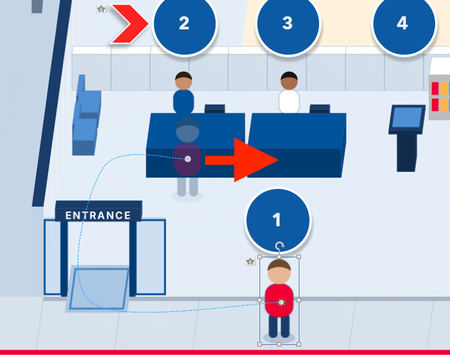
I created a curved motion path for an icon in slide one. In slide two, I want that curved motion path to be a straight-line motion path, starting where the curved motion path ended in the previous slide. How do I accomplish this?Solved105Views0likes12CommentsArticulate Rise - change navigation arrows?
Hello All, I have some older/less technologically adept staff in our organization who get confused by the navigation UI in Articulate Rise. For example, when you start a microlearning module, you navigate from the first page by pressing/clicking the down arrow on the screen. However, some of my staff took that to be a visual indicator arrow, and were looking for/pressing any buttons below the actual area of the Rise learning window. I take this as an accessibility challenge that I can help accommodate to, rather than a user error. My ideal solution would be to be able to replace the arrow entirely (ex with a different button or shape), make it more of a visible button via emphasis lines, high-contrast background circle, or even customized text next to the arrow ("press the arrow to continue"). My intermediate solution is going to be to create modified backgrounds with embedded instructions, written instructions in the course page itself (less ideal given I'd be essentially replacing the title page to do so), or some kind of "how to navigate e-learnings" pdf as a precursor resource to any course. A way to modify and customize the slide-to-slide navigation would be best, though I'd love to hear how others have addressed this issue. Thanks!32Views0likes1CommentAccessibility for users with visual disabilities
Hi everyone, unfortunately I’m having a problem with the accessibility of a course created using Storyline 360. An image – which is important for the course because the user has to click on it to register their presence – is unfortunately not being ‘announced’ by the screen reader. The image can be reached using the Tab key; it is accessible and has alternative text, but the screen reader (JAWS) does not announce its presence ‘out loud’. What other settings do I need to change? What am I doing wrong? I’ve also tried replacing it with a button, but its appearance on the monitor is still not announced vocally. Thank you very much. Cristina77Views0likes6CommentsMaking Screenshots Accessible in Rise 360
How can screenshots be accessible in Rise 360, particularly when they contain text that learners need to read or reference? For example, in a training where learners need to see a form and understand what information goes where, how can that content be accessible to screen readers while still providing the visual reference? Are there any best practices or recommended approaches for handling this in Rise? Thank you in advance!41Views0likes1Commentstoryline missing navigation buttons in modern player landscape view on iphone
I created a course using the modern player and it previews correctly in the program when viewed in both phone portrait and phone landscape. But when I view it in the browser on my iphone, the navigation buttons, cc and other controls are not there in landscape. Portrait still works. Has anyone else seen this or know of a fix? Images attached.Demystifying Text Styles
This week's tip comes from John_Moore_YL at our certified training partner, Yukon Learning. Text styles in Storyline control the visual appearance of text elements, such as paragraphs and headings. They also play an important role in accessibility by making courses easier to navigate with a screen reader. There are six default text styles in Storyline: Normal, Heading Levels 1-4, and Hyperlink. In this video, John will show you how text styles help you create more consistent, accessible, and efficient course designs. You'll learn: What text styles are How they are applied in Storyline How they make formatting and updating your courses easier Resources: Yukon Learning YouTube Channel Need Articulate 360 Training? Sign up.69Views2likes0CommentsOdd AI audio issue
Hi everyone, I’m hoping someone can help with an issue I’ve encountered while developing French versions of courses. In multiple courses, the French AI-generated audio plays correctly, but the automatically generated closed captions appear in English. In each case, the workflow was: Develop the English version of the course. Create a copy for the French version. Export the Word document, translate it, and import the translated content. Regenerate the AI audio in French. The Generate Closed Captions option remained selected throughout the process (it is enabled by default). However, for some reason, the captions generated are still in English while the audio is French. I can resolve the issue by recreating the AI audio slide by slide, which also regenerates the captions correctly. However, I’ve noticed another problem: the newly generated audio is a different length than the original, even when using the same voice, speed, and all other settings. To troubleshoot, I tried several approaches, including: Generating completely new AI audio from the translated slide content. Using the Notes section to create new audio. Recreating audio through the existing AI Text-to-Speech settings while ensuring all voice and playback settings matched the original. Despite using the same settings and text, the regenerated audio lengths are different, which impacts animation timing throughout the course. My questions are: Is there a faster way to update or regenerate closed captions that are in the wrong language without recreating the audio on every slide? Has anyone experienced captions being generated in English while using French AI audio? Does anyone know why AI text-to-speech audio length would differ when regenerated using the same voice and settings? Will I need to recreate the audio and adjust animations slide by slide, or is there a more efficient solution? Any insights or recommendations would be greatly appreciated. Thanks in advance! Bryce