articulate 360 teams
250 TopicsEmbed Youtube Video - Error 153
Hello, Has something changed in Storyline?! I'm trying to embed a YouTube video using "iframe". I'm copying the embed code from YouTube, but it says 'Watch video on Youtube - Erro 153...'. I used: <iframe width="560" height="315" src="https://www.youtube.com/embed/dqaN76shzJE?si=F_NwSZruLu5BJAU6" title="YouTube video player" frameborder="0" allow="accelerometer; autoplay; clipboard-write; encrypted-media; gyroscope; picture-in-picture; web-share" referrerpolicy="strict-origin-when-cross-origin" allowfullscreen></iframe> Any/all help would be appreciated. Thanks2.1KViews0likes11CommentsAI TTS and SSML functionality
Hello everyone, I would like to bring the attention of the community on AI TTS and the limited use of SSML with it. I know that it is not supported because you built AI voices "to understand the relationship between words and adjust delivery accordingly". However, AI voices mispronounce acronyms and other words like company names and such. By saying that I am forced to use the old TTS voices, and it is a bit upsetting because the AI voices sound indeed more natural and "human", big benefits in e-learning for ensuring a more pleasant learning experience for our users. This is a request to work on SSML for AI voices because I strongly believe it is needed. Anna1.9KViews4likes19CommentsAI Voices
Just my two cents, AI Voices were good because we didn't need to go back to our live voice to get something redone, or if we wanted to update 1 slide or add something to a presentation. Now we are seeing voices being removed so the advantage of the AI voices is reduced. I see 2 posts this morning and it's not even lunch time from people that need to make updates to 1 or 2 slides, change a word, or add something and the voice is gone. Maybe we need to look at AI again.Solved1.6KViews9likes17Commentslack of Rise innovation
Just talked to a former customer who went to Mindsmith because of the lack of innovation in Rise over the past four years. Groups like Maestro are filling in the gaps but I'm curious if others are leaving Articulate for competitors because of similar sentiment. I hope not. I spent the last year learning Rise and Storyline. Hoping this discussion prompts a conversation that gets engineering's attention and where we might hear about the future. ANNNNNDDDDD - everyone is doing AI innovation. What other features besides integrating with AI partners can we look forward to in the near future? Excited to hear more!1.3KViews2likes22CommentsScreen recording jumping back to start frame before moving onto next slide
Hi Is anybody having an issue with the screen recording feature? I have added a screen recording to my project using the 'try it' feature so it presents as a system simulation, however when completing the actions e.g clicking on a hotspot, the screen recording action will play, but then flash back to the start frame before moving onto the next slide. This doesn't make it flow very well... This hasn't happened in the past so I'm under the impression it's a software glitch?Solved1.3KViews4likes20Comments2025/ 2026 Roadmap for Improvements
Hello Articulate team and community! I thought to inquire about what the roadmap for any future improvements/updates looks like (2025- 2026) for Rise 360 and Articulate Suite overall. Is there anything specific in works at the Articulate team? It's been fun exploring the recent features involving AI, and would love to know more about what to expect in the coming year. :-) Thanks a bunch!1.2KViews0likes1CommentWill Articulate 360 Standard Team (Non-AI) Still Be Available After March 31, 2026?
Hi! Recently, we received an email from Articulate saying: After 31st March 2026, all subscriptions will be upgraded at renewal to Articulate 360 AI, which may impact your current pricing. Does this mean the Standard Team plan (non-AI) will no longer be available for purchase after March 31, 2026? My organization currently has an Articulate 360 Standard Team subscription (expires April 2026). We buy new licenses annually through a public tender and need to plan the exact license type and pricing in advance. If anyone has official clarification from Articulate, please share. Thanks!799Views3likes4CommentsConvert Rise to Storyline
Can you take an existing Rise course and convert it to Storyline? I have tried the PDF to PPT route and importing that into Storyline (too many distortions and slides are not even 20% the same) and read below on another possibility. I have tried multiple options from below and it just shows a location address. Thank you! From the web: Yes, you can embed Rise courses into Storyline. To do this, you must first export the Rise 360 course as a web package and extract the zip file on your computer. Then, add the extracted folder to your Storyline project as a web object716Views1like3CommentsInsert text to speech Internet connectivity error
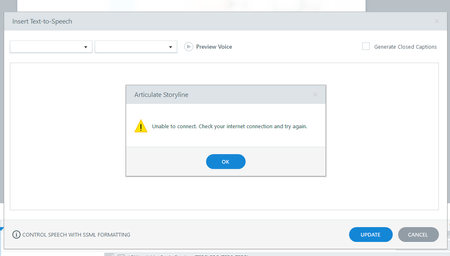
Hi Team, I am facing an issue with Insert text to speech option, tool is repeatedly showing 'unable to connect. check your internet connections and try again' error message since yesterday. I have a fair internet connectivity even while sharing this message, need urgent help as I am working on a priority projectSolved703Views0likes10CommentsHow to transfer a Rise 360 account to another team member?
Hi everyone, I am curious if there is a chance to copy a whole Rise account to another team member? I am aware of the option to transfer the content when a user leaves the team (explained in this KBA Articulate 360 Teams: Managing Content When Users Leave Your Team | Articulate - Community). But in our case the user should remain in the team, but his content should be administrated by another person. Here it is very important that the collaborator settings persist! Thank you very much for help in advance! Best RegardsSolved699Views0likes2Comments