code block
126 TopicsMeet Your Learner Persona
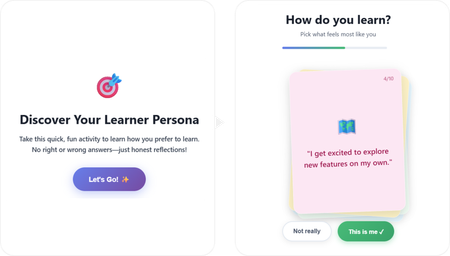
Hello there! 👋 Here's my project: A short, playful interaction that learners could experience at the beginning of a course, but not limited to that. I used both Lovable and ChatGPT as my buddies throughout this learning journey. The interactive code is embedded directly inside the course project. Check out the project here: Meet Your Learner Persona ✨The story behind As a newcomer to vibe coding, the experience was rewarding in the best possible way. I genuinely enjoyed every part of the process and learned a lot, especially about writing effective prompts, navigating code, and making small changes. I found a lot of inspiration by exploring visual and interaction design references on platforms like Dribbble, Figma, and Godly, which helped shape the experience's look and feel. Throughout the project, I experimented with both simple and more complex interactions. In the end, I found myself drawn to the simpler ones, those that quietly support the learning journey without adding unnecessary friction or contributing to cognitive overload. Try taking it to discover your type. 💻Here's also the prompt I used: Create a self-contained, embeddable HTML/CSS/JavaScript interactive learning game designed to be placed inside a Rise course code block. Concept: “Discover Your Learner Persona” – a playful, low-pressure personality-style interaction that helps learners reflect on how they prefer to learn. Experience goals: Fun, fast, and intuitive (2 minutes max) No right or wrong answers Feels like a game, not a test Encourages self-awareness and engagement at the beginning of a course Interaction design: Display one card at a time in the center of the screen Each card contains a short first-person statement describing a learning behavior Two buttons below each card: “This is me” “Not really” When the learner clicks “This is me”, assign 1 hidden point to a specific learner persona When “Not really” is clicked, move on without scoring After all cards are answered, calculate the dominant learner persona and display the result Learner personas (4 total): The Explorer – learns by experimenting, trying things out, discovering through action The Builder – learns best with structure, steps, and logical progression The Observer – prefers watching, reading, and understanding before acting The Connector – learns through discussion, stories, and social interaction Cards (8–10 total): Write short, relatable, first-person statements such as: “I like to jump in and try things out, even if I don’t fully understand yet.” “I feel more confident when learning follows clear steps.” “I prefer seeing examples before I start.” “Talking things through with others helps me learn.” Each card should clearly map to one persona behind the scenes, but never reveal scoring or categories to the learner. Result screen: Display the learner’s persona as a friendly title (e.g. “You are: The Explorer”) Include a short, encouraging description of what this persona means Add 2–3 practical tips on how this learner can approach the course effectively Include reassuring language that most people are a mix and there is no best persona Visual & UX style: Clean, modern, friendly Card-based layout with soft rounded corners Smooth transitions between cards Large, readable text Accessible contrast Neutral, welcoming color palette (colorful, but in light colors) Card layout and behavior: Display the cards as a stacked, slightly fanned card pile, inspired by a physical deck of cards. Cards should overlap each other diagonally, forming a small pile rather than a grid Only the top card is fully readable and interactive at any time The cards underneath should be partially visible, offset slightly in position and rotation Use subtle differences in rotation (e.g. -3°, +2°, -1°) to create a natural, tactile feel Each card should have rounded corners, a soft shadow, and a solid background color Interaction behavior: When a learner answers a card, animate it smoothly off the pile (slide or fade) The next card should move into the top position of the stack The pile should visually shrink as cards are completed Technical constraints: No external libraries or frameworks All HTML, CSS, and JavaScript in a single file Fully responsive (works well on desktop and mobile) Safe for embedding in Rise as a code block or zip package5.3KViews50likes14CommentsPaint by Num-Birds: Songbird Identification Tool
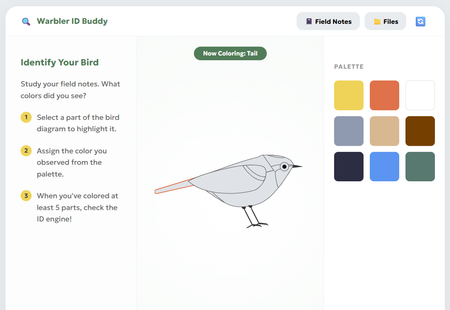
This interaction pushes learners to get curious and creative while identifying some of the most notoriously difficult bird species to spot - warblers! The paint-by-numbers interface paired learning materials (like snapshots, anatomy diagrams, and their own field notes) introduces learners to the fundamentals of bird identification, and allows them to explore this process of visually ID'ing a bird for themselves. Review Here: https://360.articulate.com/review/content/54d099bd-477a As a team with avid birdwatchers, trying to "onboard" people to the hobby always poses a classic blocker: "How do you tell the birds apart?" Though sound, habitat, and other factors play a role, visuals are the first pillar of identification that beginners start to familiarize themselves with. Using Rise's code block, we wanted to create a tool that went beyond flip cards, checklists, and other default interactions. Leveraging HTML/CSS, we created a workshop space that: Breaks down key features to note for ID'ing through an interactive diagram Offers as much or as little support they may need in the form of the snapshots, diagrams, and facts in the "Files" Provides a challenge to apply what they've learned by identifying the "Field Notes" recordings To build this block, we used a mix of vibe-coding and human code expertise! Once we had refined our idea on our own, Gemini was enlisted to help create the basic UI and functions. The functionality was refined and adjusted many times for user ease and clarity. Finally, we looped human experts back in to polish the code, refine the diagram, and squash any stubborn bugs. It was a whirlwind learning experience! Some takeaways: Having the AI refine snippets of the code ensured overall block integrity. We made the mistake at the start of having Gemini spit out a whole new HTML file to adjust minor pieces; we found it changed things that we hadn't asked it to, and actually got "lazy", condensing body text and dressing down UI elements increasingly with each iteration Knowing when to use AI, and when to call in a human expert was our superpower. Gemini deeply, SERIOUSLY struggled trying to create an SVG of a bird. So, we took the monstrosity it outputted and edited the code ourselves to create an image we were happy with! We also enlisted our senior developer to jump in and fix some serious coding errors that had made the block totally un-playable. Not all AI's are made equal: Canva's AI was very promising for vibe-coding at first, but Gemini ultimately became our tool of choice as it provided the most accurate and useful responses. We chose this activity because as bird lovers, we know that warblers in particular have such subtle differences - a black eye ring on one bird might make it a totally different species from the next! The ability to paint and visually describe these tiny differences seemed like the perfect learning opportunity for this challenge (and get our other coworkers on board with birding)! Let us know what you think! Were you able to paint a perfect match? Created by Aamir Aman, Tal Castillo, and Ryan Young.4.4KViews37likes15CommentsAccessibility Reality Checker (3 - minute Simulator)
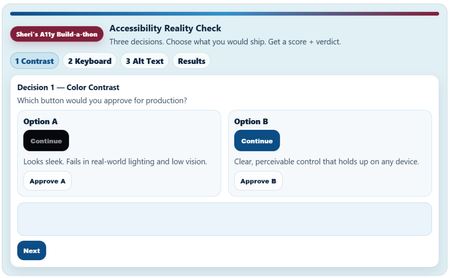
Link to Rise Course (Quick Share) Accessibility Reality Checker Copy /Paste Link: https://share.articulate.com/kdeNT__CFskcknh1QTeIp Project overview I created this project because most accessibility training fails in a predictable way. It explains rules, but it doesn’t change decisions. Teams ship inaccessible experiences because the tradeoffs are invisible in the moment. I worked to build something that puts some of those tradeoffs out into the open. Instead of building a tutorial, I built a short decision simulator: three common, high-impact accessibility choices (contrast, keyboard navigation, and alt text). I framed each choice under the question “Which would you ship?” The simulator allows the review to choose and get immediate consequences, then see an “accessibility” score. I made the simulator small, fast, and opinionated because that is how product decisions and learning content approval happens in the real world. This is not and was not intended to be a comprehensive accessibility course. It’s a pressure test for everyday judgment. Prompts and constraints The Build-a-thon prompt was to explore what the Rise Code Block can really do. My personal guide was: “Can I build something that feels like a real product review decision instead of another accessibility checklist?” My constraint and format drivers were: No long explanations up front No hidden scoring Do not pretend or ignore nuances The review must make a decision and live with the result Tools and implementation Built entirely in Articulate Rise 360’s Code Block Plain HTML, CSS, and JavaScript only Custom UI, state management, scoring logic, step flow, results meter, and share text are all handled in the Code Block Intentionally used: Semantic HTML Keyboard-operable controls Visible focus states High-contrast color choices The experience itself is designed to model the behaviors it’s teaching. The experience had to go beyond just talk about the experiences. What I learned I need to spend a lot more time upskilling on HMTL and JavaScript. Vibe Coding can be fun. Rise’s Code Block is capable of much richer, multi-step interactions than I use it for. Using the Code Block require you to be disciplined about structure, focus management, and state. Small UX decisions (focus order, feedback timing, contrast, visual hierarchy) have a big impact on whether a user experience feels accessible, useable, or sloppy. Accessibility cannot be taught in 5 minutes, but a quick accessibility review can expose bad decisions and highlight options for better user experiences instincts This type of tool/ format is good for awareness, decision calibration, but not for deep technical training. I like to call this a “feature” of the simulator not a bug. I acknowledge simulator has some real limitation for real work use in it’s current state.3.4KViews30likes11CommentsA Growing List of Cool Code Block Examples
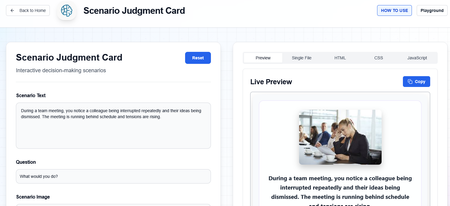
➡️ View the examples and grab the code Hi everyone! 👋 You'll find (42 so far) examples of what you can do with the Rise Code Block. These are my tests that I've built to be responsive and accessible. I've provided the code for each so you can easily copy, paste, and insert them in your Rise courses. There is a suggestion box if you'd like to upvote an idea or enter your own. If you have any comments, just drop them here in review. You can reach me directly at [email protected]. Latest Updates: A new Latest Updates section that lists existing snippets that have been updated to add new features based on user feedback. I've also moved the Update Log to the top so you can easily determine the latest version/date and details. NEW - Two-Person Scenario helps you build a two-person scenario where the learn can take on the role of one of the characters, or as an observer. You can include your own characters, optional backgrounds and audio narration. There is a UI for this one to help you set up the details without editing the code directly. NEW - Sentiment Check that mimics Rise's new survey block but can remember an earlier response. For example, at the beginning of a course, you check user confidence and, at the end, you recheck it. Your Input Buy Me a Coffee Suggestion Box Interactions Click & Reveal Checklist Display Cards Drag and Drop Flip Cards Glossary You Can Print Hover Definitions & Popup Info Labeled Graphic Matching Activity Memory Match Scratch Card Reveal Scrolling Ticker Sentence Builder Sentiment Check Sorting Interaction with Feedback Spin the Wheel Timeline Vertical & Horizontal Tabs Effects & Media Animated Checklist Confetti Dividers Multi-track audio Player Graphics Blended Image Slider Image Compare Slider Knowledge Checks / Quizzes Card Order Question Flashcard Self-Assessment Row Order Question Swipe Card Quiz Yes/No Swipe Cards User Input Capture & Recall Reflections You Can Print Course Completion Certificate ElevenLabs Chatbot Learner Name with Persistence Notebook You Can Print Pulse Check (no right/wrong answer question) Utilities Compound Interest Calculator Form Wrapper Timer E-Learning Challenges & Fun Stuff #535 Snow Globe #540 Valentine Oracle Fire Triangle Simulator Rise Code Block "Build-a-Thon" Submission Getting Help Introduction Prompts, Workflow and QA Building a Code Snippet The Prompts Editing HTML Working in Other Languages3.1KViews24likes26CommentsMy Custom Rise Block Component Library
Hi everyone! I wanted to share a custom library of Rise-compatible interactive components I’ve been building and experimenting with for eLearning projects. The library includes custom-designed blocks and interactions intended to help make Rise courses more engaging, flexible, and visually dynamic beyond the default block set. You can explore the library here: https://cognitoblox.netlify.app/ This is an ongoing project, and I’d genuinely love feedback from the community: Which components do you find most useful? What kinds of interactions would you like to see added? Any ideas for improving usability or accessibility? Happy to connect with fellow developers who are experimenting with custom Rise code blocks as well! Thanks for checking it out1.2KViews21likes20CommentsRise Canvas
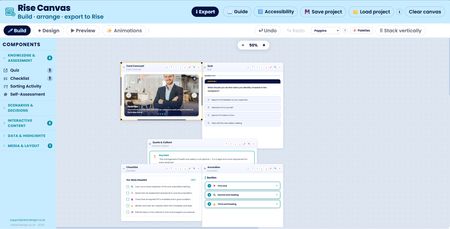
A drag and drop code block creator... the components can be resized and positioned anywhere on the canvas. Any number of different components can be added to the canvas… Output as HTML/JS to add to a code block Rise Canvas Rise Canvas is not affiliated with Articulate® or Rise 360®.1.7KViews19likes20CommentsUp-Updated "Reveal" codes
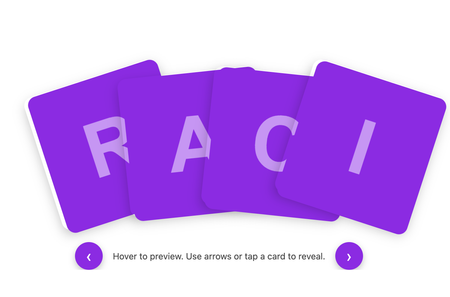
I’ve been experimenting with the original HTML code blocks included in Articulate 360’s built-in examples and wanted to share how far you can extend that base structure using GenAI to iterate and refine interactions. Starting with the default image-reveal index provided by Articulate, I used GenAI to progressively develop three new versions. I supplied my own images, created meaningful alternative text for screen readers, and introduced additional UX and accessibility improvements. Every version is fully tailorable if you want to adapt the formatting, colours, spacing or behaviour. The three examples are: Enhanced Image Reveal Grid Uses the original Articulate structure. Adds a hover zoom, a click-to-zoom state, and high-contrast purple letter tiles for accessibility. Fanned “Deck of Cards” Flip Interaction A dynamic fanned layout, more like a real card hand. Cards lift and reveal their letter on hover, flip on click, and reset if clicked again. Includes chevron navigation for easier cycling. Plain Flip Grid with Navigation A clean, accessible flip-card grid with navigation chevrons. Mirrors the deck behaviour but with a simplified layout. NOW WITH MORE EXAMPLES of what reveal styles can imagine! If you have suggestions, improvements or alternative approaches, I’d really love the feedback. And if you’d like to use or remix any part of this, feel free — I’d love to see what you create with it. Review3602.2KViews14likes13Comments3D Cube Interaction
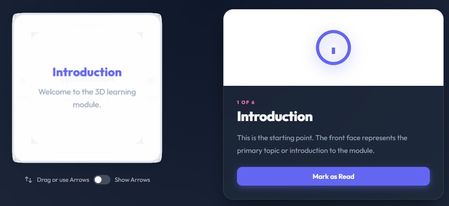
For this build-a-thon, one of the interactions I built was a Cube Rotation Interaction—a custom HTML/CSS/JS block meant to feel a little unexpected. Learners can rotate a 3D cube (by dragging or using arrow controls) to move between faces. Each face represents a topic, and selecting one updates an info panel with supporting content and a Complete button. Once completed, a checkmark appears directly on the cube so learners can easily track what they’ve already explored. The idea came from wanting to build something that doesn’t feel possible in Rise or Storyline. I was brainstorming interactions that really require HTML/CSS, and landed on the idea of rolling a die—something tactile, playful, and naturally three-dimensional. I liked the idea of learners discovering content in any order, rather than clicking through a fixed path. I used ChatGPT early on to brainstorm and create a build spec before jumping into development. From there, I built and refined the interaction in Antigravity using its code builder (powered by Gemini). It took a fair amount of back-and-forth to get the rotation, visuals, and overall feel right. I also added optional arrow controls for accessibility and used GitHub to track different versions along the way. A few things I learned: Rotating the content instead of the entire cube was important—this helped maintain a sense of orientation. Starting with a clear build spec made working with an LLM much more effective. Snapping to the nearest face was a needed touch to make things clear and readable. Small visual details matter more than expected (like darkening the cube during rotation so the cursor doesn’t get lost). Course Link: https://360.articulate.com/review/content/52d258fe-2de4-427a-b04c-747a8970182b/review I’m sharing the code so others can explore or remix it, and because this was a fun way to push beyond familiar interaction patterns and experiment with something a bit more playful. <!DOCTYPE html> <html lang="en"> <head> <meta charset="UTF-8"> <meta name="viewport" content="width=device-width, initial-scale=1.0"> <title>Flip Cube Interaction</title> <link rel="preconnect" href="https://fonts.googleapis.com"> <link rel="preconnect" href="https://fonts.gstatic.com" crossorigin> <link href="https://fonts.googleapis.com/css2?family=Outfit:wght@300;400;600;800&display=swap" rel="stylesheet"> <style> /* Scoped variables for easy tuning */ :root { --cube-size: 300px; /* Super Slick & Vibrant Palette (Dark Theme Base) */ --bg-grad-start: #0f172a; --bg-grad-end: #1e293b; --text-main: #f8fafc; --text-muted: #94a3b8; --primary: #6366f1; /* Indigo */ --primary-glow: rgba(99, 102, 241, 0.5); --accent: #f472b6; /* Pink */ --success: #10b981; /* Emerald */ --success-glow: rgba(16, 185, 129, 0.5); --panel-bg: rgba(30, 41, 59, 0.7); --panel-border: 1px solid rgba(255, 255, 255, 0.1); --panel-shadow: 0 25px 50px -12px rgba(0, 0, 0, 0.5); --face-bg: rgba(255, 255, 255, 0.95); --face-border: 4px solid #e2e8f0; --face-border-active: 4px solid var(--primary); --face-shadow: 0 0 30px rgba(0,0,0,0.1); --font-main: 'Outfit', sans-serif; } body { font-family: var(--font-main); background: radial-gradient(circle at top center, var(--bg-grad-start), var(--bg-grad-end)); margin: 0; padding: 2rem; display: flex; justify-content: center; align-items: center; min-height: 120px; color: var(--text-main); overflow: hidden; } /* --- Progress Tracker --- */ .progress-tracker { position: fixed; top: 20px; right: 20px; background: white; padding: 12px 24px; border-radius: 50px; box-shadow: 0 4px 20px rgba(0,0,0,0.08); font-weight: 800; font-size: 1.2rem; color: var(--primary); display: flex; align-items: center; gap: 10px; z-index: 100; transition: all 0.3s cubic-bezier(0.175, 0.885, 0.32, 1.275); } .progress-tracker.complete { background: var(--accent); color: white; transform: scale(1.1); box-shadow: 0 10px 30px rgba(247, 37, 133, 0.4); } .progress-icon { width: 24px; height: 24px; fill: currentColor; } /* --- Container Layout --- */ .cube-experience { display: grid; grid-template-columns: 1fr 1fr; gap: 60px; max-width: 1100px; width: 100%; /* Glassmorphism Panel Wrapper (optional, currently using grid) */ align-items: center; } /* Mobile Layout */ MeDia (max-width: 860px) { .cube-experience { grid-template-columns: 1fr; gap: 60px; padding: 20px; } :root { --cube-size: 260px; } body { padding: 1rem; } } MeDia (max-width: 400px) { :root { --cube-size: 220px; } } /* --- Cube Module --- */ .cube-module { display: flex; flex-direction: column; align-items: center; position: relative; } .cube-stage { width: var(--cube-size); height: var(--cube-size); perspective: 1000px; cursor: grab; position: relative; /* Prevent scrolling on touch drag */ touch-action: none; -webkit-user-select: none; user-select: none; } .cube-stage:active { cursor: grabbing; } .cube { width: 100%; height: 100%; position: absolute; transform-style: preserve-3d; /* transform is set by JS */ transition: transform 0ms; /* Initial state, JS handles duration */ will-change: transform; } /* --- Animations --- */ @keyframes slideUpFade { from { opacity: 0; transform: translateY(20px); } to { opacity: 1; transform: translateY(0); } } @keyframes pulseGlow { 0% { box-shadow: 0 0 0 0 var(--success-glow); } 70% { box-shadow: 0 0 0 10px rgba(16, 185, 129, 0); } 100% { box-shadow: 0 0 0 0 rgba(16, 185, 129, 0); } } /* --- Cube Faces --- */ .face { position: absolute; width: var(--cube-size); height: var(--cube-size); background: var(--face-bg); border: var(--face-border); display: flex; flex-direction: column; justify-content: center; align-items: center; text-align: center; padding: 24px; box-sizing: border-box; border-radius: 24px; backface-visibility: hidden; backface-visibility: visible; box-shadow: var(--face-shadow); transition: border-color 0.3s, opacity 0.3s; /* Added opacity transition */ } /* Dynamic Opacity during Interaction */ .cube-stage.interacting .face { opacity: 0.9; background: #cbd5e1; /* Light grey for contrast with white cursor */ } .face.visited { border: var(--face-border-active); } /* Checkmark moved to face-content to rotate with text */ .face.visited .face-content::after { content: ''; position: absolute; top: 0px; /* Adjusted for face-content padding/relative pos */ right: 0px; width: 28px; height: 28px; background: var(--success); border-radius: 50%; background-image: url("data:image/svg+xml,%3Csvg xmlns='http://www.w3.org/2000/svg' viewBox='0 0 24 24' fill='none' stroke='white' stroke-width='3' stroke-linecap='round' stroke-linejoin='round'%3E%3Cpolyline points='20 6 9 17 4 12'/%3E%3C/svg%3E"); background-size: 18px; background-repeat: no-repeat; background-position: center; animation: popIn 0.4s cubic-bezier(0.175, 0.885, 0.32, 1.275); box-shadow: 0 4px 10px rgba(76, 201, 240, 0.3); /* Ensure it sits on top */ z-index: 10; transform: translate(15px, -15px); /* Offset to corner */ } @keyframes popIn { 0% { transform: translate(15px, -15px) scale(0); } 100% { transform: translate(15px, -15px) scale(1); } } .face h3 { margin: 0 0 12px 0; font-size: 1.5rem; color: var(--primary); font-weight: 800; } .face p { margin: 0; font-size: 1rem; line-height: 1.6; color: var(--text-muted); font-weight: 400; } .face ul { text-align: left; padding-left: 20px; margin: 0; font-size: 0.95rem; color: var(--text-muted); } /* Face Specific Transforms will be injected or handled by common class + specific class */ .face--front { transform: rotateY(0deg) translateZ(calc(var(--cube-size)/2)); } .face--right { transform: rotateY(90deg) translateZ(calc(var(--cube-size)/2)); } .face--back { transform: rotateY(180deg) translateZ(calc(var(--cube-size)/2)); } .face--left { transform: rotateY(-90deg) translateZ(calc(var(--cube-size)/2)); } .face--top { transform: rotateX(90deg) translateZ(calc(var(--cube-size)/2)); } .face--bottom { transform: rotateX(-90deg) translateZ(calc(var(--cube-size)/2)); } /* --- Instructions --- */ .instructions { margin-top: 25px; font-size: 0.95rem; color: rgba(255, 255, 255, 0.8); /* Lighter for accessibility */ display: flex; align-items: center; gap: 8px; font-weight: 500; } .key-hint { background: rgba(255,255,255,0.15); padding: 2px 6px; border-radius: 4px; font-size: 0.8em; font-family: monospace; border: 1px solid rgba(255,255,255,0.3); color: white; } /* --- Info Panel --- */ .panel { background: var(--panel-bg); border-radius: 24px; padding: 0; overflow: hidden; display: flex; flex-direction: column; border: var(--panel-border); height: auto; min-height: 400px; opacity: 1; transition: opacity 0.2s ease-out, transform 0.2s ease-out; box-shadow: var(--panel-shadow); backdrop-filter: blur(20px); -webkit-backdrop-filter: blur(20px); } .panel.fade-out { opacity: 0; transform: translateY(10px); } .panel-graphic { background: linear-gradient(135deg, rgb(255, 255, 255) 0%, rgb(255, 255, 255) 100%); /* Subtle glass gradient */ height: 180px; display: flex; justify-content: center; align-items: center; color: var(--primary); position: relative; } .panel-graphic::after { content: ''; position: absolute; bottom: 0; left: 0; right: 0; height: 1px; background: linear-gradient(90deg, transparent, rgba(255,255,255,0.1), transparent); } .panel-graphic svg { width: 90px; height: 90px; filter: drop-shadow(0 10px 15px var(--primary-glow)); transition: transform 0.4s cubic-bezier(0.175, 0.885, 0.32, 1.275); } /* Animate icon on entrance */ .panel:not(.fade-out) .panel-graphic svg { transform: scale(1) translateY(0); } .panel.fade-out .panel-graphic svg { transform: scale(0.8) translateY(10px); } .panel-content { padding: 32px; } .panel-label { text-transform: uppercase; letter-spacing: 2px; font-size: 0.7rem; color: var(--accent); margin-bottom: 5px; font-weight: 800; } .panel-title { margin: 0 0 16px 0; font-size: 2rem; color: var(--text-main); font-weight: 800; letter-spacing: -0.02em; } .panel-body { line-height: 1.8; color: var(--text-muted); font-size: 1.05rem; } /* Panel Text Animations */ .panel-title, .panel-body, .btn-complete { transition: transform 0.4s ease-out, opacity 0.4s ease-out; } .panel.fade-out .panel-title { transform: translateX(20px); opacity: 0; } .panel.fade-out .panel-body { transform: translateX(20px); opacity: 0; transition-delay: 0.05s; } .panel.fade-out .btn-complete { transform: translateY(20px); opacity: 0; transition-delay: 0.1s; } /* Complete Button */ .btn-complete { background: var(--primary); color: white; border: none; padding: 12px 24px; font-size: 1rem; font-weight: 600; border-radius: 12px; cursor: pointer; margin-top: 24px; width: 100%; transition: all 0.3s cubic-bezier(0.175, 0.885, 0.32, 1.275); display: flex; align-items: center; justify-content: center; gap: 8px; font-family: var(--font-main); box-shadow: 0 4px 15px var(--primary-glow); } .btn-complete:hover { transform: translateY(-2px) scale(1.02); box-shadow: 0 8px 25px var(--primary-glow); } .btn-complete:active { transform: translateY(1px); } .btn-complete.completed { background: var(--success); cursor: default; box-shadow: none; pointer-events: none; } .btn-complete.completed:hover { transform: none; } .nav-arrow { position: absolute; width: 44px; /* Slightly Larger */ height: 44px; border-radius: 50%; /* Glassmorphism */ background: rgba(255, 255, 255, 0.05); backdrop-filter: blur(8px); border: 1px solid rgba(255, 255, 255, 0.1); display: flex; align-items: center; justify-content: center; color: white; cursor: pointer; box-shadow: 0 4px 15px rgba(0,0,0,0.1); transition: all 0.2s cubic-bezier(0.25, 1, 0.5, 1); z-index: 10; } .nav-arrow:hover { background: white; color: black; transform: scale(1.15); border-color: white; box-shadow: 0 8px 25px rgba(255,255,255,0.3); } /* Positioning around the cube stage */ /* Since buttons are in cube-module (relative), and stage is centered */ /* We can position absolute relative to the module center, or use margins */ /* Better approach: Wrapper or exact placement relative to stage */ /* Let's place them inside the stage container for easy relative positioning */ .cube-stage .nav-arrow { position: absolute; } .nav-arrow--top { top: -60px; /* More padding */ left: 50%; transform: translateX(-50%); } .nav-arrow--bottom { bottom: -60px; left: 50%; transform: translateX(-50%); } .nav-arrow--left { top: 50%; left: -60px; transform: translateY(-50%); } .nav-arrow--right { top: 50%; right: -60px; transform: translateY(-50%); } .nav-arrow--top:hover { transform: translateX(-50%) scale(1.15); } .nav-arrow--bottom:hover { transform: translateX(-50%) scale(1.15); } .nav-arrow--left:hover { transform: translateY(-50%) scale(1.15); } .nav-arrow--right:hover { transform: translateY(-50%) scale(1.15); } /* Toggle Switch */ .toggle-container { display: flex; align-items: center; gap: 10px; font-size: 0.9rem; color: rgba(255,255,255,0.6); /* Lighter */ margin-left: auto; /* Push to right if in flex container */ padding-top: 30px; } .switch { position: relative; display: inline-block; width: 40px; height: 22px; } .switch input { opacity: 0; width: 0; height: 0; } .slider { position: absolute; cursor: pointer; top: 0; left: 0; right: 0; bottom: 0; background-color: rgba(255,255,255,0.2); transition: .4s; border-radius: 34px; } .slider:before { position: absolute; content: ""; height: 16px; width: 16px; left: 3px; bottom: 3px; background-color: white; transition: .4s; border-radius: 50%; } input:checked + .slider { background-color: var(--primary); } input:checked + .slider:before { transform: translateX(18px); } /* Arrow Visibility */ .nav-arrow { /* ... existing styles ... */ opacity: 0; pointer-events: none; /*transform: scale(0.8);*/ /* Conflict with pos transforms, handled below */ } .cube-stage.show-arrows .nav-arrow { opacity: 1; pointer-events: auto; /*transform: scale(1);*/ } /* Specific positions for show state (combining with hover scale) */ .cube-stage.show-arrows .nav-arrow--top { transform: translateX(-50%) scale(1); } .cube-stage.show-arrows .nav-arrow--bottom { transform: translateX(-50%) scale(1); } .cube-stage.show-arrows .nav-arrow--left { transform: translateY(-50%) scale(1); } .cube-stage.show-arrows .nav-arrow--right { transform: translateY(-50%) scale(1); } .cube-stage.show-arrows .nav-arrow--top:hover { transform: translateX(-50%) scale(1.15); } .cube-stage.show-arrows .nav-arrow--bottom:hover { transform: translateX(-50%) scale(1.15); } .cube-stage.show-arrows .nav-arrow--left:hover { transform: translateY(-50%) scale(1.15); } .cube-stage.show-arrows .nav-arrow--right:hover { transform: translateY(-50%) scale(1.15); } /* Face Content Wrapper */ .face-content { width: 100%; height: 100%; display: flex; flex-direction: column; justify-content: center; align-items: center; text-align: center; transition: transform 0.4s ease-out; transform-origin: center center; backface-visibility: hidden; /* sharpening */ position: relative; /* For checkmark positioning */ } /* Progress Tracker text fix */ .progress-tracker { /* ... */ color: var(--primary); } #trackerText { color: var(--primary); } </style> </style> </head> <body> <div class="cube-experience" aria-label="3D Cube Interaction"> <!-- Left: Cube Module --> <div class="cube-module"> <div class="cube-stage" id="cubeStage" aria-label="Interactive 3D Cube." tabindex="0"> <div class="cube" id="cube"> <!-- Faces injected via JS or static below --> <div class="face face--front" data-face="front"> <h3>Front Face</h3> <p>Start here.</p> </div> <div class="face face--right" data-face="right"> <h3>Right Face</h3> </div> <div class="face face--back" data-face="back"> <h3>Back Face</h3> </div> <div class="face face--left" data-face="left"> <h3>Left Face</h3> </div> <div class="face face--top" data-face="top"> <h3>Top Face</h3> </div> <div class="face face--bottom" data-face="bottom"> <h3>Bottom Face</h3> </div> </div> <!-- Navigation Arrows --> <button class="nav-arrow nav-arrow--top" aria-label="Rotate Up"> <svg width="24" height="24" fill="none" viewBox="0 0 24 24" stroke="currentColor"><path stroke-linecap="round" stroke-linejoin="round" stroke-width="2" d="M5 15l7-7 7 7"/></svg> </button> <button class="nav-arrow nav-arrow--right" aria-label="Rotate Right"> <svg width="24" height="24" fill="none" viewBox="0 0 24 24" stroke="currentColor"><path stroke-linecap="round" stroke-linejoin="round" stroke-width="2" d="M9 5l7 7-7 7"/></svg> </button> <button class="nav-arrow nav-arrow--bottom" aria-label="Rotate Down"> <svg width="24" height="24" fill="none" viewBox="0 0 24 24" stroke="currentColor"><path stroke-linecap="round" stroke-linejoin="round" stroke-width="2" d="M19 9l-7 7-7-7"/></svg> </button> <button class="nav-arrow nav-arrow--left" aria-label="Rotate Left"> <svg width="24" height="24" fill="none" viewBox="0 0 24 24" stroke="currentColor"><path stroke-linecap="round" stroke-linejoin="round" stroke-width="2" d="M15 19l-7-7 7-7"/></svg> </button> </div> <div class="instructions"> <div class="toggle-container"> <svg width="20" height="20" fill="none" viewBox="0 0 24 24" stroke="currentColor"> <path stroke-linecap="round" stroke-linejoin="round" stroke-width="2" d="M7 16V4m0 0L3 8m4-4l4 4m6 0v12m0 0l4-4m-4 4l-4-4" /> </svg> <span>Drag or use Arrows</span> <label class="switch"> <input type="checkbox" id="arrowToggle"> <span class="slider"></span> </label> <span>Show Arrows</span> </div> </div> </div> <!-- Right: Graphic Panel --> <div class="panel" id="infoPanel" aria-live="polite"> <div class="panel-graphic" id="panelGraphic"> <!-- SVG injected here --> </div> <div class="panel-content"> <div class="panel-label" id="panelLabel">Face 1 of 6</div> <h2 class="panel-title" id="panelTitle">Introduction</h2> <div class="panel-body" id="panelBody"> Explore the cube to reveal different topics. </div> <button id="btnComplete" class="btn-complete"> <span>Mark as Read</span> </button> </div> </div> </div> <!-- Progress Tracker --> <div class="progress-tracker" id="progressTracker"> <svg class="progress-icon" viewBox="0 0 24 24" fill="currentColor"> <path d="M12 2C6.48 2 2 6.48 2 12s4.48 10 10 10 10-4.48 10-10S17.52 2 12 2zm-2 15l-5-5 1.41-1.41L10 14.17l7.59-7.59L19 8l-9 9z"/> </svg> <span id="trackerText">0 / 6</span> </div> <!-- Celebration Canvas --> <canvas id="confettiCanvas" style="position: fixed; top: 0; left: 0; width: 100%; height: 100%; pointer-events: none; z-index: 999;"></canvas> </div> <script> /** * Minimal Math Lib */ class Quaternion { constructor(x = 0, y = 0, z = 0, w = 1) { this.x = x; this.y = y; this.z = z; this.w = w; } static identity() { return new Quaternion(0, 0, 0, 1); } copy() { return new Quaternion(this.x, this.y, this.z, this.w); } setFromAxisAngle(axis, angleRad) { const halfAngle = angleRad / 2; const s = Math.sin(halfAngle); this.x = axis.x * s; this.y = axis.y * s; this.z = axis.z * s; this.w = Math.cos(halfAngle); return this; } multiply(q) { const qax = this.x, qay = this.y, qaz = this.z, qaw = this.w; const qbx = q.x, qby = q.y, qbz = q.z, qbw = q.w; this.x = qax * qbw + qaw * qbx + qay * qbz - qaz * qby; this.y = qay * qbw + qaw * qby + qaz * qbx - qax * qbz; this.z = qaz * qbw + qaw * qbz + qax * qby - qay * qbx; this.w = qaw * qbw - qax * qbx - qay * qby - qaz * qbz; return this; } premultiply(q) { const qax = q.x, qay = q.y, qaz = q.z, qaw = q.w; const qbx = this.x, qby = this.y, qbz = this.z, qbw = this.w; this.x = qax * qbw + qaw * qbx + qay * qbz - qaz * qby; this.y = qay * qbw + qaw * qby + qaz * qbx - qax * qbz; this.z = qaz * qbw + qaw * qbz + qax * qby - qay * qbx; this.w = qaw * qbw - qax * qbx - qay * qby - qaz * qbz; return this; } normalize() { let l = Math.sqrt(this.x*this.x + this.y*this.y + this.z*this.z + this.w*this.w); if (l === 0) { this.x=0; this.y=0; this.z=0; this.w=1; } else { l = 1/l; this.x*=l; this.y*=l; this.z*=l; this.w*=l; } return this; } dot(q) { return this.x*q.x + this.y*q.y + this.z*q.z + this.w*q.w; } slerp(qb, t) { if (t === 0) return this; if (t === 1) return this.copy().set(qb.x, qb.y, qb.z, qb.w); let x = this.x, y = this.y, z = this.z, w = this.w; // Calculate cosine let cosHalfTheta = w * qb.w + x * qb.x + y * qb.y + z * qb.z; // If negative, invert one to take shortest path if (cosHalfTheta < 0) { this.w = -qb.w; this.x = -qb.x; this.y = -qb.y; this.z = -qb.z; cosHalfTheta = -cosHalfTheta; } else { this.copyFrom(qb); } // If parallel, linear interp if (cosHalfTheta >= 1.0) { this.w = w; this.x = x; this.y = y; this.z = z; return this; } const sinHalfTheta = Math.sqrt(1.0 - cosHalfTheta * cosHalfTheta); // Avoid division by zero if (Math.abs(sinHalfTheta) < 0.001) { this.w = 0.5 * (w + this.w); this.x = 0.5 * (x + this.x); this.y = 0.5 * (y + this.y); this.z = 0.5 * (z + this.z); return this.normalize(); } const halfTheta = Math.atan2(sinHalfTheta, cosHalfTheta); const ratioA = Math.sin((1 - t) * halfTheta) / sinHalfTheta; const ratioB = Math.sin(t * halfTheta) / sinHalfTheta; this.w = (w * ratioA + this.w * ratioB); this.x = (x * ratioA + this.x * ratioB); this.y = (y * ratioA + this.y * ratioB); this.z = (z * ratioA + this.z * ratioB); return this; } copyFrom(q) { this.x=q.x; this.y=q.y; this.z=q.z; this.w=q.w; return this; } set(x,y,z,w) { this.x=x; this.y=y; this.z=z; this.w=w; return this; } static slerpFlat(qa, qb, t) { return qa.copy().slerp(qb, t); } toMatrix3D() { const x = this.x, y = this.y, z = this.z, w = this.w; const x2 = x + x, y2 = y + y, z2 = z + z; const xx = x * x2, xy = x * y2, xz = x * z2; const yy = y * y2, yz = y * z2, zz = z * z2; const wx = w * x2, wy = w * y2, wz = w * z2; return `matrix3d( ${1 - (yy + zz)}, ${xy + wz}, ${xz - wy}, 0, ${xy - wz}, ${1 - (xx + zz)}, ${yz + wx}, 0, ${xz + wy}, ${yz - wx}, ${1 - (xx + yy)}, 0, 0, 0, 0, 1 )`; } } /** * Configuration & Data */ const CONFIG = { sensitivity: 0.005, // Radians per pixel friction: 0.92, // Inertia decay snapThreshold: 0.001 // Velocity threshold }; // Calculate Base Quaternions for each face (UPRIGHT) // Front: Id // Right: Ry(-90) // Back: Ry(180) // Left: Ry(90) // Top: Rx(90) // Bottom: Rx(-90) function createQ(axis, angleDeg) { return new Quaternion().setFromAxisAngle(axis, angleDeg * Math.PI / 180); } const FACES = { front: { id: 'front', label: '1 of 6', cubeContent: `<h3>Introduction</h3><p>Welcome to the 3D learning module.</p>`, panel: { title: "Introduction", body: "This is the starting point. The front face represents the primary topic or introduction to the module.", icon: `<svg viewBox="0 0 24 24" fill="none" stroke="currentColor" stroke-width="2"><circle cx="12" cy="12" r="10"/><path d="M12 16v-4"/><path d="M12 8h.01"/></svg>` }, baseQ: Quaternion.identity() }, right: { id: 'right', label: '2 of 6', cubeContent: `<h3>Analysis</h3><p>Key metrics and data points.</p>`, panel: { title: "Analysis", body: "Here we dive into the numbers. Understanding the metrics is crucial for evaluating performance.", icon: `<svg viewBox="0 0 24 24" fill="none" stroke="currentColor" stroke-width="2"><path d="M18 20V10"/><path d="M12 20V4"/><path d="M6 20v-6"/></svg>` }, baseQ: createQ({x:0, y:1, z:0}, -90) }, back: { id: 'back', label: '3 of 6', cubeContent: `<h3>Methodology</h3><ul><li>Step 1: Plan</li><li>Step 2: Execute</li></ul>`, panel: { title: "Methodology", body: "A systematic approach ensures consistent results. We follow a strict two-phase methodology.", icon: `<svg viewBox="0 0 24 24" fill="none" stroke="currentColor" stroke-width="2"><path d="M12 2L2 7l10 5 10-5-10-5zM2 17l10 5 10-5M2 12l10 5 10-5"/></svg>` }, baseQ: createQ({x:0, y:1, z:0}, 180) }, left: { id: 'left', label: '4 of 6', cubeContent: `<h3>History</h3><p>Looking back at origins.</p>`, panel: { title: "History", body: "Knowing where we came from helps us understand where we are going.", icon: `<svg viewBox="0 0 24 24" fill="none" stroke="currentColor" stroke-width="2"><circle cx="12" cy="12" r="10"/><polyline points="12 6 12 12 16 14"/></svg>` }, baseQ: createQ({x:0, y:1, z:0}, 90) }, top: { id: 'top', label: '5 of 6', cubeContent: `<h3>Vision</h3><p>High-level goals.</p>`, panel: { title: "Vision", body: "The top-down view allows us to see the bigger picture and long-term strategic goals.", icon: `<svg viewBox="0 0 24 24" fill="none" stroke="currentColor" stroke-width="2"><path d="M1 12s4-8 11-8 11 8 11 8-4 8-11 8-11-8-11-8z"/><circle cx="12" cy="12" r="3"/></svg>` }, baseQ: createQ({x:1, y:0, z:0}, -90) }, bottom: { id: 'bottom', label: '6 of 6', cubeContent: `<h3>Foundation</h3><p>Underlying support.</p>`, panel: { title: "Foundation", body: "Every great structure needs a solid base. These are the fundamental principles.", icon: `<svg viewBox="0 0 24 24" fill="none" stroke="currentColor" stroke-width="2"><path d="M3 21h18"/><path d="M5 21v-7"/><path d="M19 21v-7"/><path d="M9 9l3-6 3 6"/><path d="M9 9h6v12H9z"/></svg>` }, baseQ: createQ({x:1, y:0, z:0}, 90) } }; /** * State */ let state = { qCurrent: Quaternion.identity(), isDragging: false, startX: 0, startY: 0, currentFace: 'front', vy: 0, lastMoveTime: 0, isSnapping: false, visitedFaces: new Set() }; /** * Elements */ const cube = document.getElementById('cube'); const stage = document.getElementById('cubeStage'); const panel = document.getElementById('infoPanel'); const panelGraphic = document.getElementById('panelGraphic'); const panelLabel = document.getElementById('panelLabel'); const panelTitle = document.getElementById('panelTitle'); const panelBody = document.getElementById('panelBody'); const btnComplete = document.getElementById('btnComplete'); const trackerText = document.getElementById('trackerText'); const progressTracker = document.getElementById('progressTracker'); /** * Initialization */ function init() { // Hydrate cube faces document.querySelectorAll('.face').forEach(faceEl => { const id = faceEl.getAttribute('data-face'); if (FACES[id]) { faceEl.innerHTML = `<div class="face-content">${FACES[id].cubeContent}</div>`; } }); updatePanel('front', true); // Initial Transform updateCubeTransform(); // Events stage.addEventListener('mousedown', onPointerDown); stage.addEventListener('touchstart', onPointerDown, { passive: false }); // Window Listeners window.addEventListener('mousemove', onPointerMove); window.addEventListener('mouseup', onPointerUp); window.addEventListener('touchmove', onPointerMove, { passive: false }); window.addEventListener('touchend', onPointerUp); stage.addEventListener('keydown', onKeyDown); // Nav Buttons document.querySelector('.nav-arrow--top').addEventListener('click', (e) => { e.stopPropagation(); triggerRelativeRotate(0, -1); }); // Up (Simulate Drag Up) document.querySelector('.nav-arrow--bottom').addEventListener('click', (e) => { e.stopPropagation(); triggerRelativeRotate(0, 1); }); // Down (Simulate Drag Down) document.querySelector('.nav-arrow--left').addEventListener('click', (e) => { e.stopPropagation(); triggerRelativeRotate(-1, 0); }); // Left (Simulate Drag Left) document.querySelector('.nav-arrow--right').addEventListener('click', (e) => { e.stopPropagation(); triggerRelativeRotate(1, 0); }); // Right (Simulate Drag Right) // Toggle Arrows const toggle = document.getElementById('arrowToggle'); toggle.addEventListener('change', (e) => { stage.classList.toggle('show-arrows', e.target.checked); }); document.querySelectorAll('.nav-arrow').forEach(btn => { btn.addEventListener('mousedown', (e) => e.stopPropagation()); btn.addEventListener('touchstart', (e) => e.stopPropagation()); }); // Complete Button const btnComplete = document.getElementById('btnComplete'); btnComplete.addEventListener('click', onCompleteClick); requestAnimationFrame(animate); } /** * Interaction Logic */ function onPointerDown(e) { state.isSnapping = false; state.isDragging = true; state.vx = 0; state.vy = 0; stage.classList.add('interacting'); // Trigger opacity change const { x, y } = getCoord(e); state.startX = x; state.startY = y; e.preventDefault(); document.body.style.cursor = 'grabbing'; stage.style.cursor = 'grabbing'; } function onPointerMove(e) { if (!state.isDragging) return; if(e.type === 'touchmove') e.preventDefault(); const { x, y } = getCoord(e); const dx = x - state.startX; const dy = y - state.startY; state.vx = dx; state.vy = dy; state.startX = x; state.startY = y; state.lastMoveTime = performance.now(); applyRotation(dx, dy); } function onPointerUp(e) { if (!state.isDragging) return; state.isDragging = false; document.body.style.cursor = ''; stage.style.cursor = 'grab'; // If user held still for > 100ms, kill velocity const timeSinceMove = performance.now() - state.lastMoveTime; if (timeSinceMove > 100) { state.vx = 0; state.vy = 0; } startInertia(); } function getCoord(e) { if (e.touches && e.touches.length > 0) { return { x: e.touches[0].clientX, y: e.touches[0].clientY }; } return { x: e.clientX, y: e.clientY }; } function applyRotation(dx, dy) { // Screen Space Rotation const angleY = dx * CONFIG.sensitivity; const angleX = -dy * CONFIG.sensitivity; const qRotY = new Quaternion().setFromAxisAngle({x:0,y:1,z:0}, angleY); const qRotX = new Quaternion().setFromAxisAngle({x:1,y:0,z:0}, angleX); // Apply Screen Rotations state.qCurrent.premultiply(qRotX); state.qCurrent.premultiply(qRotY); state.qCurrent.normalize(); updateCubeTransform(); } /** * Physics & Animation */ function animate() { requestAnimationFrame(animate); } function startInertia() { if(state.isSnapping) return; function inertiaLoop() { if (state.isDragging || state.isSnapping) return; state.vx *= CONFIG.friction; state.vy *= CONFIG.friction; if (Math.abs(state.vx) < 1 && Math.abs(state.vy) < 1) { snapToNearestFace(); return; } applyRotation(state.vx, state.vy); requestAnimationFrame(inertiaLoop); } inertiaLoop(); } function getBestMatch(q) { // Z-Rolls: 0, 90, 180, 270 (Degrees) const rolls = [0, 90, 180, 270]; const axisZ = {x:0, y:0, z:1}; let bestDist = -1; // Cosine similarity: 1 is identical, -1 opposite. let bestFaceId = 'front'; let bestTargetQ = null; let bestRoll = 0; // Iterate all 24 states for (const [key, data] of Object.entries(FACES)) { const baseQ = data.baseQ; for (let r of rolls) { const rollQ = new Quaternion().setFromAxisAngle(axisZ, r * Math.PI / 180); // Note: Premultiply rollQ because it's a global view rotation const candidateQ = rollQ.multiply(baseQ.copy()); // Dot product |dot| closer to 1 means closer orientation let dot = Math.abs(q.dot(candidateQ)); if (dot > bestDist) { bestDist = dot; bestFaceId = key; // Snap to the ROLLED state, not the base state bestTargetQ = candidateQ; bestRoll = r; } } } return { targetQ: bestTargetQ, faceId: bestFaceId, roll: bestRoll }; } function snapToNearestFace() { state.isSnapping = true; // Remove interacting class to restore full opacity stage.classList.remove('interacting'); const match = getBestMatch(state.qCurrent); animateSnap(match.targetQ, match.faceId, match.roll); } function animateSnap(qTarget, faceId, roll = 0) { const qStart = state.qCurrent.copy(); const startTime = performance.now(); const duration = 500; // Ensure shortest path for slerp if (qStart.dot(qTarget) < 0) { qTarget.set(-qTarget.x, -qTarget.y, -qTarget.z, -qTarget.w); } // Apply counter-rotation to text immediately so it looks right as it settles rotateFaceContent(faceId, roll); function loop(now) { if (state.isDragging) return; const elapsed = now - startTime; const t = Math.min(elapsed / duration, 1); const ease = 1 - Math.pow(1 - t, 3); state.qCurrent = Quaternion.slerpFlat(qStart, qTarget, ease); updateCubeTransform(); if (t < 1) { requestAnimationFrame(loop); } else { state.isSnapping = false; state.qCurrent.copyFrom(qTarget); updateCubeTransform(); if (state.currentFace !== faceId) { updatePanel(faceId); state.currentFace = faceId; } } } requestAnimationFrame(loop); } function rotateFaceContent(faceId, roll) { const faceEl = document.querySelector(`.face[data-face="${faceId}"] .face-content`); if (faceEl) { // Counter-rotate text to keep it upright // If cube is rolled +90 (CW), text needs -90 (CCW) faceEl.style.transform = `rotate(${-roll}deg)`; } } function triggerRelativeRotate(dxDir, dyDir) { if (state.isSnapping || state.isDragging) return; const rotationAmount = Math.PI / 2; let axis, angle; // Global Rotation Axes if (dxDir !== 0) { axis = {x:0, y:1, z:0}; // Screen Y // Invert logic: Left Arrow (dx=-1) -> Show Left (+90 deg) angle = -dxDir * rotationAmount; } else { axis = {x:1, y:0, z:0}; // Screen X // Invert logic: Top Arrow (dy=-1) -> Show Top (+90 deg) angle = -dyDir * rotationAmount; } const qRot = new Quaternion().setFromAxisAngle(axis, angle); // Apply Global Rotation: New = Rot * Old const qTargetProposed = state.qCurrent.copy().premultiply(qRot); // Calculate best match based on proposed target const match = getBestMatch(qTargetProposed); animateSnap(match.targetQ, match.faceId, match.roll); } function updateCubeTransform() { const mat = state.qCurrent.toMatrix3D(); cube.style.transform = mat; } function updatePanel(faceId, instant = false) { const data = FACES[faceId]; if (!data) return; if (instant) { renderPanelContent(data); return; } panel.classList.add('fade-out'); setTimeout(() => { renderPanelContent(data); panel.classList.remove('fade-out'); }, 200); } function renderPanelContent(data) { panelLabel.textContent = data.label; panelTitle.textContent = data.panel.title; panelBody.textContent = data.panel.body; panelGraphic.innerHTML = data.panel.icon; // Update Button State const isVisited = state.visitedFaces.has(data.id); if (isVisited) { btnComplete.classList.add('completed'); btnComplete.innerHTML = `<svg width="20" height="20" fill="none" viewBox="0 0 24 24" stroke="currentColor"><path stroke-linecap="round" stroke-linejoin="round" stroke-width="3" d="M5 13l4 4L19 7"/></svg> Completed`; } else { btnComplete.classList.remove('completed'); btnComplete.textContent = "Mark as Read"; } } function onCompleteClick() { const currentId = state.currentFace; if (state.visitedFaces.has(currentId)) return; // Mark as visited state.visitedFaces.add(currentId); // Add visual indicator to cube face const faceEl = document.querySelector(`.face[data-face="${currentId}"]`); if (faceEl) faceEl.classList.add('visited'); // Update Tracker trackerText.textContent = `${state.visitedFaces.size} / 6`; // Update Button State (Immediate) btnComplete.classList.add('completed'); btnComplete.innerHTML = `<svg width="20" height="20" fill="none" viewBox="0 0 24 24" stroke="currentColor"><path stroke-linecap="round" stroke-linejoin="round" stroke-width="3" d="M5 13l4 4L19 7"/></svg> Completed`; // Celebration Check if (state.visitedFaces.size === 6) { triggerCelebration(); } } function triggerCelebration() { const tracker = document.getElementById('progressTracker'); tracker.classList.add('complete'); // Simple Confetti const canvas = document.getElementById('confettiCanvas'); const ctx = canvas.getContext('2d'); canvas.width = window.innerWidth; canvas.height = window.innerHeight; const pieces = []; const colors = ['#f72585', '#4361ee', '#4cc9f0', '#7209b7', '#ffd166']; for(let i=0; i<300; i++) { pieces.push({ x: Math.random() * canvas.width, y: Math.random() * canvas.height - canvas.height, w: Math.random() * 10 + 5, h: Math.random() * 10 + 5, color: colors[Math.floor(Math.random() * colors.length)], vy: Math.random() * 5 + 2, vx: Math.random() * 4 - 2, rot: Math.random() * 360, rotSpeed: Math.random() * 10 - 5 }); } function loop() { ctx.clearRect(0,0,canvas.width,canvas.height); let active = false; pieces.forEach(p => { p.y += p.vy; p.x += p.vx; p.rot += p.rotSpeed; if (p.y < canvas.height) active = true; ctx.save(); ctx.translate(p.x, p.y); ctx.rotate(p.rot * Math.PI / 180); ctx.fillStyle = p.color; ctx.fillRect(-p.w/2, -p.h/2, p.w, p.h); ctx.restore(); }); if (active) requestAnimationFrame(loop); } loop(); } function onKeyDown(e) { let handled = false; if (e.key === 'ArrowLeft') { triggerRelativeRotate(-1, 0); handled=true; } else if (e.key === 'ArrowRight') { triggerRelativeRotate(1, 0); handled=true; } else if (e.key === 'ArrowUp') { triggerRelativeRotate(0, -1); handled=true; } else if (e.key === 'ArrowDown') { triggerRelativeRotate(0, 1); handled=true; } if(handled) e.preventDefault(); } init(); </script> </body> </html>641Views13likes2CommentsFrom Tolerating Rise to Being Obsessed With It — A Code Block Story
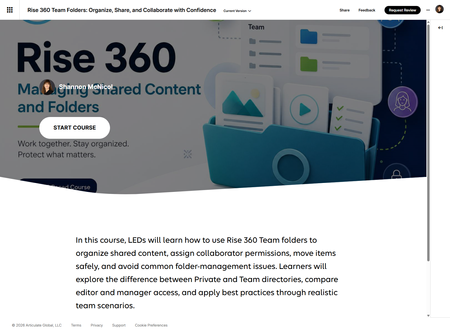
Okay, I owe Rise 360 an apology. A public one. Right here. For a long time, I was that person. The one muttering under their breath about how Rise was "too rigid" and "not flexible enough" and "why can't I just make it do the thing." I used it because I had to. I tolerated it the way you tolerate a coworker who microwaves fish in the break room. 🐟 And then… Code Blocks happened. 🤔 Suddenly I could drop custom HTML, CSS, and JavaScript directly into Rise and build whatever I wanted. Interactive tabs. Scenario cards with reveal animations. A full permissions comparison table with filter toggles. A side-by-side AI Avatar video wrapper with bullet points that sync to the video as it plays — like, ACTUALLY sync, using JavaScript timeupdate listeners. Rise went from "I guess this works" to "wait, I can do THAT?" faster than I'd like to admit. My latest project is a 9-lesson Rise 360 course for Learning Experience Designers on Team Folders. The whole thing is built with Code Blocks and Articulate AI Avatars — branded with a full custom color system, video intros on every lesson, and enough JavaScript to make past-me very confused and present-me very smug. A few things I never thought I'd say about Rise: I built a custom play button overlay because Rise iframes block autoplay — and it looks amazing I embedded video directly into HTML as base64 so it's fully self-contained — one file, no dependencies I applied an entire brand palette via CSS custom properties and it just… worked I actually looked forward to opening Rise every morning. I know. I'm as surprised as you are. 😵 If you've ever felt like Rise had a ceiling — I'm here to tell you the ceiling is a Code Block and you can build whatever you want on top of it. What's the most "wait, Rise can DO that?!" thing you've ever built? Drop it below. I need to know I'm not alone. 👇 Rise 360: Managing Shared Content and Folders1KViews12likes9CommentsRisk Quest: Investigator Training
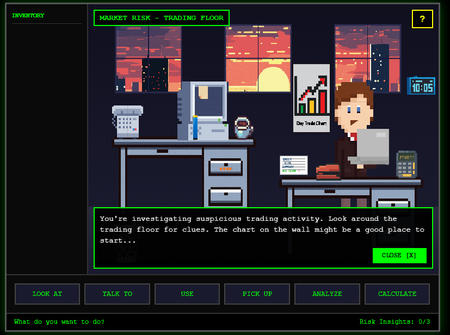
Code Block Experience Inspired by the old point-and-click adventure games, I wanted to build a simulation-style experience that lets learners have fun while actually practicing investigation skills. In this scenario, you step into the role of a newly assigned Risk Investigator trying to figure out why financial projections don’t match real-world returns. Projects like this usually don’t happen. Not because they aren’t valuable, but because they take time, money, and resources that most teams just don’t have. Fast builds are expected. Games are not. So instead of waiting for the perfect conditions, I used Rise Code Blocks, ChatGPT, stock images, and a lot of trial and error to build a playable proof of concept the team could realistically evaluate. The Risk Quest demo puts you directly in the investigation. You explore the environment, pick up and use objects, connect the dots, and report back what you’ve uncovered. If you’re not paying attention, you’ll miss things. That’s intentional. The project is broken into three parts: Risk Quest Demo Play the experience. Be the investigator. Figure out what’s going on. Risk Quest Evolution Walk through how the project evolved from v1 to the current POC. You can see what changed, what stuck, and what ideas didn’t survive contact with reality. Hidden Assets All of the graphics used in the experience and how they were stored and referenced directly in the Code Block as the look and feel evolved. And yes, this whole thing is heavily influenced by nostalgia. Did anyone else play these growing up? Zak McKracken and the Alien Mindbenders, Maniac Mansion, Sam and Max, Indiana Jones and the Fate of Atlantis, and my personal favorite, Monkey Island as Guybrush Threepwood. 😁 Take a look, share feedback, swap a memory or two, and enjoy.654Views11likes3Comments