review 360
1483 TopicsHow can I start a motion path where it ended in a previous slide?
I created a curved motion path for an icon in slide one. In slide two, I want that curved motion path to be a straight-line motion path, starting where the curved motion path ended in the previous slide. How do I accomplish this?Solved105Views0likes12CommentsRemoval of Comments After Publishing to Review In Rise?
I am currently working on a course in Rise and had just gotten feedback from my manager on my course. I decided to publish a new version to Review, but now when I go back to look at the comments that were originally there, it says the course has no comments. Has this happened to anyone else? And is there a way to get them back?(Kind of urgent) How do I make an icon animate across a map in multiple slides?
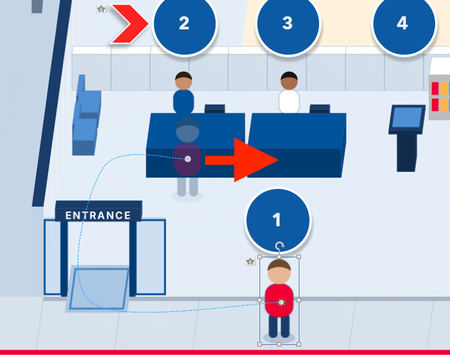
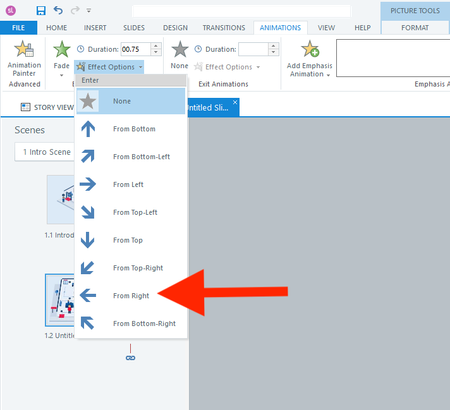
Hi everyone, I actually have two questions. I will start with the easier one first. Question 1 In a fade-in from the right animation, is there a way to adjust how far to the right the object starts? I don't want it to animate from off the right side of the slide. I only want it to start a few pixels to the right. Question 2 How do I animate the red shirt character below across 13 slides? I want it to follow each button from 1 to 13. I realize I should use the Motion Path. But what's the smartest way to use the motion path across slides? I have always found the motion path to be challenging. Thank you all for your help! :)74Views0likes3CommentsBrowse Review 360 should be searchable
My team has recently began to localize multiple course series into multiple languages. Due to requirements, each language iteration is published separately requiring each language version of a Storyline to be published to Review360 separately. For even further confusion, add that each storyline has the exact same start page (branding) and we are unable to match the correct Storyline piece to where it should go in the language-coordinated Rise course because we cannot read the translated title. Using the current setup for Browse Review 360 when inserting these items into the course, we can't tell which Storyline goes in which slot within the course. This would be so much easier if I could provide a screenshot, but, NDA. May I suggest that when inserting a Storyline block into Rise that the Browse Review 360 function be searchable by name (at the minimum) or allow folder searching versus the current jumble of files it currently displays?48Views0likes4CommentsVideo on Storyline slide stops playing when viewing in Review 360
Wondering if anyone else has encountered this issue. I have a Storyline course that has an mp4 video inserted on a slide. When I preview the course in Storyline the video plays fine without any issues. When I publish the course to Review 360 and go through the course, the slide loads and the video starts to play and then abruptly stops. I can't rewind and start over, can't fast forward...nothing. Anyone else run into this? Is something going on with Review 360?139Views1like9CommentsImprovements to the Review 360 + Rise 360 Review Process
Real‑Time Review Updates When reviewers access a Review 360 link and leave comments, they should be able to see updates in real time—without waiting for the author to republish or send a new link. Rise already allows real‑time updates when publishing LMS output, so extending this behavior to Review 360 would make collaboration significantly smoother and reduce downtime between revisions. Comment Linking to Specific Lesson Sections Even with screenshots and highlights, it can be difficult to find exactly where a reviewer’s comment applies—especially in larger courses. A feature that lets comments attach directly to a specific block, media item, or text element in Rise 360 (similar to slide‑anchored comments in Storyline or PowerPoint) would reduce time spent searching through lessons. Change Tracking in AI-Assisted Edits When AI makes adjustments—for example, replacing a term like “client” with “customer”—the only way to verify changes is by scrolling through the whole lesson. A “review changes” mode or a searchable list showing where edits occurred would help creators quickly confirm modifications and avoid missing anything. Also, giving the developer the ability to say I want this one changed, but not this other one would be beneficial. Improved Reviewer Navigation Flexibility When a reviewer receives a Review 360 link, they often must follow the course’s navigation rules (knowledge checks, continue buttons, locked progress). Even if restricted navigation is turned off, certain interactive elements still block progress unless completed. Reviewers should be able to freely jump to any lesson or section without needing to complete activities—saving authors from temporarily removing knowledge checks or continue buttons just for the review cycle. Overall Benefit These enhancements would dramatically reduce review time, eliminate duplicate work across multiple reviewers, and streamline development for anyone building courses for employers or clients.36Views0likes1CommentIn Storyline, how can I prevent the Player Next button from working until all layers are visited?
I am using Storyline. I have a large course with many slides. One slide has four layers in it. I want the player's next button to remain inactive until all of the layers are viewed. Each layer has several icons to be viewed, as well as a close button to go back to the main layer. How can I prevent the player's next button from being active UNTIL each layer has been viewed? I added a Storyline file to help with this solution.131Views1like6Comments