Forum Discussion

Recent update to Storyline breaks LMS resume
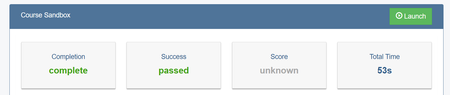

We’ve also been experiencing this exact issue with Storyline and HR Learn LMS. We made some content updates to three modules, and when we swapped the SCORM packages in the LMS course with the updated packages that were published after Storyline update 100, we’re getting the same prompt to resume screen with inoperable Yes and No buttons. Our modules are all set to “Always Resume” so this prompt should NOT be happening. We then tested a fourth module that was authored by different Instructional Designer, in a separate course and got the same Resume Prompt. This tells us that the original three modules developed by one ID were not corrupted files and that this is a global Articulate or LMS issue.
We’ve submitted two tickets to Articulate, their response:
“Starting with Storyline 360 Update 100, we improved how resume data is stored in our courses. As part of this change, the resume data structure was updated. While many LMSs (like SCORM Cloud) automatically clear older resume data when a new course version is uploaded, some platforms—such as your LMS—may retain the older data.
This can cause problems when a learner tries to resume an updated course. Since the old resume data no longer matches the new structure, it may lead to errors or unexpected behavior when the course loads.
We recommend asking learners to choose “Restart” instead of “Resume” when prompted to avoid issues. This ensures they start fresh with compatible data.
Just a quick note: the resume data is considered corrupted or incompatible when transitioning between pre- and post-Update 100 versions of the same course. Unfortunately, this is a permanent state—it can't be recovered once the data is incompatible.
On the other hand, if all SCORM packages for the course were published using Update 100 or later, you shouldn’t encounter this issue, as the resume data structure remains consistent across those versions.”
We work for a large global manufacturer, with 85,000 users in our LMS and our content regularly requires updates. We need this fixed!

Hi TMerrifield!
Sorry to hear you've also been experiencing this issue!
I noticed that you're working with my teammate Robert through a support case. It looks like he replied to your e-mail sharing insight and suggestions.
If you have any follow-up questions, feel free to reconnect with him through your case!