Forum Discussion

Storyline issue – Layer not persisting during review since recent updates
Hello everyone,
I’m encountering an issue in Storyline that seems to have appeared after the most recent updates.
Context:
I’m using a question slide with:
- one Correct layer
- one Incorrect layer
I added a third layer called “Lock”, designed to hide the Next button.
Main slide:
- Standard question slide
- Next button visible after answering
Correct / Incorrect layers:
- Display feedback
- Next button available to proceed
Triggers in Correct / Incorrect layers:
Lock layer:
- Hides the Next button
Trigger logic:
- The “Lock” layer is triggered when the learner clicks the “Next” button
- Its purpose is to prevent navigation when the slide is revisited
- This is mainly used during review mode via a lightbox (recap)
Expected behavior:
When the learner revisits the slide in lightbox/review mode, the “Lock” layer should remain active, ensuring that the Next button stays hidden.
Current behavior:
- The “Lock” layer does not persist upon revisit
- The slide returns to its base state with the feedback
- The Next button becomes visible and clickable again
- This breaks the intended restriction logic during recap
Additional info:
- This setup worked correctly prior to the recent updates
Question:
Has anyone experienced similar behavior with layer persistence or slide state reset in lightbox/review mode?
Could this be linked to a recent change in how Storyline handles layer states or slide revisits?
Thanks in advance for your help!
Hi everyone,
I have some great news to share.
We just released another update for Storyline 360 (Build 3.114.36655.0), and this includes a fix for the issue you encountered where layers set to “Hide other layers” didn’t behave as expected when revisiting a slide.
This was related to slide layers not maintaining their expected behavior after a slide revisit, and it has now been resolved.
To take advantage of this update, please open the Articulate 360 desktop app on your computer and click the Update button next to Storyline 360. You can find step-by-step instructions here.
SafeTeamAcademy, I especially appreciate you sharing the impact this had on your team’s timelines. I can understand how challenging it is to spend time investigating something internally before confirming it’s tied to a product issue. Thanks as well for your feedback on proactive communication, it’s really valuable and something we’re continuing to look at improving.
Please let me know if you’re still seeing any trouble after updating or if you have any questions!

11 Replies
- NateMarshall-91Community Member
We are experiencing the same behavior and it is isolated to the new version. I'm the only one that did not get the update loaded last night and when I publish a review link of the same course the issue goes away.
our issue is an interaction behaves properly on first use of the slide and then if a learner revisits the slide the layers don't recognize the "hide other layers" checkbox and the layers are only visible from the bottom up. Hi SafeTeamAcademy,
Thanks for the detailed breakdown, I can see how this would be frustrating, especially since your setup was working as expected before.
I also appreciate NateMarshall-91 chiming in and sharing what your team is seeing. Based on testing and similar reports, this behavior is related to a bug in the latest Storyline update (Update 114), particularly affecting how layers behave when revisiting a slide.
Specifically, there’s an issue where layers set to “Hide other slide layers” don’t behave as expected after a slide is revisited, which aligns with what you’re seeing with your “Lock” layer not persisting and the Next button becoming available again.
This worked correctly in previous versions, so it’s not related to your setup or trigger logic.
This has been reported to our product team and is currently under investigation.
In the meantime, a possible workaround is to revert to a previous version of Storyline (Build 3.113), where this behavior works as expected.
- SafeTeamAcademyCommunity Member
Hello EricSantos,
Indeed, we reverted to a previous version this morning (3.113), and everything is working properly again. Thank you! 🙂
Please feel free to keep us informed once the issue is resolved in a future update.
We would also like to share that investigating this issue internally, before identifying it as a Storyline bug, required several days of work and impacted our timelines. In that regard, it could be very helpful for us if known issues or bug reports were communicated proactively, as it would help avoid unnecessary investigations and reassure teams when unexpected behavior occurs.
Thank you again for your support and for the valuable feedback you always provide.
- KelleyConradCommunity Member
I'm having several issues with the latest version and had to revert to the prior version. Audio doesn't play correctly on layers, triggers are inconsistent, layers don't work as expected, etc.
- SafeTeamAcademyCommunity Member
Hello KelleyConrad
You’re absolutely right to flag this.
From our perspective, it would indeed be very helpful if customers were proactively informed when known issues or regressions are identified in a new update. In our case, we spent several days investigating these malfunctions internally (audio on layers, inconsistent triggers, unexpected layer behavior), which significantly delayed our production timelines before we were able to confirm that the root cause was linked to a recent update.
Having earlier visibility on known bugs would allow teams like ours to quickly rule out internal configuration issues and adapt accordingly, rather than losing valuable time troubleshooting.
Thanks again for your additionnal message !
Hi everyone,
I have some great news to share.
We just released another update for Storyline 360 (Build 3.114.36655.0), and this includes a fix for the issue you encountered where layers set to “Hide other layers” didn’t behave as expected when revisiting a slide.
This was related to slide layers not maintaining their expected behavior after a slide revisit, and it has now been resolved.
To take advantage of this update, please open the Articulate 360 desktop app on your computer and click the Update button next to Storyline 360. You can find step-by-step instructions here.
SafeTeamAcademy, I especially appreciate you sharing the impact this had on your team’s timelines. I can understand how challenging it is to spend time investigating something internally before confirming it’s tied to a product issue. Thanks as well for your feedback on proactive communication, it’s really valuable and something we’re continuing to look at improving.
Please let me know if you’re still seeing any trouble after updating or if you have any questions!
- StephenMorelandCommunity Member
Was the latest build pushed to all users? I'm still on v3.114.36620.0 and there's no update button on my Articulate360 window.
Hello StephenMoreland,
Thanks for calling that out, I can see why that would be confusing.
A quick note on how updates are delivered, even when a new build is released, it may not appear right away in the Articulate 360 desktop app.
In this case, you can manually check for the latest version by clicking the drop-down menu in the upper right corner of the Articulate 360 app and selecting Check for Updates. I’ve included a screenshot below showing where to find that option.
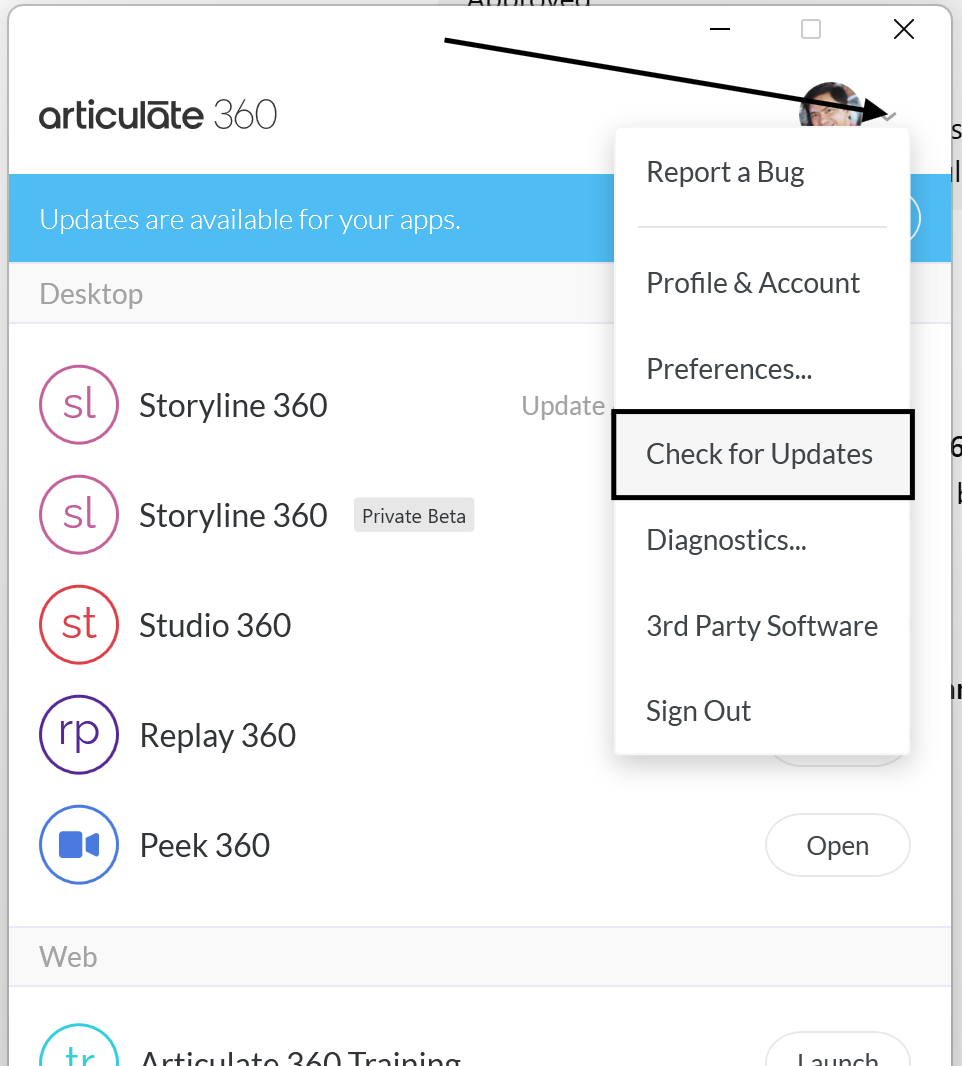
One thing to keep in mind, the Articulate 360 desktop app can update automatically in the background, but updates for Storyline 360 are installed separately, so they won’t always show up unless you check or install them directly.
If you’re still not seeing the update after checking, it’s also possible that automatic updates are disabled or managed by your organization’s IT team.
Let me know how it goes after trying that.
- VictoriaSubl967Community Member
I am having problems with slide layers overlapping when reviewing in 360Review AFTER updating. I am currently on V.3118.37034.0 and slide layers (on first visit!) are overlapping even though they are set to "hide other slide layers".
- SafeTeamAcademyCommunity Member
Bonjour VictoriaSubl967,
I'm adding EricSantos to the conversation so they can assist and provide you with a response.
Have a good day
Hi VictoriaSubl967,
Sorry to hear that Layers from your Storyline course are not playing back as expected in Review.
The bug we resolved in Update 3.114.36655.0 only occurred when revisiting a Slide. Testing now in Update 3.118.37034.0, I'm unable to replicate the same behavior on initial playback or when revisiting. It's possible the issue you're seeing could be related to your specific build. Do you mind uploading the affected .story file so we can take a closer look? Feel free to share your project file here in the discussion or privately through a support case.
In the meantime, if you're already publishing from locally-stored .story files, please try a repair of your Storyline installation to see if that improves the issue.
Also, we recently shipped a new update for Storyline 360, which is version 3.119.37125.0. I suggest updating your Storyline installation when you get the chance.
Looking forward to hearing from you!





Related Content
- 5 months ago
- 1 month ago