articulate 360
2272 TopicsOne Question Quiz/Survey
I would like to conclude my module not with a knowledge check, but with one question on how the audience perceive the topic. A simple question, with 5 answers. I tried to make this into a quiz with 1 MC question, but I am stuck in workarounds how communicate the chosen option to in Cornerstone via SCORM 1.2. Any ideas are highly appreciated!Articulate 360 Open Forum: Ask Your Questions
There's a lot to explore with the new Articulate 360, and we know there will be questions along the way. Not sure where your question fits? Start here. This is the place for general questions or questions about the launch that don't fit into one of our dedicated Q&A threads. If your question is specifically about Frontline, new content formats, Nova & credits, integrations, or team management, head to the topic-specific Q&A below, where the Articulate team will be answering questions. Explore the Q&A threads Frontline New Content Formats Nova: AI & Credits Integrations Team Mangement Looking for something else? For questions that require us to look at your specific account, subscription, billing information, or troubleshoot a technical issue, our Support team is the best place to get help: Contact Support And if you're looking for help building something or want ideas from other community members, start a discussion in Exchange Best Practices.1.2KViews2likes10CommentsEmbed Youtube Video - Error 153
Hello, Has something changed in Storyline?! I'm trying to embed a YouTube video using "iframe". I'm copying the embed code from YouTube, but it says 'Watch video on Youtube - Erro 153...'. I used: <iframe width="560" height="315" src="https://www.youtube.com/embed/dqaN76shzJE?si=F_NwSZruLu5BJAU6" title="YouTube video player" frameborder="0" allow="accelerometer; autoplay; clipboard-write; encrypted-media; gyroscope; picture-in-picture; web-share" referrerpolicy="strict-origin-when-cross-origin" allowfullscreen></iframe> Any/all help would be appreciated. Thanks2.3KViews0likes15CommentsRISE: New launch page w Library
We appreciate all the updates that Articulate has been making with custom blocks, and many, many other features these past 2 years. But today, under rigorous deadlines (our team), we are wishing we could revert back to the "legacy" UI for the opening of RISE (launch page). The new top layer (Library) seems confusing when one is in a dreadful hurry, and although I've clicked through many times today, it's not becoming intuitive, but confusing. In addition, I can no longer readily determine if I am in "Review 360" or "RISE authoring" whereas before, it was obvious, and easy to move around, know where I am. (New icons indicated "in review" or "published" have no meaning to us; but we realize every firm has their own preferred workflow.) (And yes, I do recall about 3 to 4 years ago upon a UI change involving folders, there was much controversy and we all adapted.) With changes so dramatic, I am wishing for a 'revert' to legacy UI button (like I've seen in other portals & dashboard). Nevertheless, totally regard Articulate as a top-notch software that keeps evolving, growing, and keeping up with change, innovation, and technology!123Views1like2CommentsQ&A: Nova — AI, & Credits
With the new Articulate 360, there’s even more you can do with AI, including new capabilities powered by Nova, your AI agent for advanced training creation. Nova works across Articulate 360 and Frontline to take on more complex, production-heavy workflows. Nova-powered actions use credits, while core AI capabilities, like image generation, instant convert, AI audio, and more, are included with every Articulate 360 seat and don’t use credits. Meet Nova and learn what it powers 📚 Learn more Explore these resources to learn more about Nova, AI, and credits: Using Nova for Advanced Training Creation — Explore Nova-powered capabilities, including AI Avatars, multi-format translation, and Frontline kit generation. Understanding Credits — Learn about credit usage, management, and purchasing across Articulate 360 and Frontline. Get More Value From Your Credits — Explore ways to make the most of your available credits. Articulate 360 AI User Guides — Find documentation and guidance for the core AI capabilities included with Articulate 360. 👋 Meet the team I’m Luciana, and I’ll be answering your questions about Nova, AI, and credits. As a Customer Happiness Specialist here at Articulate, I’m excited to help you navigate what’s new and learn more about how these capabilities fit into your creation experience. I’ll be joined by KellOrding and @Aaron Zitzer, who will also jump into the conversation and share their expertise. 💬 What are your questions? Ask them in the comments below. Looking to add more credits to your account? Contact your Articulate account representative to discuss your options. For account-specific questions or technical troubleshooting, our Support team is the best place to get help: Contact Support.3KViews0likes50CommentsShow Object on second visit/revisit
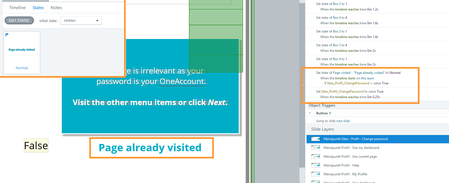
I simple want a text "page already visited" to appear at the second visit of a layer. But the text does not show up. 2 triggers: First Trigger: I set the status to "Normal" of the "page already visited"-textbox from status "invisible" on timelinestart of the layer IF variable Sites_Profil_ChangePassword is true. Second Trigger: I let the variable Sites_Profil_ChangePassword to switch to "Right" from initial "False" state when the timeline reaches 0,25 seconds of the layer. The textbox is on top of all elements in the layer and always visible. Layer Property is "Reset to initial state". This setup is working in a new file and also within the same file with a new test layer. Any ideas? As I can't create a new SL-file as there are weeks of work in it.Rise 360 Connected Package not working for learners after republishing
Hi everyone, It looks like the Connected Package feature in Rise 360 is not working correctly after a course update. We are seeing this issue specifically with learners who had already started the module before the update. After making changes to the Rise course and republishing it, these learners get the following page when they try to resume or return to the module from the LMS: “Hmm... We can't seem to find the page you're looking for.” The issue seems to be related to the learner’s previously saved progress/resume data. We have noticed that the course works correctly only when the “Reset progress after updates” option is enabled when republishing the Connected Package. If this option is not enabled, learners who had already started the course before the update are unable to resume it and encounter the error shown in the attached screenshot. Has anyone else experienced this behavior with Rise Connected Packages? Is this expected, or could there be an issue with how previously saved progress is handled after an update? Thanks for your help!Solved245Views0likes2CommentsQ&A: New Content Formats — Guides, Decks, Interactive Video, & Scenarios
Using Articulate 360 AI, you can generate guides, training decks, interactive videos, and scenarios, giving you more options for turning your expertise and source material into the right format for the moment. 📚 Learn more Explore the documentation for each of the new formats: Guides: Articulate 360 AI: Generating a Guide Training Decks: Articulate 360 AI: Generating a Training Deck Interactive Video: Articulate 360 AI: Generating an Interactive Video Scenario: Articulate 360 AI: Generating a Scenario 👋 Meet the team I’m Eric, and I’ll be answering your questions about new content formats. I work on our Customer Happiness team supporting the E-Learning Heroes community, and I'm excited to see how you all put these new formats to use in your own courses and training. I’ll be joined by Rachael_Silvano and Liam_Eagen, who will also jump into the conversation and share their expertise. 💬 What are your questions about the new content formats? Ask them in the comments below. For account-specific questions or technical troubleshooting, our Support team is the best place to get help: Contact Support.2.1KViews3likes79CommentsUnable to edit attachment in Interactive Video
Has anyone else run into this issue with Interactive Video in Articulate 360 AI? When I add an Attachment block, the content edit (pencil) icon that used to appear in the top-left corner seems to be missing. As a result, I'm unable to edit the attachment within the block. Just wondering if this is a known issue, a recent update, or if I've overlooked something. Thanks!32Views0likes1CommentQ&A: Integrations
Articulate 360 now includes new ways to connect the tools and content you already use to your training workflow. You can bring source content in from Google Drive and OneDrive, connect supported AI tools through Articulate MCP, and publish training directly to Thinkific. Learn more about the new integrations 📚 Learn more Explore documentation for the new integrations: Importing content from Google Drive Importing content from OneDrive Using Articulate MCP Publishing training to Thinkific 👋 Meet the team I’m Steven, a Customer Happiness Specialist here at Articulate, and I’ll be answering your questions about Integrations. I'm looking forward to helping you get the most out of this new tool, showing how it can speed up your workflow, and make authoring feel a lot less manual! I’ll be joined by AlyssaGomez and Aaron Zitzer, who will also jump into the conversation and share their expertise. 💬 What are your questions about integrations? Ask them in the comments below. For account-specific questions or technical troubleshooting, our Support team is the best place to get help: Contact Support.470Views0likes11Comments