community
1162 TopicsHow Can I Make Articulate AI Avatars Continue Natural Movements After They Finish Speaking?
How can I make AI avatars appear more natural and continue subtle idle movements after they finish speaking? Currently, my avatars freeze immediately after their final word, which makes the ending feel abrupt and unnatural. In HeyGen AI, there is a pause feature in the script editor that allows me to add a few extra seconds so the character can remain on screen and react naturally after completing a sentence. I haven't found a similar option in Articulate. The Advanced Settings don't appear to provide this capability, and many of the available settings seem inaccessible to me. Is there a way to create a more natural pause or idle animation after an AI avatar finishes speaking?Storyline SCORM export suddenly much larger than the Storyline project
Hi everyone, I’m having a strange issue with a Storyline 360 project and I’m hoping someone can help me understand what’s happening. I have a Storyline project that was originally 206 MB. When I published that version as SCORM, the exported SCORM package was 246 MB. I needed to get the SCORM package below 230 MB for our LMS, so I started compressing the images within the project. After compressing and replacing the images, I managed to reduce the Storyline project file from 206 MB to 196 MB. However, when I published this new version as SCORM, the package unexpectedly increased to around 270 MB. So the sequence is: Storyline project: 206 MB → SCORM: 246 MB Compressed/replaced images Storyline project: 196 MB → SCORM: ~270 MB What is particularly strange is that when I checked the published SCORM files, I found that the images were actually being increased in size during the publishing process. For example, I had an image that was 104 KB in the Storyline project. The Media Library also showed it as 104 KB. However, when I located that same image in the exported SCORM package, it was around 3 MB. I found this happening with a lot of the images — the file sizes in the published SCORM were significantly larger than the corresponding images in the Storyline project. I've also checked the Media Library and the largest images currently in the project are around 2.1 MB, so there doesn't appear to be one particularly large asset causing the increase. I extracted the SCORM package to investigate further. The extracted package is around 300 MB, while the story_content folder is only 6.9 MB, so the majority of the size appears to be coming from elsewhere in the published output. The really strange thing is that the SCORM export was working fine earlier today. The original 206 MB project exported to 246 MB. It was only after I started compressing and replacing images that the SCORM output started increasing to around 270 MB. I'm running Storyline 360 on Windows through Parallels on a Mac. Has anyone experienced anything similar, where images are becoming significantly larger when Storyline publishes them to SCORM, even though the source images in the Storyline project/Media Library are much smaller? I'm trying to understand why Storyline is increasing the image sizes during publishing and what could be causing the SCORM package to jump from 196 MB to 270 MB. Any advice would be massively appreciated! Thanks!49Views0likes2CommentseLearning professional passionate about engaging learning, AI, and emerging technologies.
Hey everyone! 👋 I’m Seema. I’ve been working in the L&D/eLearning space for around 10 years, mainly around instructional design, technical training, course development, and content review. A big part of what I enjoy is taking something technical or complicated and figuring out how to make it easier and more engaging for learners. I work with tools like Articulate Rise, Storyline, Docebo, and PowerPoint, and recently I’ve been expanding my skills into AI. I’m always interested in learning how others approach course design, learner engagement, AI in L&D, and new eLearning technologies. Looking forward to learning, sharing, and connecting with you all! 😊12Views1like1CommentMatching Question Randomizing Both Sides
I created a matching question as part of a final assessment for a course, but I can't figure out how to make the quiz randomize only one side of the exercise. For this particular question, users are matching an action with the appropriate order that action is taken (Step 1, Step 2, Step 3, etc.). I want the actions column randomized, but want the steps column to show up in numerical order, with Step 1 at the top and Step 5 at the bottom. I have tried toggling the Column Freeze setting to freeze matches, toggling it to freeze choices, and swapping which column the steps and actions are listed, but it always randomizes both sides. I did not have this issue while creating matching questions for knowledge checks earlier in this course (the right column always stayed in order), just this final quiz assessment. Any tips on how to fix this? Thanks!312Views2likes6CommentsDid the accessibility checker cause duplicate closed captions?
Hey, First off, I'm totally new to the accessibility checker before I publish in Articulate Storyline. After I selected almost all the issues (I really should study this accessibility tool before moving forward), I now see duplicate closed captions when I play Storyline as a published file in Review 360. How do I correct this issue? Thank you for your help,14Views0likes0CommentsCommunity Support for Accountability-Reported for Review
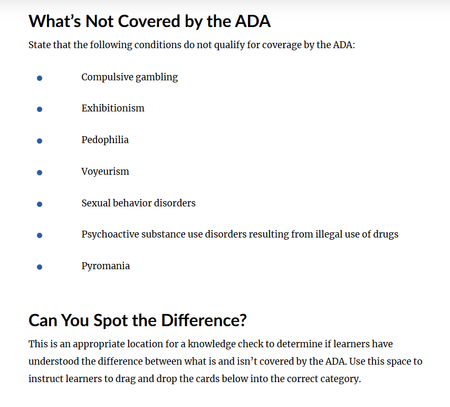
I am asking for community support for accountability to have Articulate change the language used in a course shell, using the example of pedophilia as a "condition" not covered by the ADA. While previewing the course shell for 'ADA Compliance for Employees', under 'Defining Disabilities' lesson, the attached screenshot is a list of examples of "conditions" not covered under ADA. I cannot fathom that whoever at Articulate created this content couldn't come up with ANY OTHER EXAMPLES. This content needs updated asap to include a list of appropriate reasonable "conditions" not covered by ADA. Disappointing content from an industry leader.105Views0likes2CommentsUnable to install Storyline 360
I was facing issues updating Stroyline 360, it would start the download and the fail with the error code 0x2EE7. Followed the below steps suggested by Articulate Support: Solution A: Fix the Storyline installation by following the steps in this article https://www.articulatesupport.com/article/Articulate-Storyline-360-How-to-Fix-Unexpected-or-Erratic-Behavior Solution B: Remove all Articulate 360 files and registry keys from your computer so we can start completely fresh: https://www.articulatesupport.com/article/Articulate-360-Script-to-Remove-Local-User-Data-for-Articulate-360-Apps-on-a-Windows-PC The IT team and I uninstalled all Articulate products and ran the 360CleanUp file. I installed Articulate 360, which installs fine, however, face an issue while installing Storyline 360. It starts the download and then fails, and shows the same error 0x2EE7. The IT team has confirmed that there is no event which is getting blocked at the proxy/firewall. Could you please share the link which is access to download/install Storyline 360, so we can check the access to the link. Please let me know what else can we try to fix this. I am unable to install Storyline 360, hence desperate to get this fixed.Solved50Views0likes4CommentsText to Speech problems
Hi there I don't know what's happened in some of my Articulate 360 eLearnings but when I go to edit the Text to Speech text on a slide it's showing me text from the previous slide, although it previews the correct text. I'm very confused :( This has also happened to a colleague so it's not just my pc or work. I'm using the latest version. Any thoughts on what's going on would be much appreciated :) Thank you.Solved123Views0likes8CommentsA True Test Out Option?
Hi everyone, My colleagues and I are looking into the skip ahead functionality in Rise. We have yearly compliance education in our org and often, more seasoned employees become frustrated by having to review information that they are very aware of. Essentially, we'd like an option for learners to take a pre-test at the beginning of the course. If they pass, then the module is marked as completed, they're taken to a quick summary page, and they can close out of the course. If they fail, they then have to review more content and take a separate quiz to pass. I've played around with all of the settings, and I can't figure out a way to do this. I'm finding that if I set the first test/quiz to no retries, the navigation is locked down and I'm unable to move forward in the course until I pass it (rendering the whole point a bit moot). Am I missing something or is this not possible as I've written it out? Thanks so much in advance!75Views0likes2CommentsRise Continue Buttons Disappearing
Hi everyone, Our team is running into an issue with Rise courses in our LMS (Moodle). When a learner clicks the browser’s back button, the Continue buttons inside the Rise course disappear. The only workaround we’ve found so far is to delete the learner’s attempt, which forces them to restart the course from the beginning. Has anyone else experienced this? If so, have you found a solution or workaround that doesn’t require resetting their progress? Thanks in advance!380Views0likes9Comments