Forum Discussion

Course resets after completion despite resume settings in Player
Hi, my team is facing an issue in which all our courses, after being completed by students, completely reset.
Our courses all have Restricted menu navigation so that users may not jump ahead, but may return to slides they've already visited.
We have tried both "Always resume" or "Prompt to resume" on restart in the Player settings.
Experiencing the following behaviors:
- GOOD: If a user is part way through a course, exits it, then returns, the course successfully resumes where the user left off.
- PROBLEM: If a user completes a course (passed, marked as complete in LMS), exits it, then returns, the course resets - meaning the user is dropped on the first slide of the course rather than last, the menu becomes fully restricted as if the user was just beginning the course for the first time, and all slides set to Resume Previous State must be watched all the way through again. This is preventing use of completed courses for reference material.
How do we get completed courses to save their menus' fully "unlocked" states?
(Note: We are using Storyline 2.)
70 Replies
- KrystineHundleyCommunity Member
I know this is Storyline, but I am finding it also occurs with Rise courses in our LMS. Bookmarking is working fine. If I close and reopen while in progress, it brings me back to the lesson I left off at. If I complete the course and close, it also brings me back to the Conclusion page (Last page in the course the user last visits.) All other lessons are then locked and I have to go back to the first lesson to resume.
- RenGomezStaff
Hi Prajwal,
Good call to open a support case! I see Jopney has been testing your file and has suggested some next steps.
Keep at it with her in case you have any further questions!
- PrajwalNDCommunity Member
Hey,
Although a support case has been opened, we are yet to find a solution.
Jopney has validated our course and all the course settings seem to be fine.My only concern is that a particular course with similar settings is working fine, but when we use the same course template and exact same settings, the desired output is not generated on the LMS. I've opened a support request with our LMS provider as well.
I'm curious to know if other members of the Articulate community on this thread have received a solution for similar issues? If so, could you please help me out?
- PrajwalNDCommunity Member
Hi Vincent,
Thank you for the quick response!
To give you a little bit more clarity:
After completing the course and re-opening it, do the results reset as well? - It resets to the first page some times and random questions at some slides (inspite of selecting Resume Saved state in each slide).
Have you had a chance to test the course in SCORM Cloud to see if the issue persists? - Yes, I have tested it and it is not working.
When publishing the course, which Output Option is selected?- SCORM 1.2, Report to LMS- Completed /Incomplete. Tracking- Track via course completion trigger.
An idea that I hope will help is to change the Player Property from Always Resume to Prompt to Resume- We have it already set to Always resume. This is because if we enable the Prompt to Resume, it will also add-in a feature to Resume and Restart, this is not what we are looking for.Please keep us updated on this and let us know if you have any questions! - I am in touch with Jopney Sotomayorj from the Support team on this.
As we have a team license, we have 2 out of 3 people currently facing this issue.Do let me know if you would require anything else.
- LaurieStephanCommunity Member
Hello,
I have been in contact with a support person who is not able to resolve the issue and he's been at it all day. Sounds like it's a bug.
Greetings, Lisa and SIM!
Thanks for taking the time to write up that helpful description. We'd love to help you both find the culprit, especially since the problem is happening SCORM Cloud!
You mention that any further access should be in review mode when learners complete and pass the course. Could a 'Review Quiz' button work for your design? That way, learners can go back to review the answers they submitted without changing their answers or retaking the quiz.
Also, would it be possible for each of you to share your file to help us illustrate this experience? If that works, please use this secure upload link.
I'm sorry for the trouble, but hopefully we can offer some tailored help!
- LisaSpirko-3976Community Member
Hi Katie, mine are either standalone software demos with no quizzes, or courses with quizzes in separate SCORM outputs. There are no quizzes embedded in my courses (an LMS fix... long story...). This is occurring even in outputs where there are no quizzes. In those cases, completion is marked with either a course completion trigger on the last slide or by the number of slides viewed.
Thanks,
Lisa
- LaurieStephanCommunity Member
I too am having the same issue. Storyline 360, Using TinCanAPI publishing to LMS. Course shows passed, based on a quiz results slide, but when user re-enter the course, even though player is set to resume saved state, course starts completely over. We want the first time use to be with restricted navigation but subsequent uses to be as reference so do not want it locked down.
Yikes! Looks like I just missed you when replying, Laurie!
We'd love to lend a hand if you can share your course with us. We delete all files after troubleshooting!
- LisaSpirko-3976Community Member
Hi Articulate staff,
Has there been any resolution to this issue? I'm encountering similar issues to the above folks.
Using SCORM 2004, 4th ed and Bridge LMS. Navigation is set to restricted (locked down on first attempt, free after completion). Prompt to resume is turned on. If the learner completes the course, closes it, and then relaunches it, they are prompted to resume or start from beginning (expected). However, if they opt to start from the beginning, the navigation is locked down again and they are forced to take the course over again.
This is unacceptable. Once the course has been completed and passed, any further access to the course should be in review mode only. The course should never reset the learner's status to incomplete and lock down the course again unless the LMS admin has manually reset their attempts in the LMS itself.
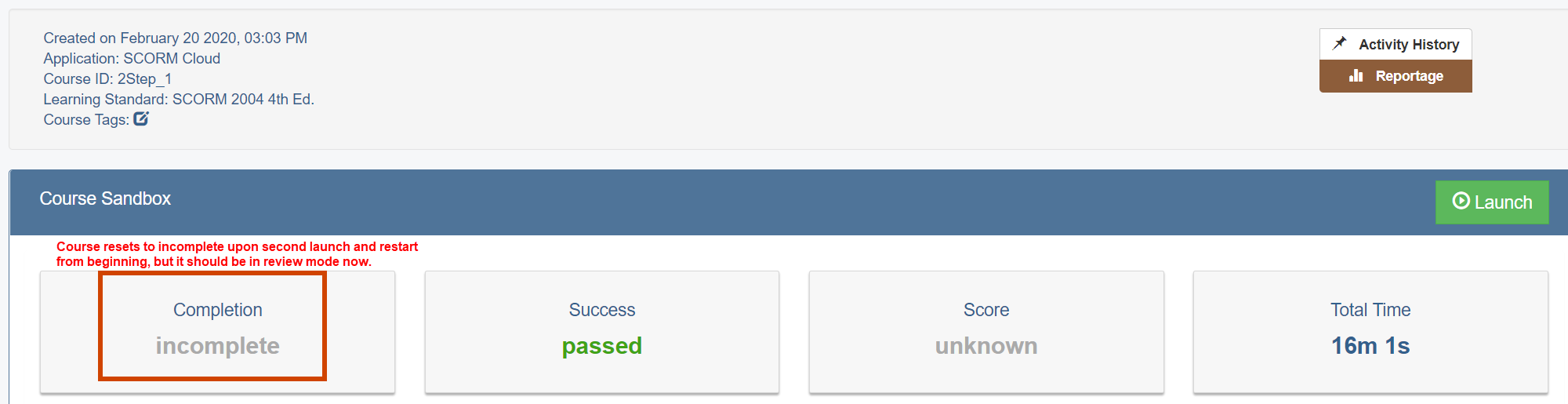
I have confirmed that the issue is occurring in SCORM Cloud. See attached screenshot -- completion status was reset to incomplete and navigation was locked down again after I launched the completed course and opted to restart from the beginning. As it is now, I will never be able to use prompt to resume if I also have navigation set to restricted for first pass, and the alternative (always resume) is not good when our internal learners need to review changes in an updated course but not be forced to sit through the entire thing.
I see above that blame is often cast at the LMS, but I do not believe Bridge is the culprit in this instance. Their documentation specifically states that once a learner has completed and passed a course, it's a done deal: Any further data sent to them by the SCORM is essentially 'ignored' by the LMS unless the admin resets the learner's attempts.
I know that there is discussion above about manually tinkering with the configuration.js file, and in my opinion, this is unacceptable. We should not have to tinker with Articulate's output files to work around poor functionality.
I'd like to see Articulate expand the options related to navigation lockdown and course restart to allow us to specify what means to restart a course from the beginning (i.e., resetting course status vs. jumping to the beginning in review mode).
I appreciate any update that Articulate staff can provide, and I'm happy to create a feature request if that will help.
Thanks,
Lisa
- SalvadorFernandCommunity Member
Totally agree with you, I am facing a similar issue, I can get the Custom Menu to unlock on Review mode by setting and calling a variable, my problem is on the second attempt (Redo Mode) everything gets reset just as the first attempt.
Hello Salvador!
Our team is happy to help! Do you mind sharing your project with us so we can see what you've created so far? Here's a secure upload link. We'll reply after reviewing the project. Lastly, we'll delete the file after troubleshooting.
- MarcelSteffen-1Community Member
In my case, the issue came itself from the LMS I was using.
I just had to fill one empty fields with a translation from German to English in the prepared course.
Afterward, miraculously everything worked as it should have done before.
- MarcelSteffen-1Community Member
Thank you Ren,
I tested in Scrom Cloud. I face the exakt same issue there as well. I already applied the changes in Configuration.js (var REVIEW_MODE_IS_READ_ONLY = false;)
Further more, when I passed a certain slide in the training and close the window, I get back to exactly that slide when I reopen it. It's a bit strange for me, as this is not happening in our LSM (avendoo).
- VinceScomaCommunity Member
Hi Marcel,
Thank you for the additional information. Good call on opening a Support Case! I see that Angelo is currently testing your file and will provide more updates when he is finished troubleshooting.
Please let us know if you have any questions!
- PrajwalNDCommunity Member
Hi,
Is there any resolution on this ?
We have a Question bank of 20 questions (randomized), on the results Slide we are pushing a Complete/Passed status if the score is >90% and an Incomplete/Failure status if the score is <90%.
We also have a Resume saved state marked for all the slides, while bookmarking is working fine for all the pages, When we reach the Results slide and reopen the course from the LMS, the Course is re-opening from the 1st slide. We want it to open on the Results slide only. We have enabled the Player settings as Always resume. Please consider this as priority and provide a resolution at the earliest.
Due to company policy, we're not able to share the story file. Let me know if you would requrie anything else.
- RenGomezStaff
Hi Marcel,
Sorry to hear you're facing the same issue! Have you tried testing this behavior in SCORM Cloud? Checking your output in another LMS environment will help sort whether this is LMS related.
If this is urgent, feel free to reach out to one of our support engineers, and they can help troubleshoot and find a workaround if possible!
- MarcelSteffen-1Community Member
Hello,
Are there any news about this issue?
Would be very interested as I face the same issue (after completing getting back to the very start).










Related Content
- 10 months ago
- 2 years ago