Forum Discussion

How can I start a motion path where it ended in a previous slide?
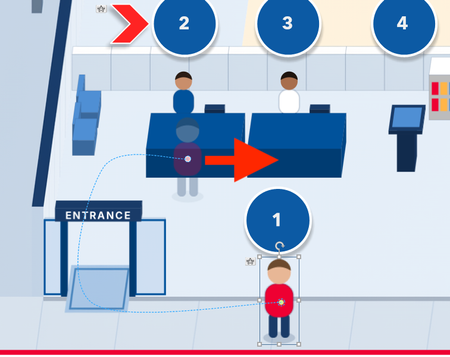
- 21 days ago
CJLu Here are the steps:
1. Duplicate your first slide as your second slide, which you have already done in your uploaded file.2. Add a straight-line motion path to the icon.
3. Move the endpoint of the straight-line motion to the position you need.
4. Move the start point of the straight-line motion to the position where the curved motion path ended.
5. Delete the trigger for curved motion in your second slide and that's it.


Your best bet is to make note of the ending coordinates of the curved path and set your character to start there in the 2nd slide.
- CJLu21 days agoCommunity Member
I found the X and Y access at the end of the curved path, but when I created it again it did not match. :(
- CherylStGermain21 days agoCommunity Member
If you want to upload the file I'm happy to take a look at it.
- CJLu21 days agoCommunity Member
Thank you. I have attached a file with the animation to which I am speaking of.
Related Content
- 1 year ago