Forum Discussion

How can I start a motion path where it ended in a previous slide?
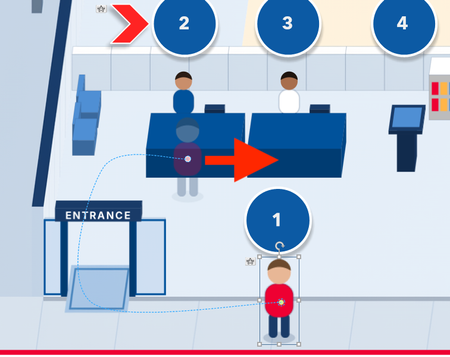
- 21 days ago
CJLu Here are the steps:
1. Duplicate your first slide as your second slide, which you have already done in your uploaded file.2. Add a straight-line motion path to the icon.
3. Move the endpoint of the straight-line motion to the position you need.
4. Move the start point of the straight-line motion to the position where the curved motion path ended.
5. Delete the trigger for curved motion in your second slide and that's it.

I found the X and Y access at the end of the curved path, but when I created it again it did not match. :(

If you want to upload the file I'm happy to take a look at it.
- CJLu21 days agoCommunity Member
Thank you. I have attached a file with the animation to which I am speaking of.
- CarlFink121 days agoCommunity Member
The two slides are the same. They seem to be identical. Neither one has a straight path.
- CJLu21 days agoCommunity Member
Yes, that's right.
I want to copy and paste the animation from the first slide and have it continue in a straight path in the second slide. I'm probably going about this all wrong. I just want the second slide to start where the first slide ends.

Related Content
- 1 year ago