Forum Discussion

How can I start a motion path where it ended in a previous slide?
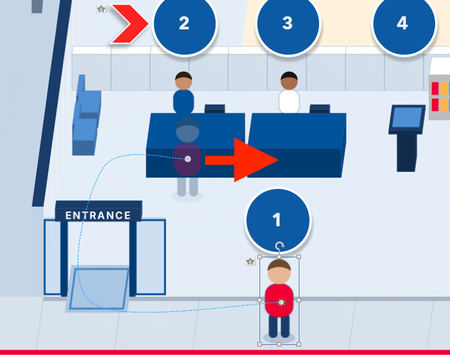
I want the curved path from slide A to be a straight path in slide B. And I want the straight path in slide B to begin where slide A's curved path ends.

I've done this. It's probably not the best method, but I will place a copy of the same character down roughly where I think the path will end. I make that character say 80% transparent and turn it's brightness to -100% to make it easier to compare positioning. And then I run the slide for testing.
The character off screen has the motion path. I've placed a modified copy of that character at the end of that path.
Then I see how far off I am. The modified character looks like it's about 4x4 pixels off. Once I've got it spot on (through testing) I simply Copy and Paste Special the modified character to the new slide. I can then undo the transparency and brightness, and add what ever new animation path I want.
Related Content
- 1 year ago