Forum Discussion

Removing the underline from a title - in Rise
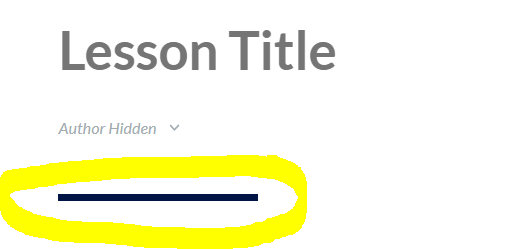
We want to remove the underline from the title - lesson name (appears under the author name). How can we do it?
Many thanks!
10 Replies
- KarlMullerCommunity Member
Rise does not provide a function to remove the line.
- RachelHelblingCommunity Member
Thanks for this!!!
- ClinicalOptimizCommunity Member
Does this still work?
- NicoleOosthuizeCommunity Member
It technically does still work, but it looks a little bit different now. Instead, add in the following:
.lesson-header__top-wrap:after {display: none;};You can then save your file and it should work.
- hkanstrmCommunity Member
If this brief line of code does turn the line of, please can this be added to course settings in next update of rise? That would be nice.
- ClinicalOptimizCommunity Member
I am unable to save code changes so this option does not work for our site.
- ClinicalOptimizCommunity Member
I was able to export the Rise module and edit the main.bundle.css by adding line at end and save. But how do I import this back into Rise to test out? I'm not currently seeing a way to import back. Ideas?
.lesson-header__top-wrap:after {display: none;};- KarlMullerCommunity Member
Hi Clinical Optimization,
You cannot upload an edited ZIP file back into Rise.
You have to make the same edit every time you export a new version of the course.





Related Content
- 2 years ago
- 2 months ago