Forum Discussion

(Kind of urgent) How do I make an icon animate across a map in multiple slides?
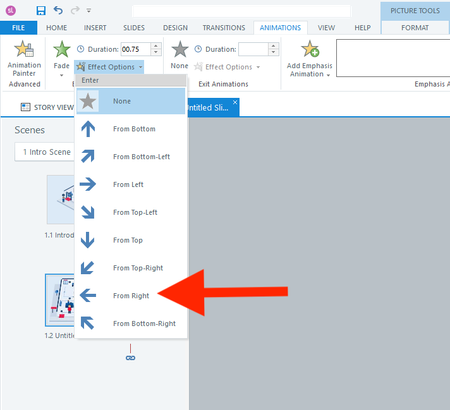

Question 1
There is not. All of those "From" animation effect options begin from outside the screen and all of the "To" ones go outside it as well. When I want this effect quickly, I combine a Fade entrance animation (no Effect Options) and add a Motion Path with the same duration. If setup right, the effect is that the object translates as it fades in. The distance and Path Options of the motion path determine the look.
If you're comfortable with JavaScript, the API allows you to either animate with GSAP, CSS, or some simple opacity and motion scripting with Storyline's JavaScript API. That would let you get real granular with it.
Question 2
The easy way to use the motion path across slides it to have multiple motion paths. When a slide starts, the character follows the motion path to the next node, assuming by animated you mean translating from node to node. If you're fine with him jumping to each node, he could be the thumb of a slider controlled by a variable that increases as each slide is seen. If the learners can go backward, the slider would also make it easy to position the character for those retroactive nodes too without getting into a bunch of duplicate-but-backward triggers.
- JudyNollet22 days agoLegend
See a way to answer question 1 without JavaScript in my earlier reply. 😄
