Forum Discussion

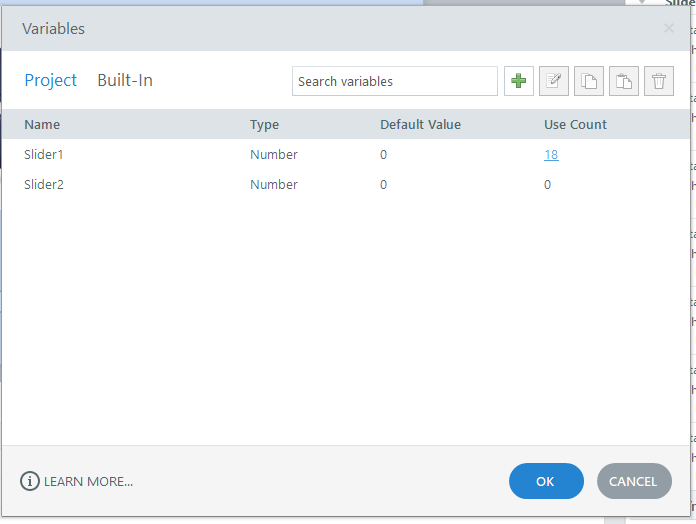
Why do I always get a error report when I click on variables user count?
When I click on the user count in the variable window, I get an error report. This started happening on the Mac/Parallels and even on a PC Windows computer.
Can anyone help me? I put in a ticket with Articulate, but they have not gotten back to me. I will add the Storyline files in the next reply.
Thanks! :)
Hello everyone!
Happy to share that we've just released a new update for Storyline 360!
In Update 118, we've included essential fixes and new features. We've released a fix for this behavior in Storyline 360.
Launch the Articulate 360 desktop app on your computer to take advantage of this update, and click the Update button next to Storyline 360. You’ll find our step-by-step instructions here.
Please let me know if you need additional help.

15 Replies
- CJLuCommunity Member
Here is a slider practice file I created. Go to the second slide, then to the variable window, and click on user count. That's where the error report comes up?
- AndrewBlemings-Community Member
The error shows for me too, though I'm not sure what its problem is. As a workaround, I deleted the variable and created a new number variable, and then replaced the first variable in all of the triggers with the new one, and now I can see the use count. The variable that a slider looks at and modifies can be swapped in the slider's tools:
- NedimCommunity Member
I assume you are using the latest version of Storyline. I don’t think this error has anything to do with your system or setup. You may want to revert to the May 5, 2026 build (3.116.36838.0). Hopefully, Articulate will soon provide a fix for the Articulate.Design.Triggers.UI.VariableUseDialog.OnHandleCreated error, which causes the variable panel to crash when clicking the Use Count while Slider, Dial, or similar interactive elements and variables are inserted on a slide.
Steps to reproduce the error in the latest version:
1. Insert a Slider or Dial
2. Open the Manage project variables panel
3. Select the Slider or Dial variable
4. Click the Use Count number
The error does not occur if the affected project is reopened in a previous version of Storyline. The error also occurs when older projects containing Sliders, Dials, and their associated variables are opened in the latest version of Storyline.
I reverted to the May 5, 2026 build (3.116.36838.0), opened your project, and was not able to reproduce the issue.- AndrewBlemings-Community Member
That's really cool. Where do you find the error logs?
- NedimCommunity Member
When the Articulate Storyline Error Report dialog appears, there is a small and not very noticeable "information" text that opens a more detailed though not very user-friendly error report. Sometimes the report provides a useful clue and the issue can be fixed fairly quickly. Other times, however, the information is more technical, vague, or related to a deeper issue, like the one in this case.
- CarlFink1Community Member
I wonder if that same error (Articulate.Design.Triggers.UI.VariableUseDialog.OnHandleCreated) could be causing the one I reported to Articulate (case #01374381). When I click the triangular button in the Markers & Hotspots panel (editing a 360 image interaction), I get a crash warning.
This makes it impossible to change the 360 image interaction into a Guided Tour.
- NedimCommunity Member
I bet it’s the same one. It seems the error is triggered when the Use Count is clicked for variables that are automatically generated by certain elements, such as Markers in a 360° image interaction.
Hi everyone,
Thanks for continuing to share details and testing results here. CJLu, since you already have a related support case open, I wanted to share an official update here for others who may run into the same issue.
We’ve confirmed this behavior is currently being tracked by our product team. At the moment, clicking the Use Count link in the Variable window may trigger a Storyline error report in Storyline 360 Update 117. Reverting to a previous build appears to work around the issue while the team continues investigating further.
We’ll be sure to share updates in this discussion as we have them.
Hello everyone!
Happy to share that we've just released a new update for Storyline 360!
In Update 118, we've included essential fixes and new features. We've released a fix for this behavior in Storyline 360.
Launch the Articulate 360 desktop app on your computer to take advantage of this update, and click the Update button next to Storyline 360. You’ll find our step-by-step instructions here.
Please let me know if you need additional help.